
- Mark as New
- Bookmark
- Subscribe
- Mute
- Subscribe to RSS Feed
- Permalink
- Report Inappropriate Content
Link Copied

- Mark as New
- Bookmark
- Subscribe
- Mute
- Subscribe to RSS Feed
- Permalink
- Report Inappropriate Content
Hello Thorstein,
Good day!
Please accept our sincerest apologies for the delay. Due to complexity of the issue, we need more time with the investigation. We are closely monitoring this case for any update and get back to you no later than 2-3 business days.
Best regards,
Crisselle C.
Intel® Customer Support
- Mark as New
- Bookmark
- Subscribe
- Mute
- Subscribe to RSS Feed
- Permalink
- Report Inappropriate Content
Hello Thorstein,
We sincerely apologize for the delay.
We are still waiting for an update from our engineering team. Once we heard from them, we will communicate it to you. Please expect another message for the status of this request no later than 3 business days.
Thank you for your kind understanding.
Best regards,
Crisselle C.
Intel® Customer Support
- Mark as New
- Bookmark
- Subscribe
- Mute
- Subscribe to RSS Feed
- Permalink
- Report Inappropriate Content
Hello Thorstein,
Good day!
Please be informed that our engineers are still actively working on this request. We will give you an update once we heard from them but no later than 2-3 business days.
Thank you for your kind patience.
Best regards,
Crisselle C.
Intel® Customer Support

- Mark as New
- Bookmark
- Subscribe
- Mute
- Subscribe to RSS Feed
- Permalink
- Report Inappropriate Content
Hello ThorstenStein,
Hope you are doing well.
Please accept our sincerest apologies for the delay in this inquiry. We still need more time to coordinate this matter with our engineers. We will try to provide you an update within 3-4 business days.
Thank you for your understanding.
Best regards,
Achilles M.
Intel Customer Support
- Mark as New
- Bookmark
- Subscribe
- Mute
- Subscribe to RSS Feed
- Permalink
- Report Inappropriate Content
Hello ThorstenStein,
Hope you are doing well.
Please accept our sincerest apologies for the delay in this inquiry. We still need more time to coordinate this matter with our engineers. We will try to provide you an update within 3-4 business days.
Thank you for your understanding.
Best regards,
Achilles M.
Intel Customer Support
- Mark as New
- Bookmark
- Subscribe
- Mute
- Subscribe to RSS Feed
- Permalink
- Report Inappropriate Content
Hello Thorstein,
How are you doing?
This is just an update to inform you that this request is still escalated to our engineers. We sincerely apologize as this is taking longer than expected. Please give us more time with the investigation. Rest assured that we will give you an update regarding the status of this request as soon as we heard from them but no later than 3-4 business days.
Thank you for your kind understanding on this matter.
Best regards,
Crisselle C,
Intel Customer Support
- Mark as New
- Bookmark
- Subscribe
- Mute
- Subscribe to RSS Feed
- Permalink
- Report Inappropriate Content
Hello Thorstein,
I hope you are having a good start of your week!
Please be advised that this request is still under investigation. Please give us more time and rest assured that we will provide an update as soon as possible but no later than 3-4 business days.
Our sincerest apologies for the delay on this request.
Best regards,
Crisselle C
Intel Customer Support
- Mark as New
- Bookmark
- Subscribe
- Mute
- Subscribe to RSS Feed
- Permalink
- Report Inappropriate Content
Hello Thorstein,
Thank you for the patience on this matter and please accept our sincerest apologies for the delay.
As suggested by our engineers, kindly try out updating to the latest drivers and firmware using latest NVM Update below. Feel free to let us know of the result or if this helps resolving the issue.
Drivers: Intel® Ethernet Adapter Complete Driver Pack
Version 26.6
NVM Update:
Non-Volatile Memory (NVM) Update Utility for Intel® Ethernet Network Adapter 700 Series
Version 8.50
If you have questions or clarifications, please do not hesitate to let us know.
Looking forward to hear from you.
Should there be no reply, we will follow up after 3 business days.
Best regards,
Crisselle C.
Intel® Customer Support

- Mark as New
- Bookmark
- Subscribe
- Mute
- Subscribe to RSS Feed
- Permalink
- Report Inappropriate Content
Hello Thorstein,
Greetings,
We would like to make a followup if you already tried our latest Intel® Ethernet Adapter Complete Driver Pack Version 26.6 and NVM Version 8.50 and checked if it resolved the issue.
If you have questions or clarifications, please do not hesitate to let us know.
Looking forward to hear from you.
Should there be no reply, we will follow up after 3 business days.
Best regards,
Aldy C.
Intel® Customer Support
- Mark as New
- Bookmark
- Subscribe
- Mute
- Subscribe to RSS Feed
- Permalink
- Report Inappropriate Content
Hello Thorstein,
Greetings,
We would like to make a followup if you already tried our latest Intel® Ethernet Adapter Complete Driver Pack Version 26.6 and NVM Version 8.50 and checked if it resolved the issue.
If you have questions or clarifications, please do not hesitate to let us know.
Looking forward to hear from you.
Should there be no reply, we will follow up again after 3 business days.
Best regards,
Aldy C.
Intel® Customer Support
- Mark as New
- Bookmark
- Subscribe
- Mute
- Subscribe to RSS Feed
- Permalink
- Report Inappropriate Content
Hi Crisselle, hi Andy,
thanks for your updates!
So far we had no time to test the new Firmware and driver because the system is in production.
We planed to test this next week and will inform you about the results!
Kind regards,
Thorsten
- Mark as New
- Bookmark
- Subscribe
- Mute
- Subscribe to RSS Feed
- Permalink
- Report Inappropriate Content
Hello Thorstein,
Greetings,
We appreciate the update and no worries. To give you ample time to install the latest NVM and driver, we will make a followup again on Wednesday, December 1.
Thank you very much.
Best regards,
Aldy C.
Intel® Customer Support
- Mark as New
- Bookmark
- Subscribe
- Mute
- Subscribe to RSS Feed
- Permalink
- Report Inappropriate Content
Hi Thorstein,
Greetings,
We would like to check if you already tried our latest Intel® Ethernet Adapter Complete Driver Pack Version 26.6 and NVM Version 8.50. If you have questions or clarifications, please do not hesitate to let us know.
Should there be no reply, we will follow up again after 3 business days.
Best regards,
Aldy C.
Intel® Customer Support
- Mark as New
- Bookmark
- Subscribe
- Mute
- Subscribe to RSS Feed
- Permalink
- Report Inappropriate Content
Hello Thorstein,
I hope you are doing good!
This is just a follow up to check if you have tried our latest Intel® Ethernet Adapter Complete Driver Pack Version 26.6 and NVM Version 8.50. If yes, please confirm and share the results with us. Feel free to let us know if you have additional questions or clarifications on this query.
Looking forward to your reply.
Should there be no response from you, we will reach out after 3 business days.
Best regards,
Crisselle C.
Intel® Customer Support
- Mark as New
- Bookmark
- Subscribe
- Mute
- Subscribe to RSS Feed
- Permalink
- Report Inappropriate Content
Hi Crisselle,
thanks that you stick with us, hope you doing well!
We tested the new firmware today! Unfortunately the problem is still present.
We updated to firmware version 8.5.
After reboot (complete poweroff) with plugged in SFP cables we got the same Bios POST error message as before. (Screenshot from BIOS POST attached)
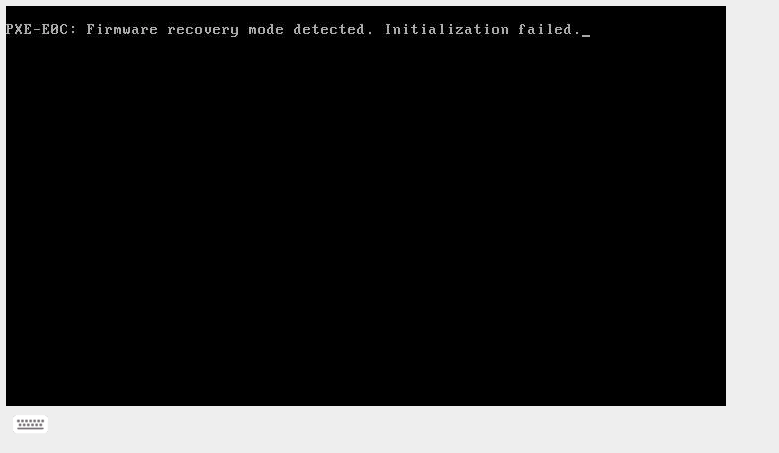
After the boot, we see following dmesg driver messages:
(ignore the driver firmware version warning, we did not installed the newest driver version, because we think the problem is with the firmware since we get the first error messages during Bios POST, where no OS or driver is loaded!)
[Tue Dec  7 14:52:04 2021] i40e: Intel(R) Ethernet Connection XL710 Network Driver
[Tue Dec  7 14:52:04 2021] i40e: Copyright (c) 2013 - 2019 Intel Corporation.
[Tue Dec  7 14:52:04 2021] i40e 0000:61:00.0: Firmware recovery mode detected. Limiting functionality.
[Tue Dec  7 14:52:04 2021] i40e 0000:61:00.0: Refer to the Intel(R) Ethernet Adapters and Devices User Guide for details on firmware recovery mode.
[Tue Dec  7 14:52:04 2021] i40e 0000:61:00.0: fw 8.5.67516 api 1.15 nvm 8.50 0x8000b6ed 1.3082.0 [8086:1572] [8086:0007]
[Tue Dec  7 14:52:04 2021] i40e 0000:61:00.0: The driver for the device detected a newer version of the NVM image v1.15 than expected v1.9. Please install the most recent version of the network driver.
[Tue Dec  7 14:52:04 2021] i40e 0000:61:00.0: MSI-X vector reservation failed: -34
[Tue Dec  7 14:52:04 2021] i40e 0000:61:00.0: MSI-X not available, trying MSI
[Tue Dec  7 14:52:04 2021] i40e 0000:61:00.1: Firmware recovery mode detected. Limiting functionality.
[Tue Dec  7 14:52:04 2021] i40e 0000:61:00.1: Refer to the Intel(R) Ethernet Adapters and Devices User Guide for details on firmware recovery mode.
[Tue Dec  7 14:52:04 2021] i40e 0000:61:00.1: fw 8.5.67516 api 1.15 nvm 8.50 0x8000b6ed 1.3082.0 [8086:1572] [8086:0000]
[Tue Dec  7 14:52:04 2021] i40e 0000:61:00.1: The driver for the device detected a newer version of the NVM image v1.15 than expected v1.9. Please install the most recent version of the network driver.
[Tue Dec  7 14:52:04 2021] i40e 0000:61:00.1: MSI-X vector reservation failed: -34
[Tue Dec  7 14:52:04 2021] i40e 0000:61:00.1: MSI-X not available, trying MSI
[Tue Dec  7 14:52:04 2021] i40e 0000:61:00.0 enp97s0f0: renamed from eth0
[Tue Dec  7 14:52:05 2021] i40e 0000:61:00.1 enp97s0f1: renamed from eth1
Kind regard,
Thorsten
- Mark as New
- Bookmark
- Subscribe
- Mute
- Subscribe to RSS Feed
- Permalink
- Report Inappropriate Content
Hello Thorsten,
No problem at all. We are closely monitoring this request for you.
Thank you for the effort in trying out our recommendation and we sincerely apologize if issue is still present after Firmware update.
Please allow us to forward this result to our engineering team. We will give you an update as soon as we heard from them but no later than 2-3 business days.
Your kind patience and cooperation on this request is highly appreciated.
Best regards,
Crisselle C.
Intel® Customer Support
- Mark as New
- Bookmark
- Subscribe
- Mute
- Subscribe to RSS Feed
- Permalink
- Report Inappropriate Content
Hi Crisselle,
thanks for the support!
If we can anything do for you or the engeniereing team, e.g. provide logs, crash dumps, bios configuration etc., let us know!
Kind regards,
Thorsten
- Mark as New
- Bookmark
- Subscribe
- Mute
- Subscribe to RSS Feed
- Permalink
- Report Inappropriate Content
Hello Thorstein,
Greetings,
Please be advised that your update and issue is still under investigation. Please give us more time and rest assured that we will provide an update as soon as possible but no later than 3-4 business days.
Our sincerest apologies for the delay on this request.
Best regards,
Aldy C
Intel Customer Support
- Mark as New
- Bookmark
- Subscribe
- Mute
- Subscribe to RSS Feed
- Permalink
- Report Inappropriate Content
Hello Thorstein,
Please be advised that we are still waiting update from our engineers. We will try to update you within 3 to 4 days. Our sincerest apologies for the delay on this request and thank you for your patience and cooperation.
Best regards,
Aldy C
Intel Customer Support
- Mark as New
- Bookmark
- Subscribe
- Mute
- Subscribe to RSS Feed
- Permalink
- Report Inappropriate Content
Hello Thorsten,
Thank you for the patience on this matter and I hope you are having a good day!
We already received an update from our engineers and have been advised to proceed with warranty replacement. One of the options to submit warranty is via link below.
https://supporttickets.intel.com/warrantyinfo?lang=en-US
But to ensure that your request will be processed as soon as possible, we will be glad to create a ticket for you internally. We will send an email to request for your personal information so we can proceed with the next step. Please be reminded not to post the details on this thread to avoid exposing confidential information.
Looking forward to your reply.
We will follow up after 3 business days in case we don't hear from you.
Best regards,
Crisselle C.
Intel Customer Support
- Mark as New
- Bookmark
- Subscribe
- Mute
- Subscribe to RSS Feed
- Permalink
- Report Inappropriate Content
Hello ThorstenStein,
Hope you are doing well.
We are just checking whether you have submitted a warranty ticket already for the replacement of your Ethernet adapter or if you received our email for the information we have requested. Just to make that you can provide us the information we are requesting, we will be re-sending the email again. Please be reminded to reply to the email and not to post the details on this thread to keep the confidentiality of these information.
Looking forward to your response. If we do not receive an update from you, we will make a follow-up after 3 business days.
Best regards,
Achilles M.
Intel Customer Support

- Subscribe to RSS Feed
- Mark Topic as New
- Mark Topic as Read
- Float this Topic for Current User
- Bookmark
- Subscribe
- Printer Friendly Page