
Hi Guys!
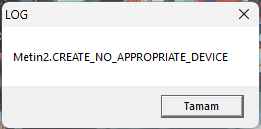
So basically Metin2 has stopped working with the latest drivers 101.4826 and 101.4824
Game works normally with 101.4676
Game gives me a graphics driver error every time I try to play and I couldn't work out anything at all. This error used to occur back when integrated laptop graphics in our systems does not have 800x600 resolution.
System Specs:
OS: Windows 11 Professional x64
CPU: Intel Core i9-10850K
GPU: Intel ARC a770
RAM: XPG SPECTRIX D50 2x16 (3600)
MOBO: MSI MAG Z490 TOMAHAWK - BIOS - 7C80v1D
SSD: TEAMGROUP MP34 1TB

Hi @eneseren
Sorry for not posting in a long time here.
Our dev team confirmed this should be fixed since driver 101.5085.
To date our latest driver is 32.0.101.6083 so please give it a shot and let me know your feedback.
Best Regards,
Ronald M.
連結已複製

Hello eneseren,
Thank you for posting on the Intel
To understand the issue in a better way, please answer the following questions:
- In case we need to replicate the issue and if necessary, if there is a setting in the game or system take screenshots of it.
- To know your system configuration, attach the report for the following tool Intel® System Support Utility for Windows (SSU), you can find the steps on the link How to get the Intel® System Support Utility Logs on Windows.
Regards,
Andres P.
Intel Customer Support Technician
Hello Andres,
The game normally has config.exe where you set up in-game settings, however when I use the drivers listed previously I can't even open config.exe to change anything.
I will be able to provide my config screenshot as I'm using the 101.4676 now.
Game Config:

My SSU File is attached.
Best regards,
Enes
Hello eneseren,
Thank you for your response and for sharing the Intel® SSU.
I see you mentioned Metin2 has stopped working with the drivers 101.4826 and 101.4824. This week we released a new graphics driver, please clean install it to version 31.0.101.4885 with Display Driver Uninstaller (DDU). For guidance, How to Use the Display Driver Uninstaller (DDU) to Uninstall an Intel® Graphics Driver.
Let me know if the behavior changes.
Regards,
Andres P.
Intel Customer Support Technician
Hello Andres,
My problem still continues with the 101.4885 and now I can't even run the game. It was a black screen before this. Now opening game exe only pops up the same error again.
Regards,
Enes
Hello eneseren,
Thank you for your answer and for completing the steps.
I will start with an investigation to provide you with the next steps, and as soon I have further details I will let you know.
Regards,
Andres P.
Intel Customer Support Technician
Hello eneseren,
Thank you for your time.
We still working on the investigation, and now we will start to replicate your issue, as soon I have the results I will let you know.
Regards,
Andres P.
Intel Customer Support Technician
Hey Andres,
I'm writing to check if there is any updates on the topic since it has been some time and more than one update.
Sincerely,
Enes
Hi @eneseren
Sorry for not posting in a long time here.
Our dev team confirmed this should be fixed since driver 101.5085.
To date our latest driver is 32.0.101.6083 so please give it a shot and let me know your feedback.
Best Regards,
Ronald M.
