
- Marquer comme nouveau
- Marquer
- S'abonner
- Sourdine
- S'abonner au fil RSS
- Surligner
- Imprimer
- Signaler un contenu inapproprié
I had met Screen flicking issue when run Chrome on Intel HD 530, And finally solved this issue by move driver 21.20.16.4596 . details is here
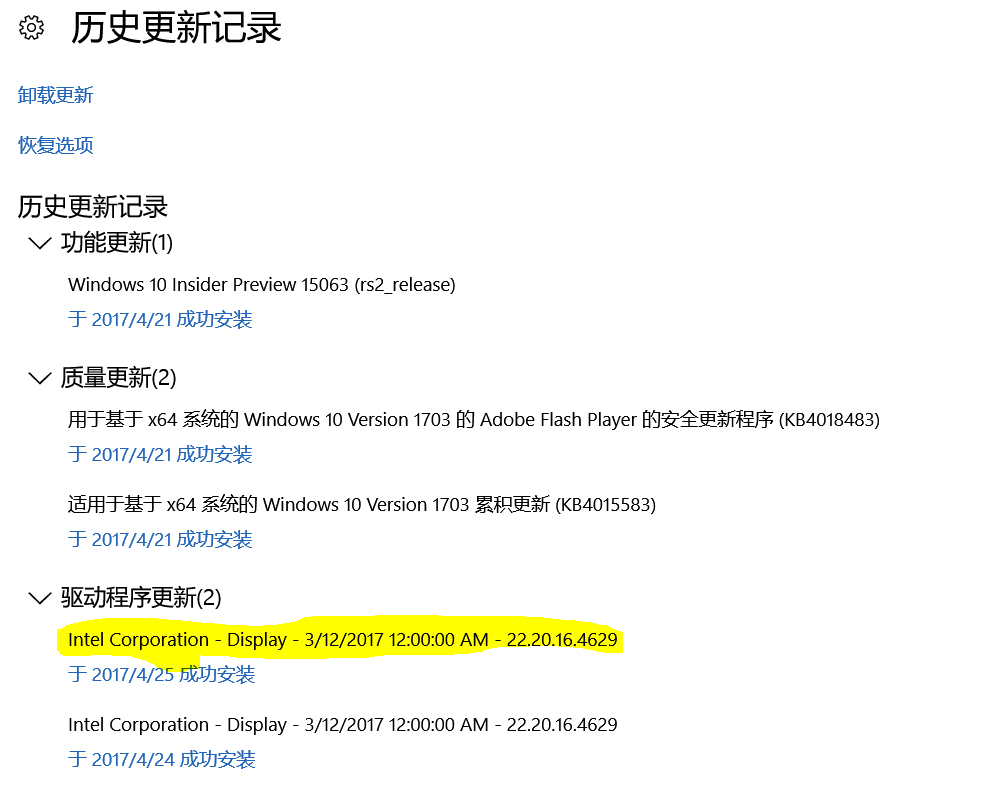
However, after I upgraded windows 10 with built in 22.20.16.4629 driver, the chrome screen flicking issue is back again.
After I downgrade the driver to 21.20.16.4596, the screen flicking issue gone.
So, what different between 21.20.16.4596 vs 22.20.16.4629 ? Why the new version driver bring the bug back again?
Thanks
Taile
- Balises:
- Drivers
Lien copié
- Marquer comme nouveau
- Marquer
- S'abonner
- Sourdine
- S'abonner au fil RSS
- Surligner
- Imprimer
- Signaler un contenu inapproprié
Hello TaileZhang,
Thank you for contacting the Intel community.
Would you please provide us with your system model and processor model to better assist you? To get your system information you can use the Intel SSU (System Support Utility) (https://downloadcenter.intel.com/download/25293/Intel-System-Support-Utility https://downloadcenter.intel.com/download/25293/Intel-System-Support-Utility😞
Download Intel® System Support Utility
- Download the utility
- Run the exe and select 'Scan'
- Save and include as an attachment in the Intel Community Forum
Best regards,
Ivan.
- Marquer comme nouveau
- Marquer
- S'abonner
- Sourdine
- S'abonner au fil RSS
- Surligner
- Imprimer
- Signaler un contenu inapproprié
Hi Ivan,
I have provide the SSU info before. You could find them here reply No. 14 and No. 22
- Marquer comme nouveau
- Marquer
- S'abonner
- Sourdine
- S'abonner au fil RSS
- Surligner
- Imprimer
- Signaler un contenu inapproprié
Thank you for the information TaileZhang, I have one question, where did you download the driver version 22.20.16.4629? Would you please point me to the Intel website where you downloaded it or it was updated through Windows update?
I'm asking because the latest graphics driver that I found from the Intel website for the Intel® HD Graphics 530 can be located here:
https://downloadcenter.intel.com/download/26669/Intel-Graphics-Driver-for-Windows-15-45-?product=88345 Intel® Graphics Driver for Windows* [15.45]
Version: 15.45.16.4627
I will really appreciate if you could let me know this information.
Also, I want to mention that soon a new driver version will be released and it will be good to wait and try this new driver version once it is released.
Regards,
Ivan.
- Marquer comme nouveau
- Marquer
- S'abonner
- Sourdine
- S'abonner au fil RSS
- Surligner
- Imprimer
- Signaler un contenu inapproprié
I got the driver from the Windows upgrade insider program, Slow ring.
- Marquer comme nouveau
- Marquer
- S'abonner
- Sourdine
- S'abonner au fil RSS
- Surligner
- Imprimer
- Signaler un contenu inapproprié
Here is screenshot of the windows update. sorry for my windows is Chinese version.
- Marquer comme nouveau
- Marquer
- S'abonner
- Sourdine
- S'abonner au fil RSS
- Surligner
- Imprimer
- Signaler un contenu inapproprié
I tested the 4627 driver, still has same issue as windows built in 4629.
- Marquer comme nouveau
- Marquer
- S'abonner
- Sourdine
- S'abonner au fil RSS
- Surligner
- Imprimer
- Signaler un contenu inapproprié
Thank you for the information you have kindly provided, at this point I appreciate if you can wait for new driver that hopefully it will be released soon.
Please keep checking the https://downloadcenter.intel.com/ download center for new driver released.
Best regards,
Ivan.

- Marquer comme nouveau
- Marquer
- S'abonner
- Sourdine
- S'abonner au fil RSS
- Surligner
- Imprimer
- Signaler un contenu inapproprié
What is this Windows your version? Maybe 15063? If you are with creators update i have the same problem with Radeon R9 280 (version 17.4.3) and i think that the problem is in this Windows update or Chrome.
- Marquer comme nouveau
- Marquer
- S'abonner
- Sourdine
- S'abonner au fil RSS
- Surligner
- Imprimer
- Signaler un contenu inapproprié
my windows Ver is 15063.138 .
After I downgraded intel graphic driver to 21.20.16.4596, the issue is gone.
- Marquer comme nouveau
- Marquer
- S'abonner
- Sourdine
- S'abonner au fil RSS
- Surligner
- Imprimer
- Signaler un contenu inapproprié
Thanks for the information, at this point, I suggest you to wait for the new driver that it will be released hopefully soon.
Best wishes,
Ivan.
- Marquer comme nouveau
- Marquer
- S'abonner
- Sourdine
- S'abonner au fil RSS
- Surligner
- Imprimer
- Signaler un contenu inapproprié
Hello TaileZhang,
I haven't been able to replicate this issue, at this point I suggest you to stay with the driver version that works and to wait for a new Windows® update, also stanchev36 mentions that he has Radeon R9 280 and he gets the same problem so there is a possibility that this is an issue with this Windows® update and Chrome.
I used the Intel® NUC7i7BNH to try to replicate the issue but I was not able to replicate it.
Best regards,
Ivan.
- Marquer comme nouveau
- Marquer
- S'abonner
- Sourdine
- S'abonner au fil RSS
- Surligner
- Imprimer
- Signaler un contenu inapproprié
Sure. I am using the old version driver to workaround the issue, and looking foreword the new release.
Thanks!
- Marquer comme nouveau
- Marquer
- S'abonner
- Sourdine
- S'abonner au fil RSS
- Surligner
- Imprimer
- Signaler un contenu inapproprié
You are more than welcome and thank you for your patience.
Ivan.
- Marquer comme nouveau
- Marquer
- S'abonner
- Sourdine
- S'abonner au fil RSS
- Surligner
- Imprimer
- Signaler un contenu inapproprié
I have used the new 21.20.16.4664 driver for two day. So far so good.
- Marquer comme nouveau
- Marquer
- S'abonner
- Sourdine
- S'abonner au fil RSS
- Surligner
- Imprimer
- Signaler un contenu inapproprié
I'm glad that the latest version solved this issue and thank you for taking your time to report the result.
Best wishes,
Ivan U.

- S'abonner au fil RSS
- Marquer le sujet comme nouveau
- Marquer le sujet comme lu
- Placer ce Sujet en tête de liste pour l'utilisateur actuel
- Marquer
- S'abonner
- Page imprimable