
- Mark as New
- Bookmark
- Subscribe
- Mute
- Subscribe to RSS Feed
- Permalink
- Report Inappropriate Content
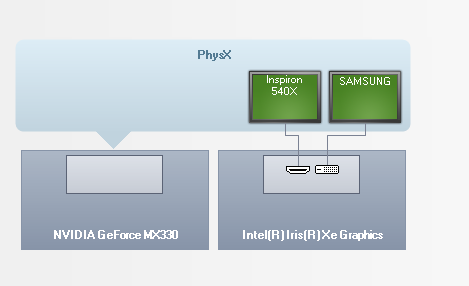
Hello When I connect an external monitor Samsung to the HDMI port, the Intel application recognizes it as DVI. I am attaching a picture. It has been behaving like this lately, probably since the last update of the Intel application. Please help me.

- Mark as New
- Bookmark
- Subscribe
- Mute
- Subscribe to RSS Feed
- Permalink
- Report Inappropriate Content
...S
Link Copied
- Mark as New
- Bookmark
- Subscribe
- Mute
- Subscribe to RSS Feed
- Permalink
- Report Inappropriate Content
...S
- Mark as New
- Bookmark
- Subscribe
- Mute
- Subscribe to RSS Feed
- Permalink
- Report Inappropriate Content
- Mark as New
- Bookmark
- Subscribe
- Mute
- Subscribe to RSS Feed
- Permalink
- Report Inappropriate Content
- Mark as New
- Bookmark
- Subscribe
- Mute
- Subscribe to RSS Feed
- Permalink
- Report Inappropriate Content
Does the monitor work properly? That is, this is just an inconvenience in what it displays?
Sometimes, it takes a reboot before things like this display properly. Have you tried this?
...S
- Mark as New
- Bookmark
- Subscribe
- Mute
- Subscribe to RSS Feed
- Permalink
- Report Inappropriate Content
Video îs ok, but no sound. I reboot the AIO, I install the newest driver for Intel.
- Mark as New
- Bookmark
- Subscribe
- Mute
- Subscribe to RSS Feed
- Permalink
- Report Inappropriate Content
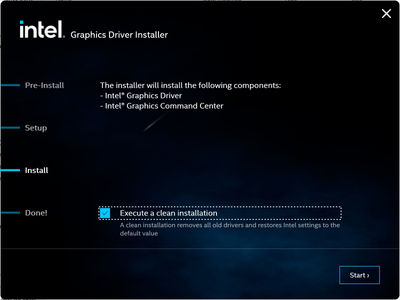
Well, having no sound would be consistent with the iGFX thinking that this is a DVI connection. My thought is that this is the result of the iGFX detecting that the monitor had been moved from one connector to another and transferred the configuration from the previous connector to this connector - but without changing the connector type. This was why I originally suggested that you reboot, as this should reestablish the configuration, but, this didn't work. So, we need to remove this configuration completely. The only way I can think to (hopefully) accomplish this is to reinstall the latest driver - but this time doing a clean install.
Here is link for latest driver (build 2127): https://www.intel.com/content/www/us/en/download/776137/intel-7th-10th-gen-processor-graphics-windows.html.
Here is picture that shows where to set the flag for a clean install:
Hope this helps,
...S
- Mark as New
- Bookmark
- Subscribe
- Mute
- Subscribe to RSS Feed
- Permalink
- Report Inappropriate Content
I am attaching new pictures.
Plase, help me.
- Mark as New
- Bookmark
- Subscribe
- Mute
- Subscribe to RSS Feed
- Permalink
- Report Inappropriate Content

- Subscribe to RSS Feed
- Mark Topic as New
- Mark Topic as Read
- Float this Topic for Current User
- Bookmark
- Subscribe
- Printer Friendly Page