
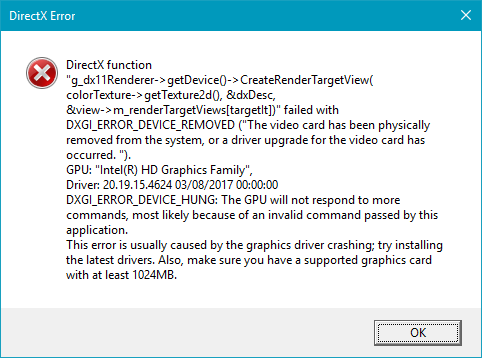
I keep getting this error during initial loading phase of FIFA 17:
I am using beta driver here:
https://downloadcenter.intel.com/download/26347/Intel-Beta-Graphics-Driver-for-Windows-10-and-Windows-7-8-1-15-40- Download Beta Intel® Graphics Driver for Windows® 10 and Windows 7*/8.1* [15.40]
Can you guys help me debug this problem?
链接已复制


Hello intelgamer,
Have you tried version .4501? Does the same error appear?
Intel® HD Graphics version .4501;
https://downloadcenter.intel.com/download/26229/Intel-Graphics-Driver-for-Windows-10-15-40-4th-Gen-?product=81497 Download Intel® Graphics Driver for Windows® 10 [15.40][4th Gen]
If case you are using Windows 7 o Windows 8.1 use this version;
https://downloadcenter.intel.com/download/26544/Graphics-Intel-Graphics-Driver-for-Windows-7-8-1-15-36-?product=81497 Download Intel® Graphics Driver for Windows 7*/8.1* [15.36].
Use the manual installation for the driver, find it here;
http://www.intel.com/content/www/us/en/support/graphics-drivers/000005629.html Manually Install an Intel® Graphics Driver in Windows® 10 and Windows...
http://www.intel.com/content/www/us/en/support/graphics-drivers/000005474.html How to Manually Install a Graphics Driver in Windows 7*
Please let me know how it goes.
Regards,
Amy.
/thread/112962 intelgamer,
Could you please let me know if the game is from Steam?
Have you tried re-installing the game?
Attach your DxDiag report please, find the instructions below.
DxDiag Instructions:
- Click on the "Start Menu" -> Type "DxDiag" -> Press "Enter" -> Wait for the DirectX Diagnostic Tool to finish loading
- In the DirectX Diagnostic Tool, click "Save All Information" -> Save the file DxDiag.txt
- Include DxDiag.txt as an attachment.
To attach a file, you must click "Use Advanced Editor" in the top right corner of the response box, then the "attach" option will appear in the bottom right corner of the response box.
Regards,
Amy.
