
- Mark as New
- Bookmark
- Subscribe
- Mute
- Subscribe to RSS Feed
- Permalink
- Report Inappropriate Content
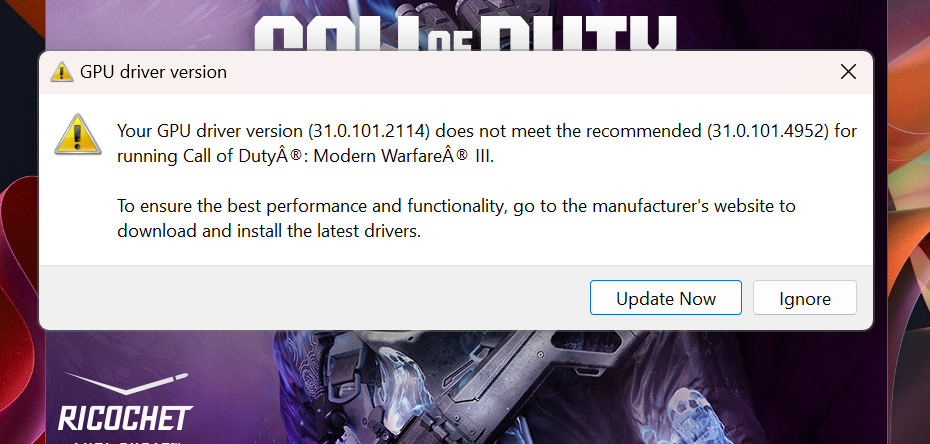
I have a Lenovo T14s core i5 vPro 10th gen Laptop with a Intel UHD graphic Card, when i want to play Call of Duty: Modern Warfare III, it gives me a error on the launch screen stating that my GPU is out of date, i have downloaded and update my drives but still gives me error when i launch the game. what can i do please help
Link Copied

- Mark as New
- Bookmark
- Subscribe
- Mute
- Subscribe to RSS Feed
- Permalink
- Report Inappropriate Content
- Mark as New
- Bookmark
- Subscribe
- Mute
- Subscribe to RSS Feed
- Permalink
- Report Inappropriate Content
- Mark as New
- Bookmark
- Subscribe
- Mute
- Subscribe to RSS Feed
- Permalink
- Report Inappropriate Content
- Mark as New
- Bookmark
- Subscribe
- Mute
- Subscribe to RSS Feed
- Permalink
- Report Inappropriate Content
i have installed the new drivers but yet it still tells me that my GPU is out of date when i try to launch Call of Duty

- Mark as New
- Bookmark
- Subscribe
- Mute
- Subscribe to RSS Feed
- Permalink
- Report Inappropriate Content
- Mark as New
- Bookmark
- Subscribe
- Mute
- Subscribe to RSS Feed
- Permalink
- Report Inappropriate Content

- Mark as New
- Bookmark
- Subscribe
- Mute
- Subscribe to RSS Feed
- Permalink
- Report Inappropriate Content
I have reviewed the logs once again, and I can see that there are two driver versions available - 31.0.101.2127 and 31.0.101.2114. Verify which driver version you can see under the device manager display adapter. Here is a link that can help you in checking it: https://www.intel.com/content/www/us/en/support/articles/000005589/graphics.html. This situation seems quite unusual.
Moreover, here's the link of the article I found: https://www.intel.com/content/www/us/en/support/articles/000093457/graphics.html
Incase the issue is still the same, I suggest contacting Activision Support.
- Mark as New
- Bookmark
- Subscribe
- Mute
- Subscribe to RSS Feed
- Permalink
- Report Inappropriate Content
Moreover, here's the link of the article I found: https://www.intel.com/content/www/us/en/support/articles/000093457/graphics.html

- Subscribe to RSS Feed
- Mark Topic as New
- Mark Topic as Read
- Float this Topic for Current User
- Bookmark
- Subscribe
- Printer Friendly Page