
- Mark as New
- Bookmark
- Subscribe
- Mute
- Subscribe to RSS Feed
- Permalink
- Report Inappropriate Content
Hello guys,
I need to install Intel Graphics Control Panel normally I would use Microsoft Store, but its comletely crushed and I can not download and install anything. I was trying everything what I found on internet but nothing helps. Do you know another source from where I can download Intel Graphics Control Panel?
Thanks in advance.
Link Copied

- Mark as New
- Bookmark
- Subscribe
- Mute
- Subscribe to RSS Feed
- Permalink
- Report Inappropriate Content
Have you tried accessing the store through the internet instead?
I would point out that the Store is running fine and I can download at speed.
...S
- Mark as New
- Bookmark
- Subscribe
- Mute
- Subscribe to RSS Feed
- Permalink
- Report Inappropriate Content
Have you rebooted since installing the graphics driver? If so, it should have installed the app automatically. Did it not?
- Mark as New
- Bookmark
- Subscribe
- Mute
- Subscribe to RSS Feed
- Permalink
- Report Inappropriate Content
Thanks for your answer. I was trying to access MS Store online but whenever I wanto to download something it sends me to app. I am using Microsoft Surface Laptop and app doesn't work.
Yes I rebooted after installing drivers and I still do not have Graphics Control Panel.

- Mark as New
- Bookmark
- Subscribe
- Mute
- Subscribe to RSS Feed
- Permalink
- Report Inappropriate Content
The IGCP is excluded from the latest Graphics Driver packages. It can be downloaded only from Microsoft. Try this link. If you will get it, after installation, you will find the IGCP in the Start Menu, under letter "I".
Leon
- Mark as New
- Bookmark
- Subscribe
- Mute
- Subscribe to RSS Feed
- Permalink
- Report Inappropriate Content
Hi, thanks for your answer. I was trying this already but Microsoft Store dosen't work on my device. I can not download it. Are you sure that I can get only from MS Store?
- Mark as New
- Bookmark
- Subscribe
- Mute
- Subscribe to RSS Feed
- Permalink
- Report Inappropriate Content
- I'm not sure if you can download it "only" from Microsoft Store, however I know that intel is not providing this application any more.
- You didn't explained why you can't download from Microsoft Store (is your account or internet access limited)? However if it is failure only, please try those steps to fix it.
Leon
- Mark as New
- Bookmark
- Subscribe
- Mute
- Subscribe to RSS Feed
- Permalink
- Report Inappropriate Content
Let me rephrase that response: Intel is not providing this application separately anymore. At MS' behest, it is being released only through the MS App Store.
...S
- Mark as New
- Bookmark
- Subscribe
- Mute
- Subscribe to RSS Feed
- Permalink
- Report Inappropriate Content
Maybe someone know how to change your resolution higher than native without Intel Graphics Control Panel. I need it for my second screen. I have Intel(R) HD Graphics 620.
- Mark as New
- Bookmark
- Subscribe
- Mute
- Subscribe to RSS Feed
- Permalink
- Report Inappropriate Content
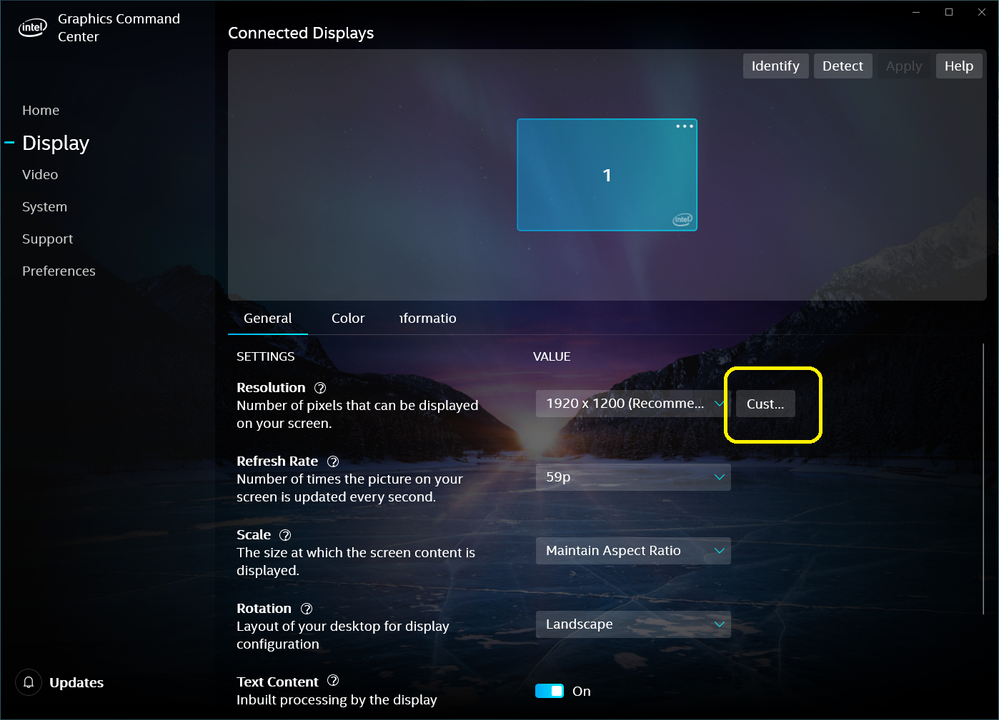
Open Start Menu and under letter "I", look for Intel Graphics Command Center. The IGCC is installed now with the new Graphics Drivers instead of IGCP.
Run the IGCC and click on "Display" , then click Custom resolution. Now you will able to adjust the resolution according to your preferences.
Leon
- Mark as New
- Bookmark
- Subscribe
- Mute
- Subscribe to RSS Feed
- Permalink
- Report Inappropriate Content
Thank you very much for your response. Yes I know I can do it in this way, but I do not have Intel Graphics Command Center and I can not install it from Microsoft Store. Is it other way to install it?
- Mark as New
- Bookmark
- Subscribe
- Mute
- Subscribe to RSS Feed
- Permalink
- Report Inappropriate Content
If you installing Intel DCH Graphics Driver (Version: 25.20.100.6618 or newer), it will be downloaded automatically. You are asking many questions, but you didn't answer why you can't download the IGCC?
Leon
- Mark as New
- Bookmark
- Subscribe
- Mute
- Subscribe to RSS Feed
- Permalink
- Report Inappropriate Content
I have not got any avaliable updates of drivers on my laptop, I have to download and install it manually?
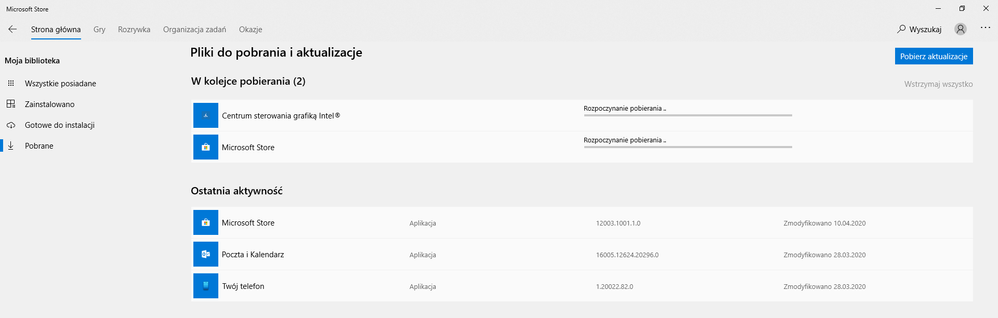
I can not download IGCC becouse my Microsoft Store doesen't work. Nothing starts installing. I tried all things form link which you sent me before and nothing works. 😞
- Mark as New
- Bookmark
- Subscribe
- Mute
- Subscribe to RSS Feed
- Permalink
- Report Inappropriate Content
By the way I really appreciate that you really want to help me. Thank you!

- Mark as New
- Bookmark
- Subscribe
- Mute
- Subscribe to RSS Feed
- Permalink
- Report Inappropriate Content
no me deja estimado. yo usaba intel graphics panel para darle a escalar a pantalla completa mi segundo monitor pero con la nueva app le doy y me sale error que puedo hacer?
- Mark as New
- Bookmark
- Subscribe
- Mute
- Subscribe to RSS Feed
- Permalink
- Report Inappropriate Content
I'm not sure that I understand your problem correctly. If you have problem using the Intel Graphics Command Center, you may still download and install the old application Intel Graphics Control Panel.
Leon
- Mark as New
- Bookmark
- Subscribe
- Mute
- Subscribe to RSS Feed
- Permalink
- Report Inappropriate Content
- What's happening while you click on the link I've given you?
- What's happening when your write is Search Box (Wyszukaj), Intel Graphics Command Center?
- Please download Intel System Support Utility (SSU).
- Run the SSU scan and save the results. Using the "paperclip" (naciśnij na na spinacz w lewym dolnym rogu), attach the .txt file with the results to your post.
Leon
- Mark as New
- Bookmark
- Subscribe
- Mute
- Subscribe to RSS Feed
- Permalink
- Report Inappropriate Content
- When I am clicking this link, it sends me to Microsoft Store website and it shows Intel® Graphics Control Panel app. Then I am clicking "download" and it sends me to my Microsoft Store app whcich dose not work.
- When I write this, nothing shows. I do not have this app.
- & 4. I attached my results
Thanks.
- Mark as New
- Bookmark
- Subscribe
- Mute
- Subscribe to RSS Feed
- Permalink
- Report Inappropriate Content
- I was looking again on the image you have attached to your previous post. I can see that "Centrum sterowania grafika Intel" (Intel Graphics Control) and Microsoft Store started to download. Is the download stacked or you didn't wait?
- You may install the firmware and driver update for your Surface Laptop (1st gen) manually. Open Microsoft Download page. There are multiple files available for this download. Once you click on the "Download" button, you will be prompted to select the files you need. You should download the SurfaceLaptop_Win10_18362_19.100.3933.0.msi file. Once downloaded, double click on the file to start the update process.
- I would suggest you, to ask the Microsoft support how to solve the update problem in their laptop.
Leon
- Mark as New
- Bookmark
- Subscribe
- Mute
- Subscribe to RSS Feed
- Permalink
- Report Inappropriate Content
1. It only shows that it started. It is stocked and I can not repair it.
2. After this update, will I get IGCP?
3. Yes, I will contact them when they will be available
- Mark as New
- Bookmark
- Subscribe
- Mute
- Subscribe to RSS Feed
- Permalink
- Report Inappropriate Content
- "After this update, will I get IGCP?" - I don't know, however may be your update will work and you will be able to download it.
- In addition to the above, open Update & Security (in Windows settings) and click on Check for updates. This should download the latest Windows updates.
Leon

- Subscribe to RSS Feed
- Mark Topic as New
- Mark Topic as Read
- Float this Topic for Current User
- Bookmark
- Subscribe
- Printer Friendly Page