
- Отметить как новое
- Закладка
- Подписаться
- Отключить
- Подписка на RSS-канал
- Выделить
- Печать
- Сообщить о недопустимом содержимом

Hello!
I'm trying to get the new Intel Graphics driver update, but during the installation process, I get this error:
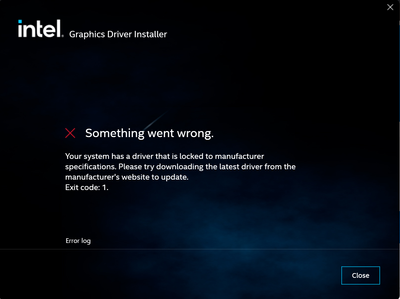
How do I fix this? Any help would be appreciated.
-Kind regards, Ruben.
Ссылка скопирована

- Отметить как новое
- Закладка
- Подписаться
- Отключить
- Подписка на RSS-канал
- Выделить
- Печать
- Сообщить о недопустимом содержимом
Ditto. I have the same problem.

- Отметить как новое
- Закладка
- Подписаться
- Отключить
- Подписка на RSS-канал
- Выделить
- Печать
- Сообщить о недопустимом содержимом
Dito. Same problem here with a Surface Pro 5 and Intel Iris Plus Graphics 640:

- Отметить как новое
- Закладка
- Подписаться
- Отключить
- Подписка на RSS-канал
- Выделить
- Печать
- Сообщить о недопустимом содержимом
Hello RedstoneRubenNL
Thank you for posting on the Intel️® communities. Please share with us which driver gives you this problem, the installation method and Intel® System Support Utility (Intel® SSU) results
- Download the Intel SSU https://downloadcenter.intel.com/download/25293/Intel-System-Support-Utility-for-Windows-
- Open the application and select "Everything" click on "Scan" to see the system and device information. By default, Intel® SSU will take you to the "Summary View".
- Click on the menu where it says "Summary" to change to "Detailed View".
- To save your scan, click on "Next", then "Save".
Regards,
David G
Intel Customer Support Technician
- Отметить как новое
- Закладка
- Подписаться
- Отключить
- Подписка на RSS-канал
- Выделить
- Печать
- Сообщить о недопустимом содержимом
Hello David,
The installation method and what driver I'm installing should be shown in the image on the original post:

I attached the intel device scan I just did using the steps you included.
- Отметить как новое
- Закладка
- Подписаться
- Отключить
- Подписка на RSS-канал
- Выделить
- Печать
- Сообщить о недопустимом содержимом
Thank you for the information provided, from the report provided we noticed a couple details:
- Your BIOS is not up to date, the latest from HP's website is F.24. You can contact them directly to confirm if this is necessary and get the steps to update.
- The drivers the manufacturer provides are from 2019, which could cause the issue with the new driver installed.
- You can install the generic version of the latest driver, available here:
- We recommend doing a Clean installation to avoid any further errors. Please follow the steps on our article:
- Clean Installation of Intel® Graphics Drivers in Windows*
Regards,
David G
Intel Customer Support Technician
- Отметить как новое
- Закладка
- Подписаться
- Отключить
- Подписка на RSS-канал
- Выделить
- Печать
- Сообщить о недопустимом содержимом
Were you able to check the previous post?
Let us know if you still need assistance.
Best regards,
David G.
Intel Customer Support Technician
- Отметить как новое
- Закладка
- Подписаться
- Отключить
- Подписка на RSS-канал
- Выделить
- Печать
- Сообщить о недопустимом содержимом
We have not heard back from you, so we will close this thread. If you need any additional information, please submit a new question as this thread will no longer be monitored.
Best regards,
David G.
Intel Customer Support Technician

- Подписка на RSS-канал
- Отметить тему как новую
- Отметить тему как прочитанную
- Выполнить отслеживание данной Тема для текущего пользователя
- Закладка
- Подписаться
- Страница в формате печати