
- Mark as New
- Bookmark
- Subscribe
- Mute
- Subscribe to RSS Feed
- Permalink
- Report Inappropriate Content
DSA notifies me that I have 2 updates available, but when I run it, it shows that "Sorry, something went wrong while trying to scan," so I can't see what updates are available and can't install the updates. I have tried to uninstall the DSA using the uninstaller and reinstall it, but the problem is still the same. How do I solve it?

- Mark as New
- Bookmark
- Subscribe
- Mute
- Subscribe to RSS Feed
- Permalink
- Report Inappropriate Content
I had the same problem with Firefox (Standardbrowser). Works with deactivated Add-ons and with Edge, Edge Beta.
Link Copied

- Mark as New
- Bookmark
- Subscribe
- Mute
- Subscribe to RSS Feed
- Permalink
- Report Inappropriate Content
after many nearly trouble free years exactly the same problem happened to my desktop six weeks ago .. i've now lost count on all the things i've tried to make DSA work again so i pretty much have given up .. but will be following your post in hope of a solution 🙂
- Mark as New
- Bookmark
- Subscribe
- Mute
- Subscribe to RSS Feed
- Permalink
- Report Inappropriate Content
I had the same problem with Firefox (Standardbrowser). Works with deactivated Add-ons and with Edge, Edge Beta.
- Mark as New
- Bookmark
- Subscribe
- Mute
- Subscribe to RSS Feed
- Permalink
- Report Inappropriate Content
More specifically EASE (Encrypt All Sites Eligible) in the HTTPS Everywhere browser extension is causing this problem.

- Mark as New
- Bookmark
- Subscribe
- Mute
- Subscribe to RSS Feed
- Permalink
- Report Inappropriate Content
Thank you so much, I had the same problem and the edge browser is working. Thanks again!

- Mark as New
- Bookmark
- Subscribe
- Mute
- Subscribe to RSS Feed
- Permalink
- Report Inappropriate Content
Same problem. Have uninstalled and reinstalled DSA. Have tried Chrome & Edge browsers with all add-ons disabled. Nothing works.
So much for the genius power supposed to live in Silicon Valley.

- Mark as New
- Bookmark
- Subscribe
- Mute
- Subscribe to RSS Feed
- Permalink
- Report Inappropriate Content
me too man wat is going on i can't even get the next update
- Mark as New
- Bookmark
- Subscribe
- Mute
- Subscribe to RSS Feed
- Permalink
- Report Inappropriate Content
I also have been having this error. It all started after DSA was upgraded to version 20.2.9.6. Was working fine prior to that. Have tried all resolutions mentioned in this and other threads. Nothing has fixed it so far.
- Mark as New
- Bookmark
- Subscribe
- Mute
- Subscribe to RSS Feed
- Permalink
- Report Inappropriate Content
FYI. I just installed the new DSA version (20.4.17) and everything is working fine now.


- Mark as New
- Bookmark
- Subscribe
- Mute
- Subscribe to RSS Feed
- Permalink
- Report Inappropriate Content
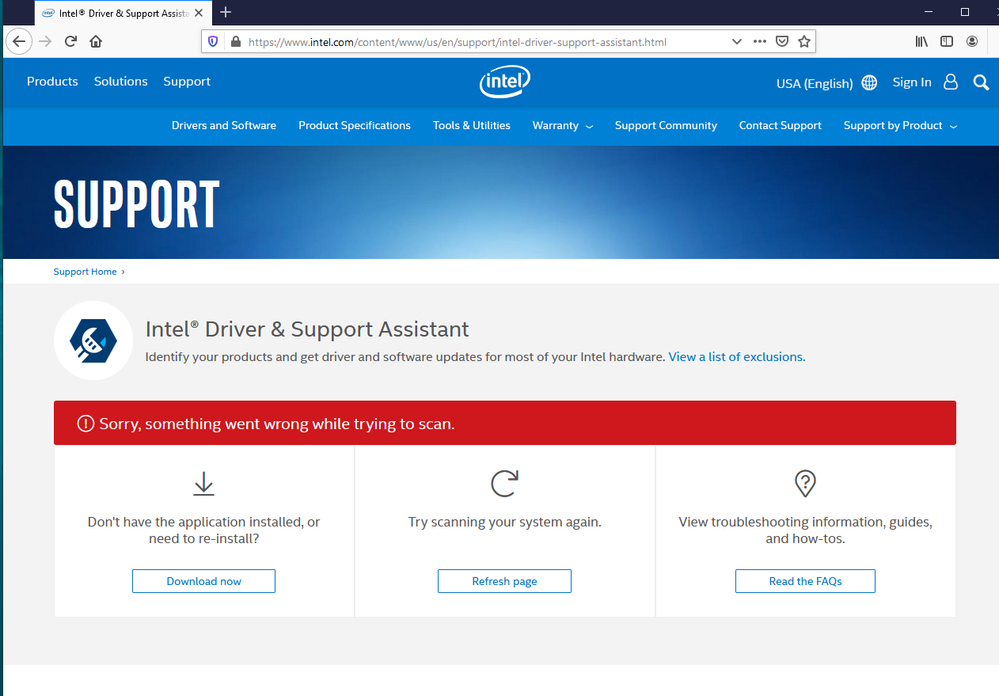
The machine is a DELL XPS 8700, Windows 10 Pro x64, Build 18363.815.
Intel DSA 20.4.17.5

- Subscribe to RSS Feed
- Mark Topic as New
- Mark Topic as Read
- Float this Topic for Current User
- Bookmark
- Subscribe
- Printer Friendly Page