
- Mark as New
- Bookmark
- Subscribe
- Mute
- Subscribe to RSS Feed
- Permalink
- Report Inappropriate Content
Hello ...
I work in an educational institution,
and we have a lab contains 20 PCs with Intel DH61WW motherboard
Recently I cloned a new image to the computers, and after updating the motherboard drivers
the HD Graphics Driver keeps crashing the PC after updating it ... I really would like some help in this issue
Thank you,
Regards
Saeed
Link Copied
11 Replies
- Mark as New
- Bookmark
- Subscribe
- Mute
- Subscribe to RSS Feed
- Permalink
- Report Inappropriate Content
Hi Saeed92,
Since this motherboard is a legacy product let me see what I could do for you.
Could you please attach the result of the Intel® System Support Utility?
https://downloadcenter.intel.com/download/25293/Intel-System-Support-Utility https://downloadcenter.intel.com/download/25293/Intel-System-Support-Utility
Regards,
Hellen.
- Mark as New
- Bookmark
- Subscribe
- Mute
- Subscribe to RSS Feed
- Permalink
- Report Inappropriate Content
Hello Hellen,
Thank you for your reply
Here's the result from SSU
Regards,
Saeed
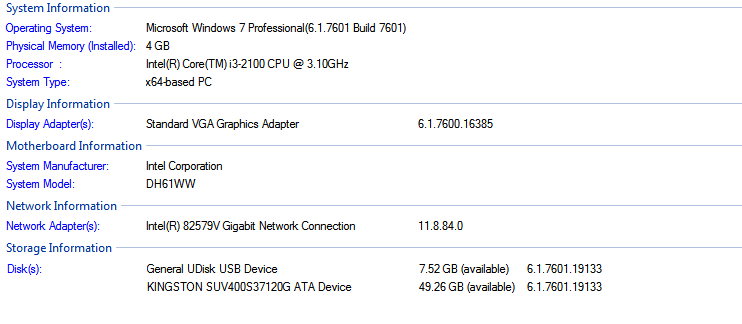
- Mark as New
- Bookmark
- Subscribe
- Mute
- Subscribe to RSS Feed
- Permalink
- Report Inappropriate Content
Hi Saeed92,
I couldn't check the correct Graphics driver you are using, regards that let's try installing this version which is the latest version for your Intel® HD Graphics 2000 controller:
https://downloadcenter.intel.com/download/24970/Intel-HD-Graphics-Driver-for-Windows-7-8-8-1-32bit https://downloadcenter.intel.com/download/24970/Intel-HD-Graphics-Driver-for-Windows-7-8-8-1-32bit
Regards,
Hellen.
- Mark as New
- Bookmark
- Subscribe
- Mute
- Subscribe to RSS Feed
- Permalink
- Report Inappropriate Content
Hello Hellen,
The driver you gave me above doesn't meet the minimum system requirements
I'll try to download the Intel® HD Graphics 2000 controller
and try again, and tell you whats happens
Regards,
Saeed
- Mark as New
- Bookmark
- Subscribe
- Mute
- Subscribe to RSS Feed
- Permalink
- Report Inappropriate Content
Hello Hellen,
I've tried to use Intel® HD Graphics 2000 controller drivers, but the problem occurred
- Mark as New
- Bookmark
- Subscribe
- Mute
- Subscribe to RSS Feed
- Permalink
- Report Inappropriate Content
Hi Saeed92,
Please try uninstalling current driver version installed, use this method;
- Open the Device Manager.
- Find the Intel Graphics Driver.
- Right click Intel Graphics Driver and select Uninstall.
- Select the check box
- Delete the driver software for this device.
- Reboot the computer after uninstall process has finished.
Then try installing the driver manually.
How to manually install an Intel® Graphics Driver in Windows® 7
http://www.intel.com/content/www/us/en/support/graphics-drivers/000005474.html http://www.intel.com/content/www/us/en/support/graphics-drivers/000005474.html
Intel® HD Graphics Driver for Windows* 7/8-64-bit
https://downloadcenter.intel.com/download/24971/Intel-HD-Graphics-Driver-for-Windows-7-8-64-bit?product=81502 https://downloadcenter.intel.com/download/24971/Intel-HD-Graphics-Driver-for-Windows-7-8-64-bit?product=81502
Please let me know the outcome.
Regards,
Hellen.
- Mark as New
- Bookmark
- Subscribe
- Mute
- Subscribe to RSS Feed
- Permalink
- Report Inappropriate Content
Hi Hellen,
I've already tried to install driver manually but I finished with the same result
plus I've tried to reinstall it manually by following the steps obove with the driver you sent to me
but the same problem occurred again
I dont know if the problem with the card it self, because with a lab contains over 20 PCs almost half of them worked fine after updating the Graphics Driver, and the other half's making issues
but I thought its fine to discuss it with you before buying a new graphic card
Thank you for your cooperation
Regards,
Saeed
- Mark as New
- Bookmark
- Subscribe
- Mute
- Subscribe to RSS Feed
- Permalink
- Report Inappropriate Content
Hi Saeed92,
Since I couldn't collect the correct information about your system, I recommend you to make sure you are using the latest BIOS version, here it is:
https://downloadcenter.intel.com/product/54876/Intel-Desktop-Board-DH61WW https://downloadcenter.intel.com/product/54876/Intel-Desktop-Board-DH61WW
Please keep in mind it is End of Interactive Support.
Also I suggest you to install all latest Windows update, and controllers' drivers.
Then if the issue remains, you can try using your system with a previous graphics version.
Intel® HD Graphics Driver for Windows* 7/8-64-bit:
https://downloadcenter.intel.com/download/24696/Intel-HD-Graphics-Driver-for-Windows-7-8-64-bit?product=81502 https://downloadcenter.intel.com/download/24696/Intel-HD-Graphics-Driver-for-Windows-7-8-64-bit?product=81502
Regards,
Hellen.
- Mark as New
- Bookmark
- Subscribe
- Mute
- Subscribe to RSS Feed
- Permalink
- Report Inappropriate Content
Hi Hellen,
before I put my question on Intel Support Community, I did verfied that I'm using the latest BIOS Version
adn I've already tried to install old version of the graphic driver
but its no use
I'm sticking with the same problem
- Mark as New
- Bookmark
- Subscribe
- Mute
- Subscribe to RSS Feed
- Permalink
- Report Inappropriate Content
Hi Saeed92,
Sorry about the misunderstanding, I couldn't collect the information requested. So let's try this, please install the Chipset driver and the ME driver after that I recommend you to install the graphics version:
Intel® ME 8: Intel® Management Engine Driver for Intel 6 Series Chipset-Based Desktop Boards:
https://downloadcenter.intel.com/download/21764/Intel-ME-8-Intel-Management-Engine-Driver-for-Intel-6-Series-Chipset-Based-Desktop-Boards?product=54876 https://downloadcenter.intel.com/download/21764/Intel-ME-8-Intel-Management-Engine-Driver-for-Intel-6-Series-Chipset-Based-Desktop-Boards?product=54876
Chipset: Intel® Chipset Device Software for Intel® Desktop Boards with 6 Series Chipset:
https://downloadcenter.intel.com/download/21926/Chipset-Intel-Chipset-Device-Software-for-Intel-Desktop-Boards-with-6-Series-Chipset?v=t https://downloadcenter.intel.com/download/21926/Chipset-Intel-Chipset-Device-Software-for-Intel-Desktop-Boards-with-6-Series-Chipset?v=t
Graphics: Intel® HD Graphics Driver for Windows* 7:
https://downloadcenter.intel.com/download/23280/Graphics-Intel-HD-Graphics-Driver-for-Windows-7?product=54876 https://downloadcenter.intel.com/download/23280/Graphics-Intel-HD-Graphics-Driver-for-Windows-7?product=54876
Hope this helps.
Regards,
Hellen.
- Mark as New
- Bookmark
- Subscribe
- Mute
- Subscribe to RSS Feed
- Permalink
- Report Inappropriate Content
Hi Saeed92,
I have been checking this thread and I was wondering if the information provided helps you.
Regards,
Hellen.

Reply
Topic Options
- Subscribe to RSS Feed
- Mark Topic as New
- Mark Topic as Read
- Float this Topic for Current User
- Bookmark
- Subscribe
- Printer Friendly Page