
- Mark as New
- Bookmark
- Subscribe
- Mute
- Subscribe to RSS Feed
- Permalink
- Report Inappropriate Content
Link Copied

- Mark as New
- Bookmark
- Subscribe
- Mute
- Subscribe to RSS Feed
- Permalink
- Report Inappropriate Content
Hello CAIXIA,
Thank you for posting in our communities.
Please provide a photo of your task manager where there is no igfxextN.exe so we can further isolate the issue.
And, by the way, are you having any issues with your system? or you were just curious about how the GPU driver works?
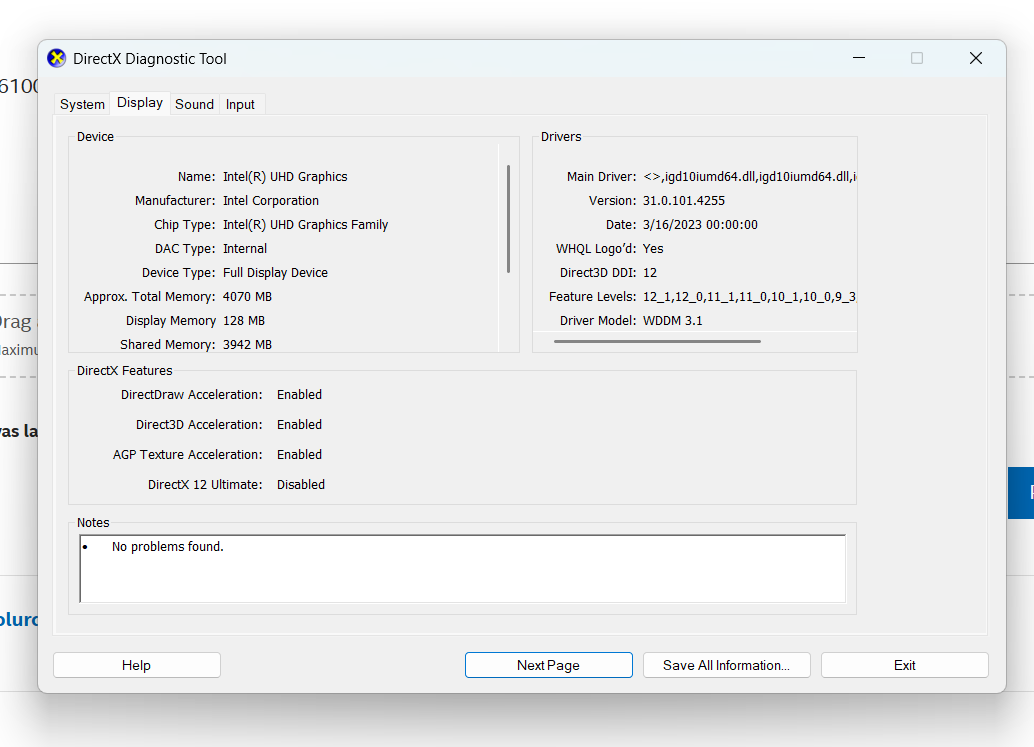
Furthermore, please generate an SSU report to help us further analyze important details on your system, such as the OS build number, graphics driver version, errors logged in the system, etc. To generate the SSU report, please refer to the article How to get the Intel® System Support Utility Logs on Windows*. Please send us the generated SSU.txt file. Since I might raise our concern with our engineers.
Thank you, and have a great day ahead!
Best regards,
Carmona A.
Intel Customer Support Technician
- Mark as New
- Bookmark
- Subscribe
- Mute
- Subscribe to RSS Feed
- Permalink
- Report Inappropriate Content
Hello CAIXIA,
We are checking in with you to see if you already have the answers to our questions so we can further isolate our issue.
Thank you, and have a great day!
Best regards,
Carmona A.
Intel Customer Support Technician
- Mark as New
- Bookmark
- Subscribe
- Mute
- Subscribe to RSS Feed
- Permalink
- Report Inappropriate Content
Hello CAIXIA,
We are checking in with you, as we have not heard any response from you.
Thank you, and have a great day!
Best regards,
Carmona A.
Intel Customer Support Technician
- Mark as New
- Bookmark
- Subscribe
- Mute
- Subscribe to RSS Feed
- Permalink
- Report Inappropriate Content
Hello CAIXIA,
We have not heard back from you, so we will close this enquiry now. If you need further assistance, please submit a new question, as this thread will no longer be monitored.
Thank you, and have a great day ahead.
Best regards,
Carmona A.
Intel Customer Support Technician

- Mark as New
- Bookmark
- Subscribe
- Mute
- Subscribe to RSS Feed
- Permalink
- Report Inappropriate Content
hi i am having the exact same issue please help!
#
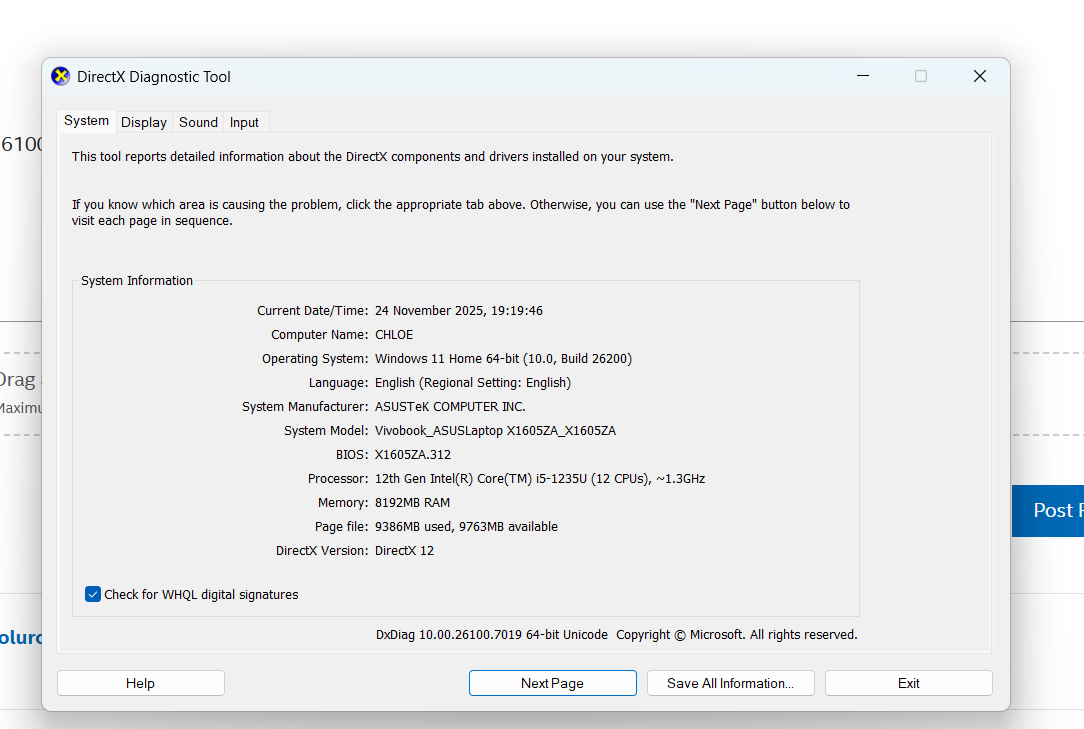
System Information
------------------
Time of this report: 11/24/2025, 19:12:25
Machine name: CHLOE
Machine Id: {0084E2EC-03DA-48F4-A514-BCBC902CFF33}
Operating System: Windows 11 Home 64-bit (10.0, Build 26200) (26100.ge_release.240331-1435)
Language: English (Regional Setting: English)
System Manufacturer: ASUSTeK COMPUTER INC.
System Model: Vivobook_ASUSLaptop X1605ZA_X1605ZA
BIOS: X1605ZA.312 (type: UEFI)
Processor: 12th Gen Intel(R) Core(TM) i5-1235U (12 CPUs), ~1.3GHz
Memory: 8192MB RAM
Available OS Memory: 7886MB RAM
Page File: 8383MB used, 10766MB available
Windows Dir: C:\WINDOWS
DirectX Version: DirectX 12
DX Setup Parameters: Not found
User DPI Setting: 120 DPI (125 percent)
System DPI Setting: 120 DPI (125 percent)
DWM DPI Scaling: UnKnown
Miracast: Available, with HDCP
Microsoft Graphics Hybrid: Not Supported
DirectX Database Version: 1.7.7
Auto Super Res Version: Unknown
System Mux Support: Mux Support Inactive - Ok
Mux Target GPU: dGPU
Mux Incompatible List:
DxDiag Version: 10.00.26100.7019 64bit Unicode
------------
DxDiag Notes
------------

- Mark as New
- Bookmark
- Subscribe
- Mute
- Subscribe to RSS Feed
- Permalink
- Report Inappropriate Content
CAIXIA



- Mark as New
- Bookmark
- Subscribe
- Mute
- Subscribe to RSS Feed
- Permalink
- Report Inappropriate Content
it's useless to try and get any answers here
this looks to be not maintained at all !
I do miss the good old "responsible intel" organization.

- Subscribe to RSS Feed
- Mark Topic as New
- Mark Topic as Read
- Float this Topic for Current User
- Bookmark
- Subscribe
- Printer Friendly Page