
- Als neu kennzeichnen
- Lesezeichen
- Abonnieren
- Stummschalten
- RSS-Feed abonnieren
- Kennzeichnen
- Anstößigen Inhalt melden
Hi there,
I was just wondering how I can run games using Pixel Shader 3,0 on Intel HD 3000. This chip states to be hosting Pixel Sharer 4.1, which I would have thought would have been even better.
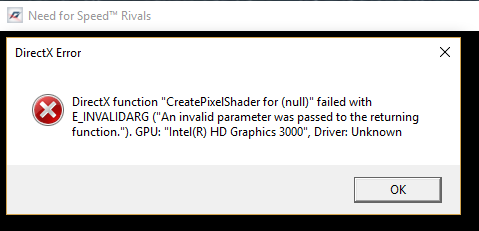
But I just always get an error, it states as in the image below, now it only happens to appear in Need for Speed: Rivals. But I would think it would happen to other programs aswell.
I have looked on countless tutorials, tried many things, even coming onto this site and looking around for something, but I always fail at running my beloved game. If there was ANY WAY to fix this error, PLEASE let me know!
I went onto 1 specific tutorial to check if I could solve my problem, and it had an apparent solution, A NEW DRIVER, I tried to get it, but it stated that my HD 3000 was no longer supported, so I am still unsuccessful.
Please respond to this, it would be so hugely appreciated.
Thanks,
- Tags:
- Intel® HD Graphics
Link kopiert

- Als neu kennzeichnen
- Lesezeichen
- Abonnieren
- Stummschalten
- RSS-Feed abonnieren
- Kennzeichnen
- Anstößigen Inhalt melden
What operating system? If Windows 10, then it HD 3000 graphics are not supported.
Doc
- Als neu kennzeichnen
- Lesezeichen
- Abonnieren
- Stummschalten
- RSS-Feed abonnieren
- Kennzeichnen
- Anstößigen Inhalt melden
Yes, this PC was updated to Windows 10 before purchase. This I guess was a huge mistake by the previous owners? Is there any other way to find a graphics driver for my GPU? I would be greatly appreciative if there was. I've also found that i bought a new game recently, THE CREW: Wild Run. This has a crash on launch and I'm suspecting that this is because of not having a graphics driver?
I also forgot to mention my PC specifications.
Toshiba Satellite PRO C850
Intel CORE i5 2450M CPU
Intel HD 3000 V.2 Mobile
8GB RAM
Thanks,
- Als neu kennzeichnen
- Lesezeichen
- Abonnieren
- Stummschalten
- RSS-Feed abonnieren
- Kennzeichnen
- Anstößigen Inhalt melden
You can find the HD 3000 graphics here:
https://www.intel.com/content/www/us/en/support/graphics-drivers/graphics-for-2nd-generation-intel-processors/intel-hd-graphics-3000.html Support for Intel® HD Graphics 3000
However, there is a later driver here:
http://www.catalog.update.microsoft.com/Search.aspx?q=intel%20hd%203000%20windows%2010 Microsoft Update Catalog
Doc
- Als neu kennzeichnen
- Lesezeichen
- Abonnieren
- Stummschalten
- RSS-Feed abonnieren
- Kennzeichnen
- Anstößigen Inhalt melden
Hi there, Thank you for your reply, I've managed to download the file, and now I'm would just like a little assistance on what to do next. I've opened the file with winRAR, but I don't know what i need to do.
Any help would be greatly appreciated.
Thanks.
- Als neu kennzeichnen
- Lesezeichen
- Abonnieren
- Stummschalten
- RSS-Feed abonnieren
- Kennzeichnen
- Anstößigen Inhalt melden
This may help you: https://www.intel.com/content/www/us/en/support/graphics-drivers/000005629.html Manually Install an Intel® Graphics Driver in Windows® 10 and Windows...
Doc
- Als neu kennzeichnen
- Lesezeichen
- Abonnieren
- Stummschalten
- RSS-Feed abonnieren
- Kennzeichnen
- Anstößigen Inhalt melden
I've followed the steps, and it now comes up with:
'The best driver software for your device is already installed'
Would this be true? If so, why isn't my GPU doing what it should be doing?
Thanks
- Als neu kennzeichnen
- Lesezeichen
- Abonnieren
- Stummschalten
- RSS-Feed abonnieren
- Kennzeichnen
- Anstößigen Inhalt melden

- Als neu kennzeichnen
- Lesezeichen
- Abonnieren
- Stummschalten
- RSS-Feed abonnieren
- Kennzeichnen
- Anstößigen Inhalt melden
Pixel Shader 3.0 errors are related to Direct3D 9. Direct3D 9 originally released with Windows XP is not included entirely with Windows by default. Additional components are available as an https://www.microsoft.com/en-us/download/details.aspx?id=35 optional runtime.
This may solve your problem.
.

- RSS-Feed abonnieren
- Thema als neu kennzeichnen
- Thema als gelesen kennzeichnen
- Diesen Thema für aktuellen Benutzer floaten
- Lesezeichen
- Abonnieren
- Drucker-Anzeigeseite