
- Mark as New
- Bookmark
- Subscribe
- Mute
- Subscribe to RSS Feed
- Permalink
- Report Inappropriate Content
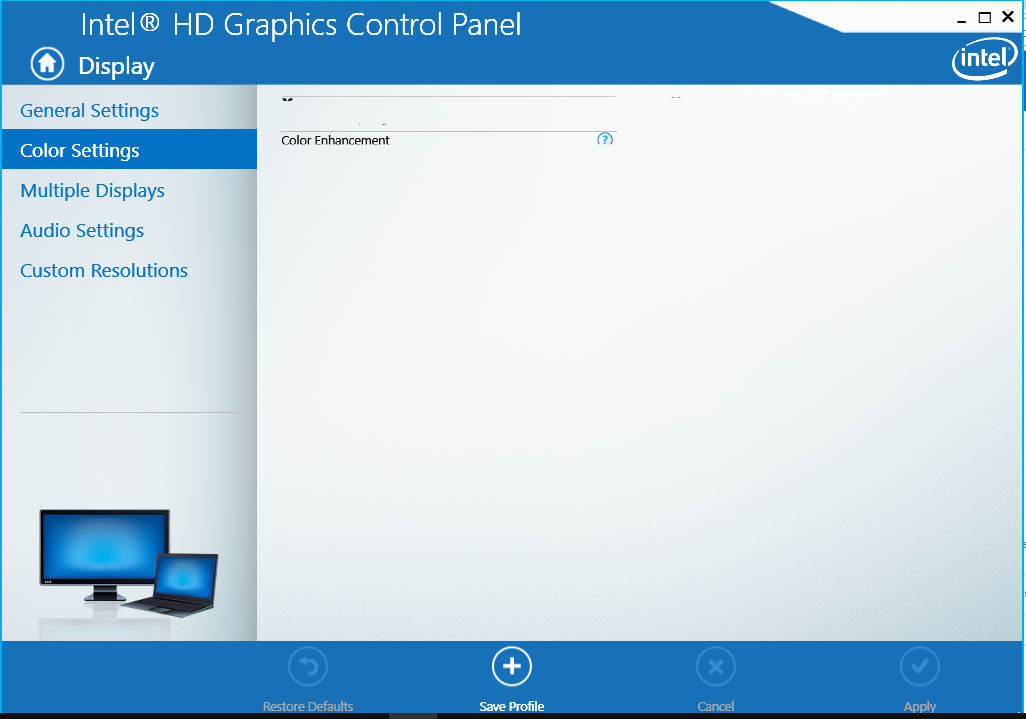
I use laptop Asus X554LA, core i3 5010u, GPU HD Graphics 5500, windows 10 build 15063. Problem with me is open intel graphics control panel, select displaty, I see a problem it display not correct. I do clean uninstall and reinstall, update lastest driver,.... Problem not fixed. Picture below. Help me, Please


- Mark as New
- Bookmark
- Subscribe
- Mute
- Subscribe to RSS Feed
- Permalink
- Report Inappropriate Content
Same issue as described at:
If latest driver fails try the others from: https://downloadcenter.intel.com/product/86210/Intel-HD-Graphics-5500 Downloads for Intel® HD Graphics 5500
Link Copied
- Mark as New
- Bookmark
- Subscribe
- Mute
- Subscribe to RSS Feed
- Permalink
- Report Inappropriate Content
Same issue as described at:
If latest driver fails try the others from: https://downloadcenter.intel.com/product/86210/Intel-HD-Graphics-5500 Downloads for Intel® HD Graphics 5500
- Mark as New
- Bookmark
- Subscribe
- Mute
- Subscribe to RSS Feed
- Permalink
- Report Inappropriate Content
Hello huynhtan,
I understand the Intel® Graphics Control Panel is not properly displaying settings.
Let me apologize for any inconvenience this issue may be causing to you.
In order to help you better I would like to gather more information about the configuration you have in the computer. Please attach to this thread the .txt file the Intel® System Support Utility will generate https://downloadcenter.intel.com/download/25293/Intel-System-Support-Utility https://downloadcenter.intel.com/download/25293/Intel-System-Support-Utility
If possible also attach the Intel Graphics Driver Report. This link will show you how to generate it https://www.intel.com/content/www/us/en/support/graphics-drivers/000005848.html https://www.intel.com/content/www/us/en/support/graphics-drivers/000005848.html
Was there any software or hardware change before the issue started happening?
To attach a file, you must click "Use Advanced Editor" on the upper right hand corner of the response box, then the "attach" option will appear on the bottom right hand corner of the response box.
Regards,
Fred D.
- Mark as New
- Bookmark
- Subscribe
- Mute
- Subscribe to RSS Feed
- Permalink
- Report Inappropriate Content
Thanks @intel, I fixed this by resetting the default in "Change date, time or number formats"

- Subscribe to RSS Feed
- Mark Topic as New
- Mark Topic as Read
- Float this Topic for Current User
- Bookmark
- Subscribe
- Printer Friendly Page