
- Mark as New
- Bookmark
- Subscribe
- Mute
- Subscribe to RSS Feed
- Permalink
- Report Inappropriate Content
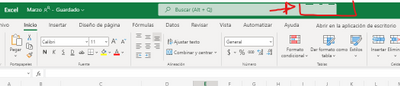
I just bought this processador i7-11700 , all is ok but when it displays a QR code or when I am using a form or excel, has problems for show it. when I uninstall it all is ok, you know what is the problem?
Example: Whatsapp, you see code it is not correct:

- Mark as New
- Bookmark
- Subscribe
- Mute
- Subscribe to RSS Feed
- Permalink
- Report Inappropriate Content
Hello @Percysr ,
We just released a new Beta driver version 27.20.100.9616 that you're welcome to try. I'm not 100% sure the code change that is confirmed to fix this issue is included in this Beta, but it is possible it slip into this one as well, so give it a shot and let us know your feedback.
I would like to confirm the Production driver that is confirmed to have the fix for this issue is still targeting mid-June 2021 release.
Best Regards,
Ronald M.
Link Copied

- Mark as New
- Bookmark
- Subscribe
- Mute
- Subscribe to RSS Feed
- Permalink
- Report Inappropriate Content
Hello Percys,
Thank you for posting on the Intel® communities.
I would like to let you know that we are working on releasing a new driver to fix the issue, just keep an eye on the Downloadcenter.intel.com to get the latest driver.
For the moment, I recommend you to disable the Hardware Acceleration (if possible) and access the following thread where you will find details about this issue.
Best regards,
Deivid A.
Intel Customer Support Technician
- Mark as New
- Bookmark
- Subscribe
- Mute
- Subscribe to RSS Feed
- Permalink
- Report Inappropriate Content
Hello @Percysr ,
We just released a new Beta driver version 27.20.100.9616 that you're welcome to try. I'm not 100% sure the code change that is confirmed to fix this issue is included in this Beta, but it is possible it slip into this one as well, so give it a shot and let us know your feedback.
I would like to confirm the Production driver that is confirmed to have the fix for this issue is still targeting mid-June 2021 release.
Best Regards,
Ronald M.
- Mark as New
- Bookmark
- Subscribe
- Mute
- Subscribe to RSS Feed
- Permalink
- Report Inappropriate Content
Thank you very much! i just install the driver and it is FIXED!.
whatsapp code it is ok:

thanks a lot

- Subscribe to RSS Feed
- Mark Topic as New
- Mark Topic as Read
- Float this Topic for Current User
- Bookmark
- Subscribe
- Printer Friendly Page