
- Mark as New
- Bookmark
- Subscribe
- Mute
- Subscribe to RSS Feed
- Permalink
- Report Inappropriate Content
I have Win11 23h2, 10100, MSI h510i pro wifi with Resizable Bar enabled and ASRock a380 Challenger and last driver ...4972, but I get the message "Unable to check the Resizable BAR status of this system.".
What's the matter ?
Link Copied

- Mark as New
- Bookmark
- Subscribe
- Mute
- Subscribe to RSS Feed
- Permalink
- Report Inappropriate Content
Hello Simgen,
Thank you for posting in the Intel Communities. We would be more than happy to assist you with the problem where you have the error message "Unable to check the Resizable BAR status of this system.".
Based on the issue you described, we want to let you know that this message appears when the Intel® Driver & Support Assistant cannot detect the Resizable BAR status when checking if the system can support Intel® Arc™ A-Series Graphics. This detection for Resizable BAR may not function due to a third-party platform being detected.
You can check the Intel® Arc™ Quick Start Guide for the system requirements, or contact your system or MSI support for more information about checking if the Resizable Bar is enabled correctly.
Best regards
Jean O.
Intel Customer Support Technician
- Mark as New
- Bookmark
- Subscribe
- Mute
- Subscribe to RSS Feed
- Permalink
- Report Inappropriate Content
You can check the Intel® Arc™ Quick Start Guide for the system requirements, or contact your system or MSI support for more information about checking if the Resizable Bar is enabled correctly.
I have the system requirements and the Resize Bar is correctly enabled.
Based on the issue you described, we want to let you know that this message appears when the Intel® Driver & Support Assistant cannot detect the Resizable BAR status when checking if the system can support Intel® Arc™ A-Series Graphics. This detection for Resizable BAR may not function due to a third-party platform being detected.
I made a new Win11 installation, no third-party software
I can't install the "Panel Arc Control" because I don't have a 11th gen cpu (again, why if 10th gen respects the system requirements ?) so how do I know if the resize bar is active and used ?
Thanks
Simone
- Mark as New
- Bookmark
- Subscribe
- Mute
- Subscribe to RSS Feed
- Permalink
- Report Inappropriate Content
Hello Simgen,
Thank you for the information provided. To discard that the Rezisable BAR is enabled and in use, you can use a third-party application, for example: GPU-Z. However, you can also use the Arc Control software which should be supported in your system since you have an Intel Arc A380, note that the system requirements for the Arc Control mention the following: 11th Generation Intel® Core processor or newer or an Intel® Arc™ Dedicated Graphics card.
If you are having trouble installing the Arc Control Software, we recommend you take a look at the following: Intel® Arc™ Control Software Not Installing. However, if the issue remains, we recommend opening a new thread so we can continue assisting you on this issue. We recommend opening one thread per issue to keep every thread organized.
Finally, if the error message remains and the Arc Control or a third-party software shows that Resizable BAR is enabled, we would like to request a screenshot of the applications showing that it is enabled and another one for the error message.
Best regards
Jean O.
Intel Customer Support Technician
- Mark as New
- Bookmark
- Subscribe
- Mute
- Subscribe to RSS Feed
- Permalink
- Report Inappropriate Content
Thanks
Simone

- Mark as New
- Bookmark
- Subscribe
- Mute
- Subscribe to RSS Feed
- Permalink
- Report Inappropriate Content
Hello, I have the same problem as Simgen.
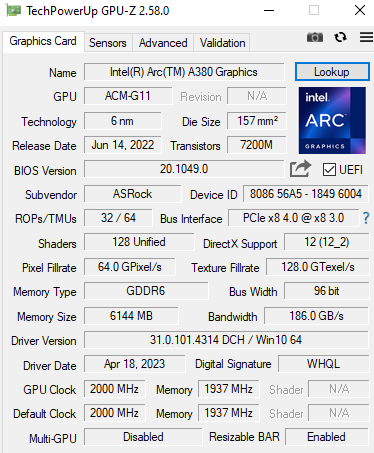
I have Win10 22h2, H410M S2H V2 (rev. 1.7) and ASRock a380 Challenger, and I get the message "Unable to check the Resizable BAR status of this system.". I have already checked if Rezisable BAR is enabled with GPU-Z.
Can you help me?
- Mark as New
- Bookmark
- Subscribe
- Mute
- Subscribe to RSS Feed
- Permalink
- Report Inappropriate Content
Hello Simgen,
We understand that the issue is now solved after disabling the integrated GPU. As everything appears to be functioning properly, we will proceed to close this thread. If you have any further inquiries, please submit a new question since this thread will no longer be monitored.
Best regards
Jean O.
Intel Customer Support Technician
- Mark as New
- Bookmark
- Subscribe
- Mute
- Subscribe to RSS Feed
- Permalink
- Report Inappropriate Content
Best regards.
Simone.

- Subscribe to RSS Feed
- Mark Topic as New
- Mark Topic as Read
- Float this Topic for Current User
- Bookmark
- Subscribe
- Printer Friendly Page