
- Mark as New
- Bookmark
- Subscribe
- Mute
- Subscribe to RSS Feed
- Permalink
- Report Inappropriate Content

Link Copied

- Mark as New
- Bookmark
- Subscribe
- Mute
- Subscribe to RSS Feed
- Permalink
- Report Inappropriate Content
Hi ELTACO141,
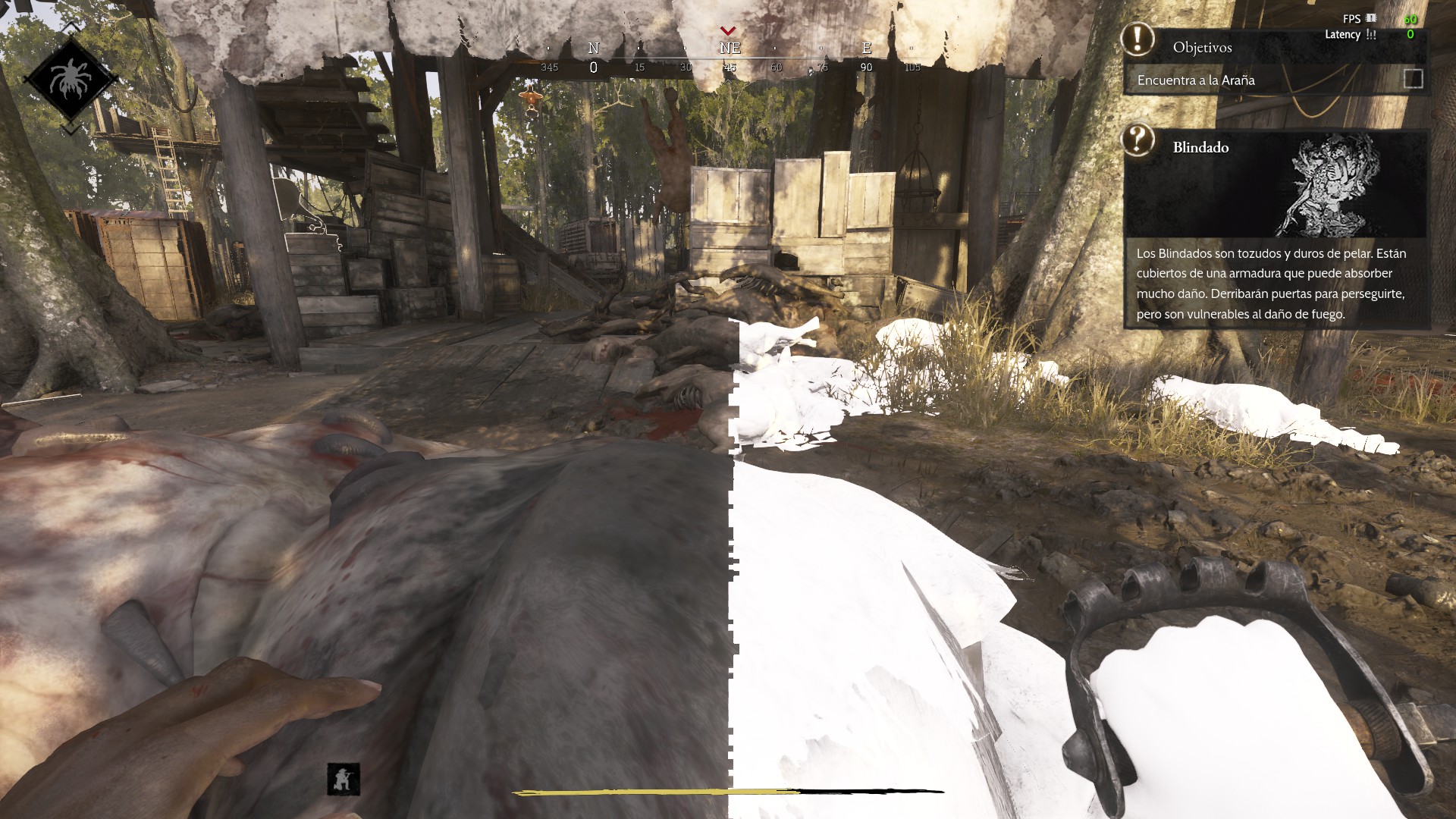
Thank you for contacting Intel regarding the texture issues you're experiencing in Hunt: Showdown 1896 when viewing specific enemies or objects from certain angles. I can see from the image you provided that there are noticeable texture rendering problems that are affecting your gaming experience.
To better assist you with resolving these texture issues, I'll need to gather some additional information about your system and the circumstances surrounding this problem.
Could you please run the Intel System Support Utility and provide the report? You can download it from: Intel® System Support Utility for Windows*
If you're not comfortable sharing the SSU report publicly, you can send your complete system specifications via private email, including your Intel graphics model, driver version, processor details, memory configuration, and operating system information.
Additionally, please let me know what troubleshooting steps you've already attempted to resolve these texture issues. Have you tried updating your Intel graphics drivers, adjusting game settings, or verifying game files?
Finally, did Hunt: Showdown 1896 work properly before, or is this a new installation? If it worked previously, when did you first notice these texture problems occurring?
This information will help me provide you with the most effective troubleshooting guidance for your specific configuration.
Best regards,
Dean R.
Intel Customer Support Technician
- Mark as New
- Bookmark
- Subscribe
- Mute
- Subscribe to RSS Feed
- Permalink
- Report Inappropriate Content
I've had this problem since January of this year. I've tried everything: reinstalling the drivers with Display Driver Uninstaller, deleting shaders, reinstalling the game, using an older driver version, and contacting game support. They told me:
"Thanks for your message. Sadly, this GPU is not supported. We don't have any testing on it, and we don't plan on adding it to the supported ones.
We are sorry for not being able to help with this request, and hope for your patience and understanding. Best regards."
And now you're my last resort after trying everything and nothing working. I hope you can help me.

- Mark as New
- Bookmark
- Subscribe
- Mute
- Subscribe to RSS Feed
- Permalink
- Report Inappropriate Content
Hello ELTACO141,
Thank you for your response. Please allow me some time to conduct a more thorough internal investigation to better understand the issue and identify the appropriate steps to take.
I will make sure to provide you with an update as soon as possible once I have more information to share.
Thank you.
Best regards,
Kenneth B.
Intel Customer Support Technician

- Mark as New
- Bookmark
- Subscribe
- Mute
- Subscribe to RSS Feed
- Permalink
- Report Inappropriate Content
Hi ELTACO141,
I'm reaching out to get additional information that can help with our ongoing investigation. To replicate this issue in our test lab, kindly share the information below.
- Screenshot of the exact game settings
- Is the issue happening in all game modes even in single player/practice mode?
I look forward to your response.
Best regards,
Jed G.
Intel Customer Support Technician
- Mark as New
- Bookmark
- Subscribe
- Mute
- Subscribe to RSS Feed
- Permalink
- Report Inappropriate Content
This problem occurs in all game modes when killing the enemies called Meathead or Ursa Mortis. It also happens with the bosses The Butcher, and I can't remember if it happens with the other enemies, but basically, I kill an enemy and the textures start turning white.
- Mark as New
- Bookmark
- Subscribe
- Mute
- Subscribe to RSS Feed
- Permalink
- Report Inappropriate Content
I tried the new update today and the problem persists. Meat Head, Ursa Mortis, Armored Zombie, Spider Boss, and The Butcher are the enemies that, when hit or even near them, cause the texture glitch, in addition to the environment (horses, fish, and meat on the ground). I haven't checked if Rotjaw has the same problem, but I took some pictures of the spider and some of the environmental elements I mentioned. I hope this helps.
- Mark as New
- Bookmark
- Subscribe
- Mute
- Subscribe to RSS Feed
- Permalink
- Report Inappropriate Content
Hello ELTACO141,
Thank you for your cooperation. We’ll work on reproducing the issue in our test lab and I’ll keep you updated as soon as we have more information.
Best regards
Jed G.
Intel Customer Support Technician
- Mark as New
- Bookmark
- Subscribe
- Mute
- Subscribe to RSS Feed
- Permalink
- Report Inappropriate Content
How is it possible that almost a year has passed since I was told the issue would be tested, and still nothing has been fixed? Furthermore, I am not alone; many other users are experiencing the exact same problem. Out of decency, you should at least let us know if you have no intention of fixing it.
I am aware that priority is being given to users with integrated graphics, while those of us who bought your dedicated GPUs are being neglected. What happened to the Intel® Game On Driver program? Titles like Arc Raiders receive continuous support, while other games are completely ignored.
Today, a new update for Hunt: Showdown 1896 was released, and the issue not only persists but has worsened—the visual glitches have now spread to the walls. The lack of communication and support for us, the consumers who purchased your dedicated products, is deeply disappointing.
- Mark as New
- Bookmark
- Subscribe
- Mute
- Subscribe to RSS Feed
- Permalink
- Report Inappropriate Content
Were they able to fix it, or is it beyond repair?
- Mark as New
- Bookmark
- Subscribe
- Mute
- Subscribe to RSS Feed
- Permalink
- Report Inappropriate Content
so nothing?



- Mark as New
- Bookmark
- Subscribe
- Mute
- Subscribe to RSS Feed
- Permalink
- Report Inappropriate Content
Guten Abend,
meine Grafikkarte ist eine Intel ARC B580.
Ich habe heute Hunt Showdown 1896 im Schießstand getestet. Die Pixelfehler bestehen immer noch!
Eltaco141 hat diese Fehler am 12.04.2025 gemeldet! In dieser Zeit sind etliche Treiber erschienen und es wurde nicht geschafft den Fehler zu beseitigen! Da stellt sich Intel ein ganz schönes Armutszeugnis aus.
Mehr als ein Jahr sollte doch für so einen Fehler reichen, Intel ist doch keine 0815 Firma!
Mich würde der aktuelle Stand interessieren! Oder besser das Spiel von der Festplatte löschen, weil es nicht möglich ist diesen Fehler per Treiber zu beheben?
Mit freundlichen Grüßen
- Mark as New
- Bookmark
- Subscribe
- Mute
- Subscribe to RSS Feed
- Permalink
- Report Inappropriate Content
Guten Abend,
ich habe noch eine Frage! Spielen die Entwickler von Intel mit ihren eigenen Grafikkarten PC Games (Intel ARC B580)?
Oder nehmen sie lieber Garfikkarten von Nvidia oder AMD? Das würde einiges erklären.
Ich habe große Hoffnung in diese Grafikkarte gesteckt! Ist es eine Enttäuschung?
Für alle Kunden die sich so wie ich für Intel entschieden haben und somit für mehr Konkurenz im Grafikmarkt, sollte doch etwas Begeistreung für einen Treiber möglich sein, auch wenn es für ein Spiel ist, dass die Entwickler scheinbar nicht so mögen (Hunt Showdown 1896) ; ).
Mein PC:
Asus TUF Gaming B650M-E WIFI Mainboard, Ryzen 7600, 32GB DDR 5 RAM, SSD 2GB, Intel ARC B580 Grafikkarte, Windows 11Pro
Treiber, Bios und Betriebssystem auf dem neusten Stand!
MfG
Mein englisch ist einfach schlecht. Falls mein deutsch nicht verstanden wird, kann ich den Text auch per KI übersetzen. Alternative für mich, die Intel Grafikkarte durch eine AMD 9600XT mit 16 GB zu ersetzen. Das war es dann mit Intel. WAHRSCHEINLICH NUR WEGEN EINEN TREIBERPROBLEM?
- Mark as New
- Bookmark
- Subscribe
- Mute
- Subscribe to RSS Feed
- Permalink
- Report Inappropriate Content
Gab es bei der Produktion von Intel B580 Grafikchips eine Serie die Fehler hatte? Denn scheinbar gibt es auch viele Spieler die mit Intel B580 Grafikkarte keine Probleme haben oder betrifft es nur die eigene Intel ARC B580 und nicht die Custom Design? Fragen über Fragen.
- Mark as New
- Bookmark
- Subscribe
- Mute
- Subscribe to RSS Feed
- Permalink
- Report Inappropriate Content
Dieser Texturfehler in Hunt tritt nicht nur im Schießstand (Pferd) auf sondern auch im Tutorial und natürlich im Spiel auf. Als kleine Ergänzung. Das ganze nach über einen Jahr! Grafikartentreiber ist der
Intel Arc & Xe Grafiktreiber 32.0.101.8864
haben jeden ausprobiert und auf Besserung gehofft! Nichts!

- Subscribe to RSS Feed
- Mark Topic as New
- Mark Topic as Read
- Float this Topic for Current User
- Bookmark
- Subscribe
- Printer Friendly Page