
- Marcar como nuevo
- Favorito
- Suscribir
- Silenciar
- Suscribirse a un feed RSS
- Resaltar
- Imprimir
- Informe de contenido inapropiado
I'd like to point out that this has always happened, but I was hoping it would be resolved by an update ***. To be clear, it only happens when I open a streaming platform like Netflix, Prime Video, or Paramount on Chrome, and it lasts a few seconds, as if the monitor were changing source. This is impossible, considering I only connected an HDMI cable. After that, I can watch movies and series as if nothing had happened. The bug never occurs while gaming or doing anything else, only on this occasion. ***Every time I update the driver—which I do periodically—the software gives me an error, after which I have to restart my PC only to open up the software and do a clean driver update again, and then it works.
Enlace copiado

- Marcar como nuevo
- Favorito
- Suscribir
- Silenciar
- Suscribirse a un feed RSS
- Resaltar
- Imprimir
- Informe de contenido inapropiado
This could be related to High-bandwidth Digital Content Protection (HDCP), which protects commercial content.
What display device are you using? Make and model?
Please create a Report for Intel Graphics Drivers when the system works normally under Windows and attach the output file here.
How to Install the Intel Graphics Command Center From the Microsoft Store
- Marcar como nuevo
- Favorito
- Suscribir
- Silenciar
- Suscribirse a un feed RSS
- Resaltar
- Imprimir
- Informe de contenido inapropiado
I'm using Samsung monitor FHD S22D300 1ms.
- Marcar como nuevo
- Favorito
- Suscribir
- Silenciar
- Suscribirse a un feed RSS
- Resaltar
- Imprimir
- Informe de contenido inapropiado
Does the problem also occur when you use the Microsoft Edge browser?
- Marcar como nuevo
- Favorito
- Suscribir
- Silenciar
- Suscribirse a un feed RSS
- Resaltar
- Imprimir
- Informe de contenido inapropiado
yes same thing on edge; just tried. thx for your help. So is it basically a normal thing? due to "Digital Content Protection"?
- Marcar como nuevo
- Favorito
- Suscribir
- Silenciar
- Suscribirse a un feed RSS
- Resaltar
- Imprimir
- Informe de contenido inapropiado
No, that's not normal. While it's normal for the driver to use HDCP to display protected streaming content, this doesn't usually trigger a complete re-initialization of the video connection ("HDMI Resync"). Unfortunately, I'm out of ideas on where to start troubleshooting. The Samsung S22D300 monitor model was introduced in 2014. It's possible that this HDCP 1.4 implementation has a compatibility issue with the Intel Arc A-Series. If you can live with the brief black screen, it's probably most stress-free to just accept it. While reinstalling the operating system might help, the outcome is uncertain and, in my opinion, not worth the effort. You could probably just check with Samsung Support if there's a firmware update available for the monitor.
- Marcar como nuevo
- Favorito
- Suscribir
- Silenciar
- Suscribirse a un feed RSS
- Resaltar
- Imprimir
- Informe de contenido inapropiado
Thanks, you were very clear. I'm wondering if changing the monitor might solve the situation. But I don't think I'll do it.

- Marcar como nuevo
- Favorito
- Suscribir
- Silenciar
- Suscribirse a un feed RSS
- Resaltar
- Imprimir
- Informe de contenido inapropiado
Hi @Scafatiello,
Thank you for posting in the community!
In addition to the helpful insights from our super user @MUC , I’d like to share a few points:
The Samsung FHD S22D300 monitor doesn’t natively support SVOD (Subscription Video On Demand) playback like smart TVs or smart monitors. Based on the manual, there are no features indicating built-in streaming capabilities. This monitor relies entirely on the connected device (e.g., PC or laptop) to handle SVOD content.
Since replacing the monitor may not be an option, I’d like to further investigate whether bandwidth limitations, aside from monitor constraints could be affecting playback. To proceed, please share:
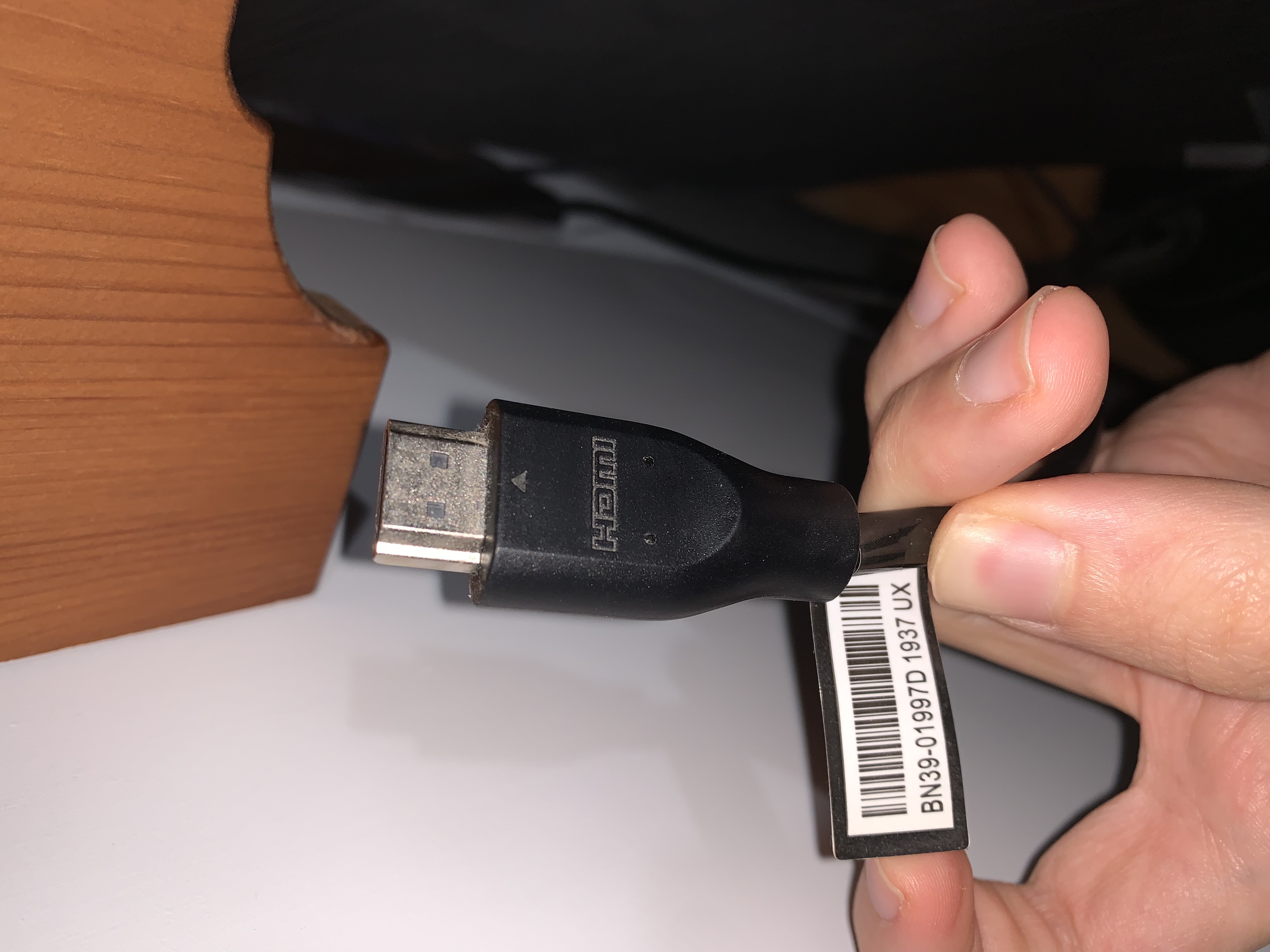
- The exact HDMI version you're using
- Your PSU make and model, including wattage
Once you have this info, kindly post an update here so I can assist further. Looking forward to your response!
Best regards,
Randy T.
Intel Customer Support Technician
- Marcar como nuevo
- Favorito
- Suscribir
- Silenciar
- Suscribirse a un feed RSS
- Resaltar
- Imprimir
- Informe de contenido inapropiado
thank you for reaching me in this discussion. EVGA 850 GQ, 80+ GOLD 850W, Semi Modulare, EVGA ECO Mode, Alimentatore 210-GQ-0850-V2 that's the PSU i'm using since i built pc. and for th HDMI i'm not pretty sure what model is it; for this reason i'm attaching 2 pictures of it. Thanks again for your help.


.jpg)
- Marcar como nuevo
- Favorito
- Suscribir
- Silenciar
- Suscribirse a un feed RSS
- Resaltar
- Imprimir
- Informe de contenido inapropiado
Sounds like an HDCP handshake issue when DRM-protected content initializes. Try disabling hardware acceleration in Chrome or switching to DisplayPort instead of HDMI. If it persists, a clean driver reinstall using DDU before updating often resolves the black screen flicker on Arc cards.
- Marcar como nuevo
- Favorito
- Suscribir
- Silenciar
- Suscribirse a un feed RSS
- Resaltar
- Imprimir
- Informe de contenido inapropiado
Hi @Scafatiello,
I agree, yes, this is clearly a monitor issue, not related to bandwidth or PSU, as both components are supported by the GPU.
To resolve this, try using a different monitor that supports HDCP 2.2 and HDR (especially if you're streaming in 4K).
However, you may also try the recommended troubleshooting steps by @Olivia342 for further isolation.
I’ve attached a cable version that supports your GPU for reference. You can try using this type of cable for further isolation and testing.
If you need more information, feel free to ask. Otherwise, please let me know if I have your permission to close this thread.
Best regards,
Randy T.
Intel Customer Support Technician


- Marcar como nuevo
- Favorito
- Suscribir
- Silenciar
- Suscribirse a un feed RSS
- Resaltar
- Imprimir
- Informe de contenido inapropiado
you can close the thread. I will eventually change monitor hoping for the best.
- Marcar como nuevo
- Favorito
- Suscribir
- Silenciar
- Suscribirse a un feed RSS
- Resaltar
- Imprimir
- Informe de contenido inapropiado
Hi @Scafatiello,
Got it, thanks for the update. I’ll go ahead and close the thread. If you need further assistance, in the future do not hesitate to contact us or post a new thread.
Best regards,
Randy T.
Intel Customer Support Technician

- Suscribirse a un feed RSS
- Marcar tema como nuevo
- Marcar tema como leído
- Flotar este Tema para el usuario actual
- Favorito
- Suscribir
- Página de impresión sencilla