
- 신규로 표시
- 북마크
- 구독
- 소거
- RSS 피드 구독
- 강조
- 인쇄
- 부적절한 컨텐트 신고
This issue is very similar if not the same to these other issues on the forum:
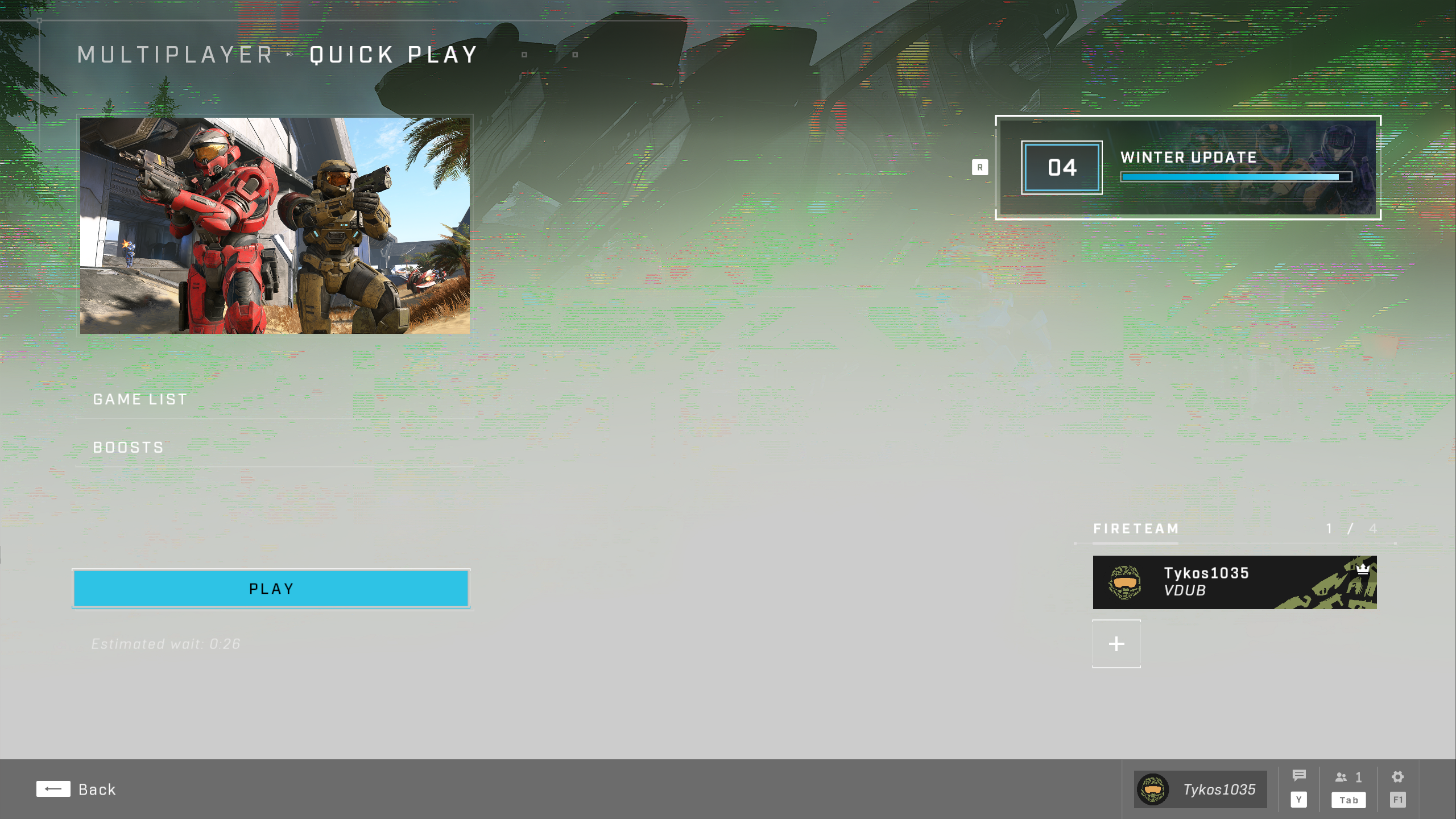
In Halo Infinite this issue of blooming-washedout-lighting and artifacting happens in the menus and during gameplay. It does not seem to slow down the framerate. I haven't played the campaign yet but I would imagine it also occurs there.
To answer the standard questions:
- The game is installed through Steam
- I just built this computer, I only have tried the current driver
- I'm on driver version 31.0.101.4032
- Resizeable BAR / C.A.M is enabled
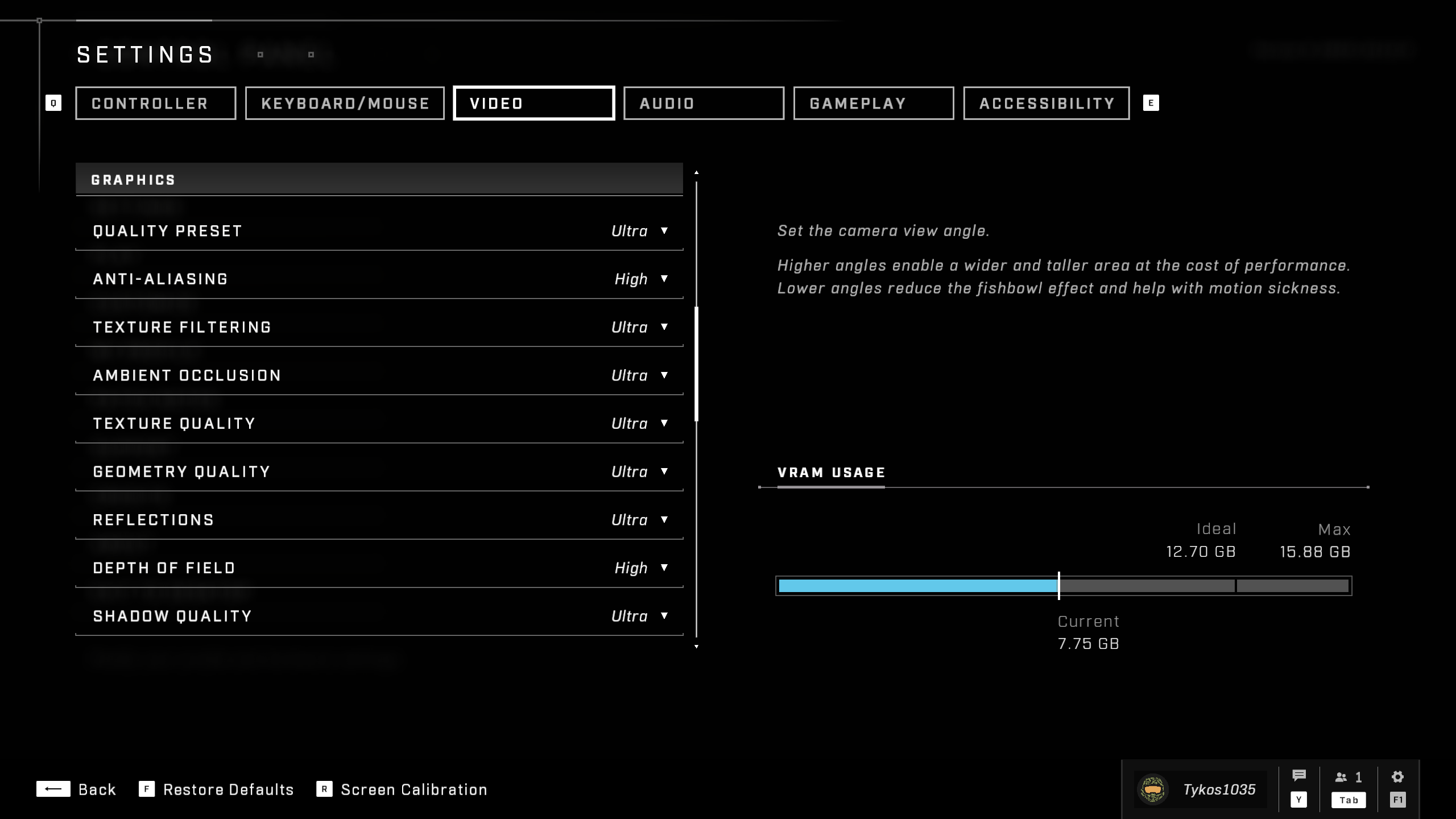
- I attached a screenshot of the graphics settings
-
I attached a screenshot of the issue in the menu as well as a short video of gameplay
-
I attached the system scan results
I've tried:
- Restarting the computer
- Uninstalling / reinstalling the game
- Changing graphics quality settings
- Validated game files via Steam
As far as repro steps, all I do is open the game via Steam and the issues start immediately when the game finishes booting up.
PC Specs:
- ASRock Z790M-ITX WiFi
- Intel i7-13700k
- Lian Li SFX 750w
- Team T-Force Vulcan 32GB DDR5 5600
- Nextorage Japan 2TB Gen 4 M.2 NVMe SSD
- Acer Predator BiFrost Intel Arc A770
- Monitor resolution: 2560x1440
링크가 복사됨


- 신규로 표시
- 북마크
- 구독
- 소거
- RSS 피드 구독
- 강조
- 인쇄
- 부적절한 컨텐트 신고
Thank you for posting on the Intel
In order to have a better understanding of the issue, please share with us the following information:
- When did the issue start? Were there any recent changes?
- Did you have any other graphics card installed previously?
- Does this happen in other games?
Regards,
Carlos L.
Intel Customer Support Technician
- 신규로 표시
- 북마크
- 구독
- 소거
- RSS 피드 구독
- 강조
- 인쇄
- 부적절한 컨텐트 신고
Hi @Carlos_L_Intel ,
I just built this computer, so no other graphics card has ever been installed, and the issue has happened every time I've tried to play Halo Infinite.
I have Call of Duty Modern Warfare II which these issues do not occur on, which is the only other game I have so far.
- 신규로 표시
- 북마크
- 구독
- 소거
- RSS 피드 구독
- 강조
- 인쇄
- 부적절한 컨텐트 신고
Thank you for the clarifications. Just to double-check, a couple of things for me to continue with my research:
- What Windows build are you running?
- As you mention there are not any special steps to reproduce this issue, just try to play online and it should happen, correct?
- Are there any other apps we should be aware of on the background when playing the game?
Regards,
Carlos L.
Intel Customer Support Technician
- 신규로 표시
- 북마크
- 구독
- 소거
- RSS 피드 구독
- 강조
- 인쇄
- 부적절한 컨텐트 신고
I am running Windows 11 Version 22H2 (OS Build 22621.1105).
Correct, it happens every time I launch the game via Steam.
I have stopped almost all the start up apps I can as well as closed any programs in the background and the issue remains.
Thanks for your fast replies!
- 신규로 표시
- 북마크
- 구독
- 소거
- RSS 피드 구독
- 강조
- 인쇄
- 부적절한 컨텐트 신고
Hello @airnichols13
Thank you for the information provided. I will proceed to check the issue internally and post back soon with more details.
Best regards,
Carlos L.
Intel Customer Support Technician
- 신규로 표시
- 북마크
- 구독
- 소거
- RSS 피드 구독
- 강조
- 인쇄
- 부적절한 컨텐트 신고
Hi @airnichols13,
Thank you for your time. Before I continue with my research. Can you please try the following BETA driver to see if anything changes:
- 신규로 표시
- 북마크
- 구독
- 소거
- RSS 피드 구독
- 강조
- 인쇄
- 부적절한 컨텐트 신고
Hi @airnichols13,
Thank you for your time. Before I continue with my research. Can you please try the following BETA driver to see if anything changes:
Execute a Clean Installation During Driver Installation
- Click the .exe to initiate the driver installation.
- Agree to the Intel Software License Agreement.
- Click the checkbox to Execute a clean installation.
- A clean installation removes all old drivers and restores Intel settings to the default value
- Click Start to begin the install.
- Reboot the system if prompted.
Please let me know any changes and I will be happy to continue to help.
Best regards,
Carlos L.
Intel Customer Support Technician
- 신규로 표시
- 북마크
- 구독
- 소거
- RSS 피드 구독
- 강조
- 인쇄
- 부적절한 컨텐트 신고
I installed the beta driver, did not change any settings, and tried Halo Infinite again - I attached a screen of the menu and video of gameplay...
It seemed maybe slightly better but still many of the same issues were present.

- 신규로 표시
- 북마크
- 구독
- 소거
- RSS 피드 구독
- 강조
- 인쇄
- 부적절한 컨텐트 신고
Hello @airnichols13
Thank you for your time and the information provided. I will proceed to check the issue internally and post back soon with more details.
Best regards,
Carlos L.
Intel Customer Support Technician
- 신규로 표시
- 북마크
- 구독
- 소거
- RSS 피드 구독
- 강조
- 인쇄
- 부적절한 컨텐트 신고
Hi @airnichols13,
Thank you for your time and patience. We would like to let you know that those issues have been reported and bugs ID have been filed to our driver debug team already.
- Graphics corruption: bug ID 18022387997
There is not an estimated time on a fix, but rest assure we are already looking into this to provide you a solution, I appreciate your understanding.
Would you like us to go ahead and close this threat for now?
Best regards,
Carlos L.
Intel Customer Support Technician
- 신규로 표시
- 북마크
- 구독
- 소거
- RSS 피드 구독
- 강조
- 인쇄
- 부적절한 컨텐트 신고
- 신규로 표시
- 북마크
- 구독
- 소거
- RSS 피드 구독
- 강조
- 인쇄
- 부적절한 컨텐트 신고
Hi @airnichols13,
I appreciate your question. Once we have a solution, we will note it in the community thread and in a future driver release notes.
Best regards,
Carlos L.
Intel Customer Support Technician
- 신규로 표시
- 북마크
- 구독
- 소거
- RSS 피드 구독
- 강조
- 인쇄
- 부적절한 컨텐트 신고
Hi @airnichols13,
Were you able to check the previous post? Let us know if you still need assistance.
Best regards,
Carlos L.
Intel Customer Support Technician
- 신규로 표시
- 북마크
- 구독
- 소거
- RSS 피드 구독
- 강조
- 인쇄
- 부적절한 컨텐트 신고
- 신규로 표시
- 북마크
- 구독
- 소거
- RSS 피드 구독
- 강조
- 인쇄
- 부적절한 컨텐트 신고
Hi @airnichols13,
Thank you for the clarification. In this case, the best way to track if we have fixed the issue will be through the release notes for the drivers.
Best regards,
Carlos L.
Intel Customer Support Technician
- 신규로 표시
- 북마크
- 구독
- 소거
- RSS 피드 구독
- 강조
- 인쇄
- 부적절한 컨텐트 신고
Hi @airnichols13,
Were you able to check the previous post?
Let us know if you still need assistance.
Best regards,
Carlos L.
Intel Customer Support Technician
- 신규로 표시
- 북마크
- 구독
- 소거
- RSS 피드 구독
- 강조
- 인쇄
- 부적절한 컨텐트 신고
- 신규로 표시
- 북마크
- 구독
- 소거
- RSS 피드 구독
- 강조
- 인쇄
- 부적절한 컨텐트 신고
Thank you for the update. Yes, once there are any updates we will publish them in the release notes. Is there anything else I could help you with?
Best regards,
Carlos L.
Intel Customer Support Technician
