
- Mark as New
- Bookmark
- Subscribe
- Mute
- Subscribe to RSS Feed
- Permalink
- Report Inappropriate Content
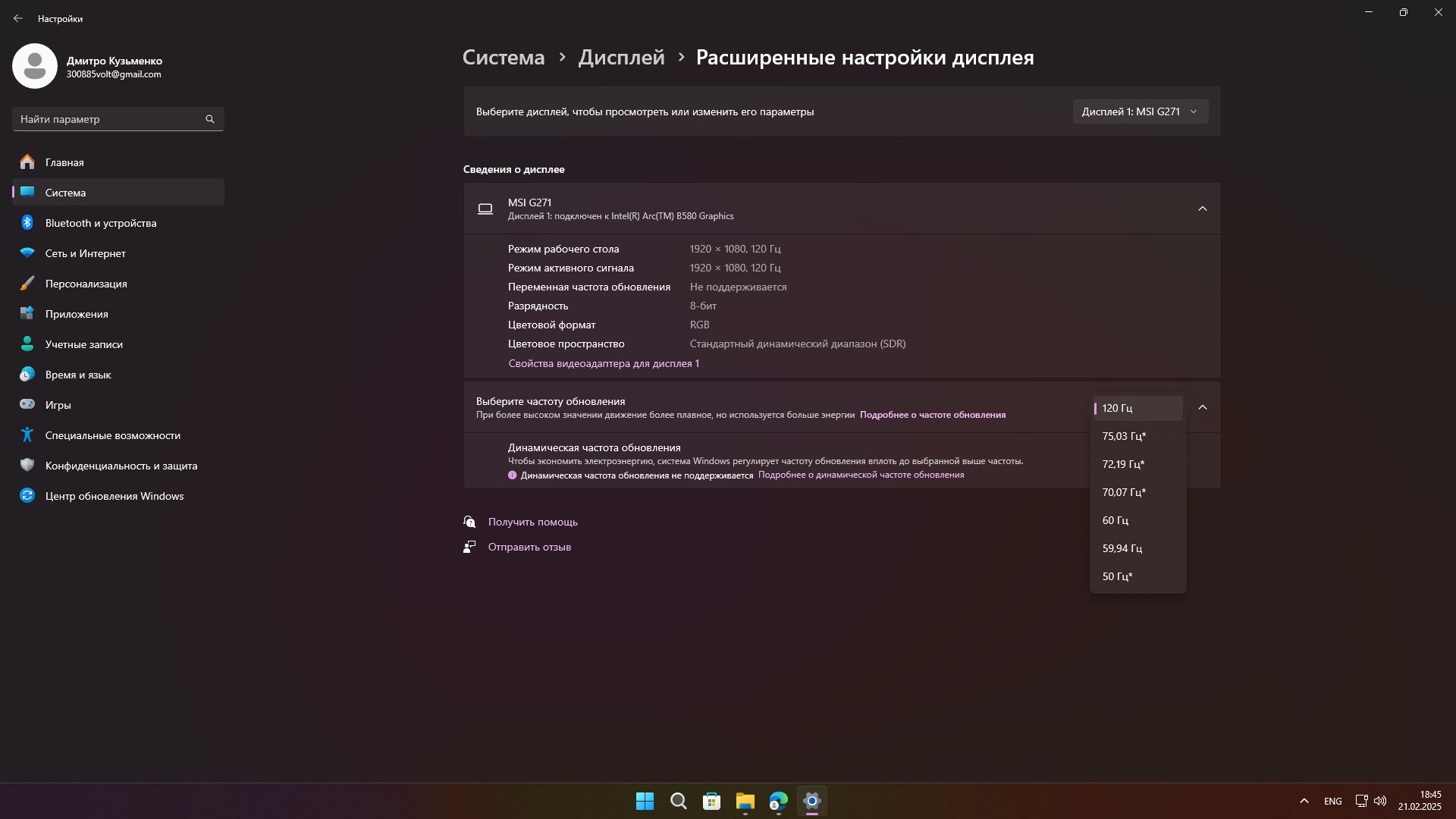
After switching from Gtx 1650 to intel arc b580 I can't make my monitor 144hz only 120hz, I completely reset Windows to 11, tried all HDMI cables and DP also tried but there was only 60hz (the problem was in the cable). My monitor is MSI Optix g271. Write the whole solution, I will try to send all the questions.

- Mark as New
- Bookmark
- Subscribe
- Mute
- Subscribe to RSS Feed
- Permalink
- Report Inappropriate Content
Hello, I solved the problem through a custom resolution using the Custom Resolution Utility (CRU). I made it 144Hz, everything works according to the tests. If there are any problems, I'll write again, for now I'm closing the topic.

Link Copied

- Mark as New
- Bookmark
- Subscribe
- Mute
- Subscribe to RSS Feed
- Permalink
- Report Inappropriate Content
Please connect the monitor via DisplayPort and create a Report for Intel Graphics Drivers and attach the output file here.
- Mark as New
- Bookmark
- Subscribe
- Mute
- Subscribe to RSS Feed
- Permalink
- Report Inappropriate Content
Can I do this with HDMI, because I returned the DisplayPort to the store because it was faulty.
- Mark as New
- Bookmark
- Subscribe
- Mute
- Subscribe to RSS Feed
- Permalink
- Report Inappropriate Content
Yes, of course. All data is useful.
- Mark as New
- Bookmark
- Subscribe
- Mute
- Subscribe to RSS Feed
- Permalink
- Report Inappropriate Content
Hello, I solved the problem through a custom resolution using the Custom Resolution Utility (CRU). I made it 144Hz, everything works according to the tests. If there are any problems, I'll write again, for now I'm closing the topic.
- Mark as New
- Bookmark
- Subscribe
- Mute
- Subscribe to RSS Feed
- Permalink
- Report Inappropriate Content

- Subscribe to RSS Feed
- Mark Topic as New
- Mark Topic as Read
- Float this Topic for Current User
- Bookmark
- Subscribe
- Printer Friendly Page