
- Mark as New
- Bookmark
- Subscribe
- Mute
- Subscribe to RSS Feed
- Permalink
- Report Inappropriate Content
Hello, I recently acquired a AsRock Intel Arc B580, and I can say it's an excellent general-purpose graphics card. I'm writing to report an issue I've been experiencing when using AI inference on this Intel Arc. It works reasonably well, but I get random blue screens.
In gaming, I haven't had any problems; even testing with FurMark, there's no instability. The problem arises when loading an LLM model or in Stable Diffusion. There's a chance I'll get a random blue screen with the error code DRIVER_IRQL_NOT_LESS_OR_EQUAL, or it might simply work without any issues.
I have two ways of triggering a BSOD:
Using LM Studio in the Vulkan runtime llama.cpp v2.3.0: Simply loading the model has a random chance of triggering a Blue Screen. If nothing happens, ejecting and loading again the model can cause it.
Using ComfyUI is when it happens most frequently. I'm using the Intel libraries for ComfyUI to work:
python -m pip install torch==2.5.1+cxx11.abi torchvision==0.20.1+cxx11.abi torchaudio==2.5.1+cxx11.abi intel-extension-for-pytorch==2.5.10+xpu --extra-index-url https://pytorch-extension.intel.com/release-whl/stable/bmg/cn/
This also works, but in this case, it's not when loading the model, but when running it. it can cause a BSOD. Randomly, or nothing happens and it works fine.
What I've done to reduce this:
- Disabling hardware acceleration in the browser reduces the number of BSODs, but it's not foolproof.
- Closing all applications except ComfyUI in the browser.
- Do absolutely nothing while it's generating (there's still a chance of a crash)
It seems that doing anything while the graphics card is in use puts me at risk of a BSOD (for example, switching applications while it's generating can give me a blue screen, or playing a video).
I've checked the VRAM usage, and it never reaches the limit. Normally, when using something like this, it uses 9GB/12GB.
It's quite random. sometimes I can go up to 30 minutes without anything happening, other times, in less than 5 minutes i get a BSOD.
I'm using the latest driver WHQL 32.0.101.8509 downloaded from Intel page
Full specs are in ssu.txt attached with windows minidumps
Thanks in advance
Link Copied

- Mark as New
- Bookmark
- Subscribe
- Mute
- Subscribe to RSS Feed
- Permalink
- Report Inappropriate Content
Hi Ronald3,
Thank you for reaching out to the Intel Community Forum. I appreciate your message, and I’m here to help you with your concern. To better understand the issue and provide accurate support, could you please share the following information:
- Have you performed a clean installation of the graphics driver using Display Driver Uninstaller (DDU) to fully remove previous GPU drivers before installing the Intel graphics driver?
- Are you overclocking any components such as the CPU, RAM, or GPU (including enabling XMP profiles)?
- What is the brand, model, and wattage of your power supply unit?
- Have you run a memory stress test—such as Windows Memory Diagnostic—to check for RAM stability?
- Have you recently installed any new programs or drivers?
- Have you run system scans, such as sfc /scannow to repair potential corrupted files, followed by chkdsk to check for storage drive errors?
- Have you tried disconnecting unnecessary USB devices or peripherals to rule out driver conflicts?
- Have you checked for any pending Windows updates, particularly for network adapters?
- Are your RAM modules running at their rated speed (e.g., 3600 MHz) or the current 2666 MHz shown in the system scan?
- What are your CPU and GPU temperatures during AI inference workloads?
- Does the BSOD occur with other GPU‑intensive applications aside from LM Studio and ComfyUI?
- Have you tried disabling Memory Integrity under Windows Security (Core Isolation)? In some cases, turning it off can resolve similar issues.
If you have any additional questions or need further assistance, please feel free to let us know.
Best regards,
Kent Russel P.
Intel Customer Support Technician
- Mark as New
- Bookmark
- Subscribe
- Mute
- Subscribe to RSS Feed
- Permalink
- Report Inappropriate Content
Hello
1. I just ran DDU in safe mode, uninstalled the driver and reinstalled it.
2. No, everything is working at its normal base speed.
3. Cooler Master GX II Pro 750w 80 Plus Bronze
4. Did it, waited one hour, Windows gave me a notification that there were no memory errors
5. No, i just installed recently the Arc B580. What I had before was a Nvidia GTX 550 (also uninstalled)
6. Did sfc /scannow, no problems, also chkdsk telled no problems
8. There's no pending updates, the last ones was security ones
9. They are rated at 3600 MHz but are running at 2666 MHz (It's set to auto in the BIOS)
10. 50 - 65C It almost never reaches 70 both cpu and gpu
11. No, i only get crash in local AI related applications (I also tried OpenVino, worked, but i get a crash at one moment)
12. That option doesn't appear in that menu. there's only information that secure boot is enabled and "TPM details."
I just found if i lock Windows (Windows + L) while ComfyUI is generating, there's a big chance of BSOD
- Mark as New
- Bookmark
- Subscribe
- Mute
- Subscribe to RSS Feed
- Permalink
- Report Inappropriate Content
Hi Ronald3,
Thank you for getting back to us. For further analysis and investigation of your concern, please provide the following information:
- Can you enable XMP in the BIOS to run your RAM at the rated 3600 MHz instead of 2666 MHz? A mismatch in memory speed may cause stability issues during memory‑intensive AI workloads.
- What are the specific power draw readings during AI inference? (You can check these using HWiNFO64 or GPU‑Z.)
- Does the BSOD occur immediately after locking Windows (Win + L), or does it take a few seconds or minutes?
- Can you reproduce the BSOD by switching between applications (Alt + Tab) during generation without locking the system?
- Does minimizing the browser window (without locking Windows) also trigger crashes?
- In Device Manager, do you see any warning symbols (yellow triangles) or unknown devices? If possible, please provide screenshots of the Device Manager.
- In Windows Event Viewer (Windows Logs > System), are there any critical errors or Event IDs around the time of the crashes? Please export and share the specific logs that show errors related to the issue or those occurring at the same time as the crashes.
- Does running a simple GPU stress test (such as FurMark) while performing other tasks (browsing, switching apps) cause instability or crashes?
- What happens if you run AI inference in a windowed browser instead of full screen mode?
If you have any additional questions or need further assistance, please feel free to let us know.
Best regards,
Kent Russel P.
Intel Customer Support Technician
- Mark as New
- Bookmark
- Subscribe
- Mute
- Subscribe to RSS Feed
- Permalink
- Report Inappropriate Content
- Enabled XMP -> RAM is now working at 3600 MHz -> not a big change
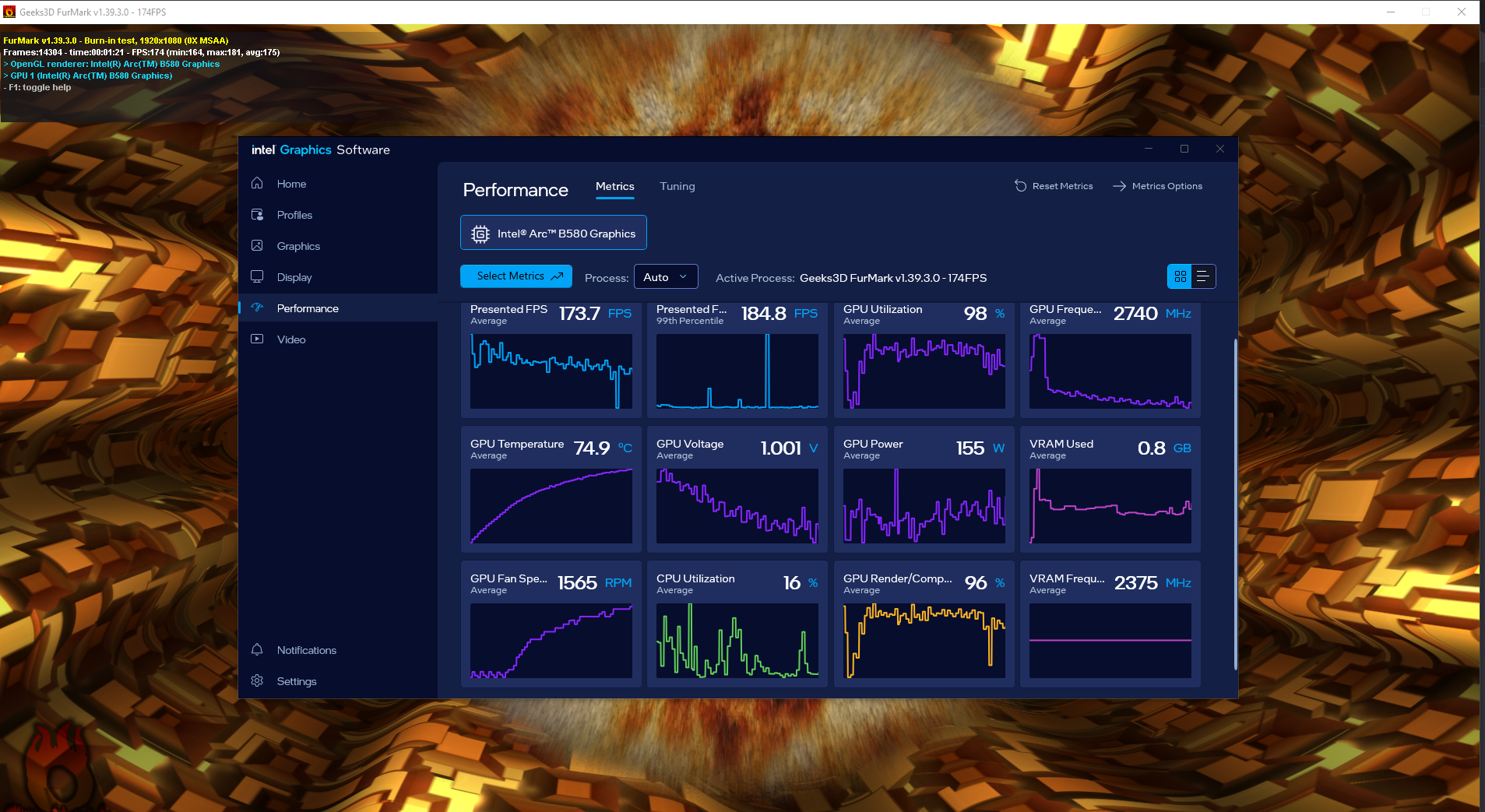
- It pulls around 150 - 157W while generating (Viewed in the Intel Performance Monitor)
- Yes the BSOD occur 1 sec after i push Win + L while generating (especially in the KSampler step), occurs the 99% of times. Very reproductible
- I tried minimizing, but I didn't get crashed. I also tried alt + tab many times while generating, but it only crashed once, which was when I opened the ticket. The other crashes were very random. It can happen simply on the same tab without doing anything, or when changing browser tabs.
- There are two "other devices" with warning symbols. No idea what they are. The only PCI slots in use are the video card and a PCI Wi-Fi card, which is working correctly.
- As I said before, I have no problems with gaming. FurMark works fine. I ran it again with the 3600MHz setting, and everything is normal.
- In windowed mode, nothing happens, it works, I guess, (the crash is random) I also tried Win + L in windowed browser and it crashed after a second
At this point, it's not my system.
- Mark as New
- Bookmark
- Subscribe
- Mute
- Subscribe to RSS Feed
- Permalink
- Report Inappropriate Content
Hi Ronald3.
Thanks for your prompt response! Please try to do a clean installation of latest Intel® Graphics Driver 32.0.101.8531 using Display Driver Uninstaller (DDU). Here are the links for your reference: How to Use the Display Driver Uninstaller (DDU) to Uninstall a... and Clean Installation of Intel® Graphics Drivers in Windows*
Also, please answer the following questions for further analysis of the issue:
- Does the crash still occur when you disable the screen saver or lock screen in the Windows settings and then press Win + L?
- What happens if, instead of locking Windows, you manually turn off your monitor using the power button while a generation is running?
- Does the crash occur when you press Ctrl + Alt + Del, which also triggers a secure screen transition, during generation?
- Could you try disabling Hardware-Accelerated GPU Scheduling in Settings > System > Display > Graphics Settings?
- Since turning off browser hardware acceleration reduced the crashes, which browser are you currently using with ComfyUI?
- Have you tested ComfyUI in another browser (e.g., Edge, Firefox, Chrome) to see if the crash behavior when pressing Win + L changes?
- In Device Manager, under Intel Arc B580 > Properties > Power Management, is the option “Allow the computer to turn off this device to save power” enabled?
If you have any questions or need further clarification, please don’t hesitate to reach out.
Best Regards,
Kent Russel P.
Intel Customer Support Technician
- Mark as New
- Bookmark
- Subscribe
- Mute
- Subscribe to RSS Feed
- Permalink
- Report Inappropriate Content
Hi Ronald3,
I just wanted to follow up and check if you’ve had a chance to review the information I shared previously. Your feedback is important, and I’d appreciate it if you could share your thoughts at your earliest convenience.
If you have any questions or need further clarification, please don’t hesitate to reach out.
Best Regards,
Kent Russel P.
Intel Customer Support Technician
- Mark as New
- Bookmark
- Subscribe
- Mute
- Subscribe to RSS Feed
- Permalink
- Report Inappropriate Content
Hi,
I already answered this before. I already installed DDU and uninstalled the driver in Safe mode on Windows, and reinstalled the Intel driver, but nothing changed. As I said before, the best way to reproduce this is to lock the computer (Win + L) when ComfyUI is generating (it happens almost 100% of the time during the KSampler step).
An yes, Ctrl + Alt + Del also crashes especially if you do it in KSampler Step
I also tried other browsers and nothing, it can happen to all of them.
And regarding #4 and #7, neither of those options appear for me, they don't show up.
This is driver issue, not my system. I hope next time you don't suggest to try other things that i already did.
- Mark as New
- Bookmark
- Subscribe
- Mute
- Subscribe to RSS Feed
- Permalink
- Report Inappropriate Content
Hi Ronald3.
Thanks for getting back, please be advised that based on your Intel SSU logs you are using driver 32.0.101.8509 which is not the latest driver for Intel Arc B580. With that being said, please try to do a clean installation of latest Intel® Graphics Driver 32.0.101.8531 using Display Driver Uninstaller (DDU) which is currently the most latest driver.
Here are the links for your reference: How to Use the Display Driver Uninstaller (DDU) to Uninstall a... and Clean Installation of Intel® Graphics Drivers in Windows*
If you have any questions or need further clarification, please don’t hesitate to reach out.
Best Regards,
Kent Russel P.
Intel Customer Support Technician
- Mark as New
- Bookmark
- Subscribe
- Mute
- Subscribe to RSS Feed
- Permalink
- Report Inappropriate Content
Hello
I updated to the latest driver 32.0.101.8531 using clean install, However, I can still reproduce the problems.
- Mark as New
- Bookmark
- Subscribe
- Mute
- Subscribe to RSS Feed
- Permalink
- Report Inappropriate Content
Hi Ronald3.
Thanks for getting back, rest assured that further investigation will be conducted. For the meantime, if you have any questions or need further clarification, please don’t hesitate to reach out.
Best Regards,
Kent Russel P.
Intel Customer Support Technician
- Mark as New
- Bookmark
- Subscribe
- Mute
- Subscribe to RSS Feed
- Permalink
- Report Inappropriate Content
Hi Ronald3,
I've sent an email to your active email address for the next step of the process. Please check both your Inbox and Spam folder for my email, and once received, kindly acknowledge it.
If you have any questions or need further clarification, please don’t hesitate to reach out.
Best Regards,
Kent Russel P.
Intel Customer Support Technician

- Mark as New
- Bookmark
- Subscribe
- Mute
- Subscribe to RSS Feed
- Permalink
- Report Inappropriate Content
Some titles were showing problems, So I just downgraded now everything is fine.
- Mark as New
- Bookmark
- Subscribe
- Mute
- Subscribe to RSS Feed
- Permalink
- Report Inappropriate Content
Hi Ronald3,
I've sent an email to your active email address for the next step of the process. Please check both your Inbox and Spam folder for my email, and once received, kindly acknowledge it.
If you have any questions or need further clarification, please don’t hesitate to reach out.
Hi Muzammil,
Thank you for joining the discussion! Please create a separate community post for accurate and proper support for your concern.
Best Regards,
Kent Russel P.
Intel Customer Support Technician

- Mark as New
- Bookmark
- Subscribe
- Mute
- Subscribe to RSS Feed
- Permalink
- Report Inappropriate Content
Hello, has this issue been resolved? I am also experiencing a crash and blue screen when using the LM Studio local model。
- Mark as New
- Bookmark
- Subscribe
- Mute
- Subscribe to RSS Feed
- Permalink
- Report Inappropriate Content
No, they sent me an email and asked me for more details about the system, and in the end told me that I have a 9th generation processor when the minimum requirement is 10th, and they dismissed my case. The minimum requirement for the Intel Arc Graphics is supposed to have ResizeBar and my board after the BIOS update has it, it is activated and working and even the Intel panel detects it. Still they didn't help me.
The crash continues to happen in latest Driver (32.0.101.8629). And other users have reported similar problems with Alt + Tab with same (DRIVER_IRQL_NOT_LESS_OR_EQUAL with igdkmdnd64.sys) and very coincidentally they have Windows 10.
Are you using Windows 10? It would be very helpful for those who have Windows 10 to check if the same thing happens to them.
ComfyUI is not needed. it also happens with LM Studio as well, especially if you load a model and submit a long prompt. While the model is generating the response, press Windows + L, and check if you get BSOD with error DRIVER_IRQL_NOT_LESS_OR_EQUAL
Similar posts with similar problem in other scenarios:
- Mark as New
- Bookmark
- Subscribe
- Mute
- Subscribe to RSS Feed
- Permalink
- Report Inappropriate Content
Bump


- Mark as New
- Bookmark
- Subscribe
- Mute
- Subscribe to RSS Feed
- Permalink
- Report Inappropriate Content

- Subscribe to RSS Feed
- Mark Topic as New
- Mark Topic as Read
- Float this Topic for Current User
- Bookmark
- Subscribe
- Printer Friendly Page