
- Mark as New
- Bookmark
- Subscribe
- Mute
- Subscribe to RSS Feed
- Permalink
- Report Inappropriate Content
The core issues are as follows:
1. Unstable and Fluctuating Fan RPM at any speed:
When the fan is set to a specific percentage (e.g., 30%), the actual RPM is not stable. It fluctuates wildly by approximately ±200 RPM. This constant hunting for a stable speed creates an inconsistent and irritating audible hum or whine. This is not a smooth operation and indicates poor control logic in the fan curve algorithm.
2. Aggressive and Noisy Fan Start/Stop Cycling :
This is the most disruptive issue. Using the default "Balanced" or similar fan profile:
The fan repeatedly cycles on and off at short intervals (every 5-10 seconds) when the GPU is under light load or idling.
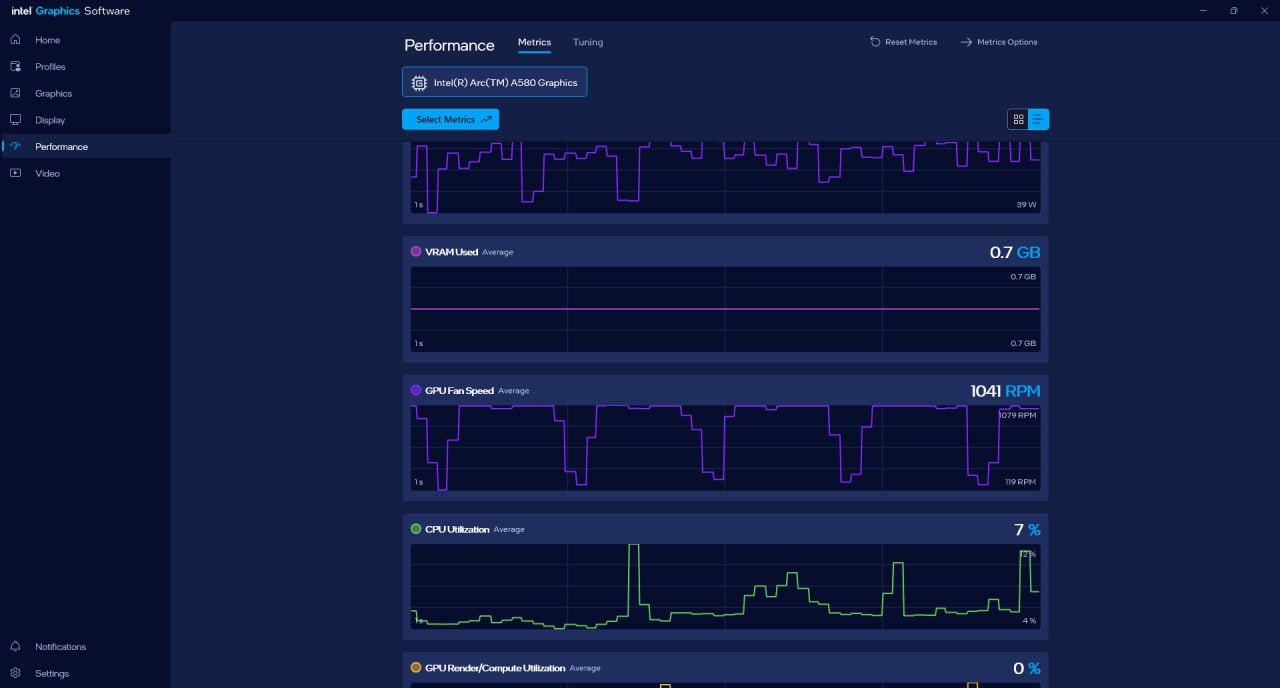
The fan ramps from 0 RPM (0%) to approximately 1050 RPM (30%) almost instantly. This violent, jarring spin-up creates a loud and very audible "whirr" or "surge" noise that is clearly noticeable from inside my computer case. ( Screenshots given below)
This cycle repeats indefinitely, creating a distracting pattern of: Silence... sudden loud WHIRR... 5 seconds of fan noise... sudden stop... Silence... and so on.
Requested Actions:
Release a driver/software update that fundamentally fixes the fan control algorithm. This must eliminate the rapid on/off cycling and smooth ramps
Fine tuning the fan control to reduce rpm fluctuation.
Gpu model : GUNNIR Intel Arc A580 Index 8G
Link Copied

- Mark as New
- Bookmark
- Subscribe
- Mute
- Subscribe to RSS Feed
- Permalink
- Report Inappropriate Content
Hello Dibbo,
Thank you for reaching out to the Intel Community Forum. I understand you are experiencing unstable fan RPM and aggressive start/stop cycling on your GUNNIR Intel Arc A580 Index 8G. To assist you better, please provide the following details:
- Are any third-party fan control tools installed?
- When did the issue start?
- Any recent changes before this issue started?
- Can you please tell us what PSU model you are using?
- Could you please provide us the SSU logs of your system? You can find instructions on How to get the Intel® System Support Utility Logs on Windows*
Please share the requested details so I can provide accurate next steps.
Thank you.
Best regards,
Kenneth B.
Intel Customer Support Technician
- Mark as New
- Bookmark
- Subscribe
- Mute
- Subscribe to RSS Feed
- Permalink
- Report Inappropriate Content
1. No! No third party fan control tool is installed.
2. The issue was from the very beginning. ( This gpu was bought last summer. Back then the ambient temperature was high. the rapid fan start/stop didn't happen because gpu's idle temperature was high. Now in winter this fan start/ stop (default fan settings in intel graphics software) cycle in every 5-10 seconds creates a hum or whine is very audible.
The main cause for this the fan spin time is very fast. Fan rpm accelerates rapidly in fan start/stop cycle. ( A screenshot is given below)
3. No recent changes.
4. My psu is Corsair Rm550x
5. yes, I am providing the SSU logs of my system.
I also providing the fan metric screenshot from intel graphics software.
This issue is not mine only. Here is a post from a different user on the same problems.
Post link- https://community.intel.com/t5/Graphics/SPARKLE-Intel-Arc-unstable-fan-RPM/m-p/1593115#M130489
- Mark as New
- Bookmark
- Subscribe
- Mute
- Subscribe to RSS Feed
- Permalink
- Report Inappropriate Content
Hello Dibbo,
Thank you for your response. Please allow me some time to conduct a more thorough internal investigation to better understand the issue and identify the appropriate steps to take.
I will make sure to provide you with an update as soon as possible once I have more information to share.
Thank you.
Best regards,
Kenneth B.
Intel Customer Support Technician
- Mark as New
- Bookmark
- Subscribe
- Mute
- Subscribe to RSS Feed
- Permalink
- Report Inappropriate Content
Hello Dibbo,
Thank you for your patience. I would like to confirm a few details to help isolate the problem:
- Can you test the unit on another known working system?
- Does the issue also occur when the system is idle or while in BIOS?
Please try the following steps:
Power Management Settings
- Disable Windows GPU scheduling in Graphics Settings
- Set Windows power plan to Balanced instead of Power Saver
- Disable Link State Power Management under PCIe settings in Power Options
BIOS/UEFI Settings
- Update the motherboard BIOS to the latest version
- Check PCIe settings to ensure the slot runs at the proper speed (Gen 3/4)
- Temporarily disable C-states to test if power state transitions are causing issues
Temperature Monitoring
- Use HWiNFO64 to monitor GPU temperatures and fan behavior
- Check for thermal throttling or unstable fan behavior
- Verify proper case airflow
Intel Arc Specific Fixes
- Enable Prefer Maximum Performance in Intel Graphics Command Center
- Disable Intel Dynamic Tuning if available
- Check for Intel Arc firmware updates via Intel Support Assistant
Hardware Checks
- Reseat the graphics card to ensure proper PCIe connection
- Verify PSU capacity and confirm all power connectors are properly seated
Please let me know the results after performing these steps. If the issue persists, I will provide further assistance.
I will wait for your response so I can continue supporting you.
Best regards,
Kenneth B.
Intel Customer Support Technician
- Mark as New
- Bookmark
- Subscribe
- Mute
- Subscribe to RSS Feed
- Permalink
- Report Inappropriate Content
Yes, I did test the card on a another system. Same issue, fan hum while idling or normal usage.
It appears on system .
1. Windows gpu scheduling is disable .
2. Windows power plan was always in balance mode.
3. Disabled link state power management.
4. Motherboard bios version is the latest one.
5. pci settings is on gen 4.
6. Disabled c state.
7. HWINFO log is provided below.
8. Enabled maximum performance.
9. Dynamic tuning not available.
10. Firmware and Driver updated to the lastest one.
11. reseted gpu many times.
12. Also tested the gpu on a Deepcool PL650D 650WATT psu.
There is no hardware problem. It is happening because of immature fan control algorithm.
here is link to a post from different user- https://community.intel.com/t5/Graphics/SPARKLE-Intel-Arc-unstable-fan-RPM/m-p/1593115#M130489
My card is not overheating . I am just pointing out that on default settings in Fan and thermal tuning the fan accelerates to fast
causing humming noises. I just want, developers to tone down this rapid acceleration. As this creates load on the fan bearings and causes the humming sound.
A screenshot metrics provided below.
- Mark as New
- Bookmark
- Subscribe
- Mute
- Subscribe to RSS Feed
- Permalink
- Report Inappropriate Content
Hello Dibbo,
Please allow me to check this once again. I'll get back to you as soon as possible.
Thank you.
Best regards,
Kenneth B.
Intel Customer Support Technician

- Mark as New
- Bookmark
- Subscribe
- Mute
- Subscribe to RSS Feed
- Permalink
- Report Inappropriate Content
Hi Dibbo,
Thank you for sharing your feedback regarding the fan noise you encountered with your Intel® Arc™ A580 graphics card.
The link you provided refers specifically to Sparkle GPUs. At this time, we do not have any reports of fan-related issues with Gunnir cards.
To better understand the humming noise you’re experiencing, could you please provide the following details:
- A video (with audio) clearly capturing the fan noise and RPM behavior of your graphics card.
- The current decibel reading of the fan. You can use a decibel meter app on your phone to measure this. This information will help us assess the severity of the issue.
Additionally, please confirm whether the fan has completely failed or is still operational.
If you have any further questions or need clarification, feel free to let us know. We’re here to assist you.
Best regards,
Patrick V.
Intel Customer Support Technician
- Mark as New
- Bookmark
- Subscribe
- Mute
- Subscribe to RSS Feed
- Permalink
- Report Inappropriate Content
Hi Dibbo,
I wanted to check if you had the chance to review the questions I posted. Please let me know at your earliest convenience so that we can determine the best course of action to resolve this matter.
Best regards,
Patrick V.
Intel Customer Support Technician




- Mark as New
- Bookmark
- Subscribe
- Mute
- Subscribe to RSS Feed
- Permalink
- Report Inappropriate Content
Hi Dibbo,
I'm reaching on behalf of my colleague, Patrick.
Since we haven't heard back from you, I will be closing this thread.
If you need further assistance, please submit a new thread or post a new issue in our community.
Thank you.
Best regards,
Randy T.
Intel Customer Support Technician

- Subscribe to RSS Feed
- Mark Topic as New
- Mark Topic as Read
- Float this Topic for Current User
- Bookmark
- Subscribe
- Printer Friendly Page