
- Mark as New
- Bookmark
- Subscribe
- Mute
- Subscribe to RSS Feed
- Permalink
- Report Inappropriate Content
- intel Arc A730M 6Gb RAM (MXM card)
driver: 32.0.101.7029 - Microsoft Windows 10 IoT Enterprise LTSC
Version 10.0.19044 Build 19044 - 12th Gen Intel(R) Core(TM) i7-12650H
32.0 GB RAM
Problem:
2 glitches, which happen randomly, with no pattern other than when trying to resume the computer from sleep. Upon resuming from windows sleep mode, one of 3 results will happen:
Either the computer will resume/wake back up, as normally expected (roughly half of the time)...
or...
I will encounter visual glitches on monitor when trying to bring the computer back up from sleep mode (see screenshots).
Or...
I will encounter a completely blank/black screen on monitor when trying the bring the computer back up from sleep mode (I can see/hear the computer is running in the background (fans spinning etc), but no image is shown on the monitor)
Troubleshooting: I replaced the HDMI cable with a new one. I also tried another HDMI port
Link Copied


- Mark as New
- Bookmark
- Subscribe
- Mute
- Subscribe to RSS Feed
- Permalink
- Report Inappropriate Content
Hello W0rn,
I hope this message finds you well.
Thank you for reaching out to Intel Community regarding your display glitch issue. We understand how frustrating it can be when visual problems prevent you from using your system effectively.
To provide you with the most accurate solution and expedite the troubleshooting process, we need to gather some specific details about your system and the issue you're experiencing.
Please provide the following information:
Issue Context:
1. Have you made any recent hardware or software changes to your system?
2. When does this glitch occur? (Only when resuming from sleep, or also during startup/restart?)
Driver Information:
3. Did this behavior occur with previous driver versions?
4. Have you updated to the latest drivers? If so, does the issue persist?
5. Are you using OEM-verified drivers?
Troubleshooting History:
6. What troubleshooting steps have you already attempted?
System Configuration: 7. Please provide your System Support Utility (SSU) log using this link: https://www.intel.com/content/www/us/en/support/articles/000057926/memory-and-storage.html
Please note: While generating the SSU report, kindly uncheck the “Networking” option.
How to generate SSU log:
- Download and run the Intel System Support Utility
- Generate a comprehensive system report
- Save and attach the log file to your response
Why we need this information: This data helps us identify patterns, compatibility issues, and system-specific factors that may be causing your display problems, allowing us to provide targeted solutions rather than generic troubleshooting steps.
We're committed to resolving this issue promptly. Once we receive this information, our technical team will investigate and provide you with specific recommendations.
Thank you for your cooperation.
Tharun,
Intel Customer Support Technician.
- Mark as New
- Bookmark
- Subscribe
- Mute
- Subscribe to RSS Feed
- Permalink
- Report Inappropriate Content
@Tharun_Intel I guess this is just a standard copy/paste reply because I already provided some of that information that you asked. I already listed system specs, but if it is really needed I guess I will download that system spec utility
1. Have you made any recent hardware or software changes to your system?
Answer: no.
2. When does this glitch occur? (Only when resuming from sleep, or also during startup/restart?)
Answer: only when resuming from sleep
Driver Information:
3. Did this behavior occur with previous driver versions?
Answer: yes
4. Have you updated to the latest drivers? If so, does the issue persist?
Answer: see my original post, where I listed what drivers I am currently using. Also, yes, the issue persists
5. Are you using OEM-verified drivers?
See my original post where I list what drivers I am currently using
- Mark as New
- Bookmark
- Subscribe
- Mute
- Subscribe to RSS Feed
- Permalink
- Report Inappropriate Content
- Mark as New
- Bookmark
- Subscribe
- Mute
- Subscribe to RSS Feed
- Permalink
- Report Inappropriate Content
Hello w0rn,
I hope this email finds you well.
Thank you for your patience while we looked into your case.
After carefully reviewing your System Support Utility (SSU) log, we found that the following driver versions on your system are currently outdated, which is likely the cause of the issue you have been experiencing:
| Driver Version Found |
|---|
| 32.0.101.7029 |
| 32.0.101.7082 |
Before we proceed further, could you kindly confirm which graphics you are currently prioritizing on your system? This will help us ensure you receive the most accurate and tailored guidance for your setup.
What We Recommend
We strongly recommend performing a clean installation of the latest graphics drivers using DDU (Display Driver Uninstaller). Please follow the steps below carefully:
Step 1 – Prepare Your System Begin by temporarily disconnecting your system from the internet. This is an important first step as it prevents Windows from automatically reinstalling outdated or incompatible drivers in the background during the process.
Step 2 – Clean the Existing Drivers Once disconnected, launch the DDU tool and select "Clean and Restart." DDU will completely remove all existing graphics driver files from your system and automatically restart it, giving you a clean foundation for the new installation.
Step 3 – Install the Latest Drivers After your system restarts, reconnect to the internet and proceed to install the latest available graphics drivers. This should resolve the issue and restore optimal performance on your system.
For a detailed visual walkthrough of this process, please refer to the following resource: Clean Driver Installation Guide – Intel Support
Should you face any difficulties or feel uncomfortable performing these steps on your own, we would be more than happy to assist you through a remote support session and guide you through the entire process personally.
Please do not hesitate to reach out — we are always here to help.
Tharun
Intel Customer Support Technician
- Mark as New
- Bookmark
- Subscribe
- Mute
- Subscribe to RSS Feed
- Permalink
- Report Inappropriate Content
Hi, you assessment is incorrect, unless there is a glitch or bug with the Intel graphics software app.
Because according to the Intel graphics software app, my drivers are up to date, and there are no new drivers available.
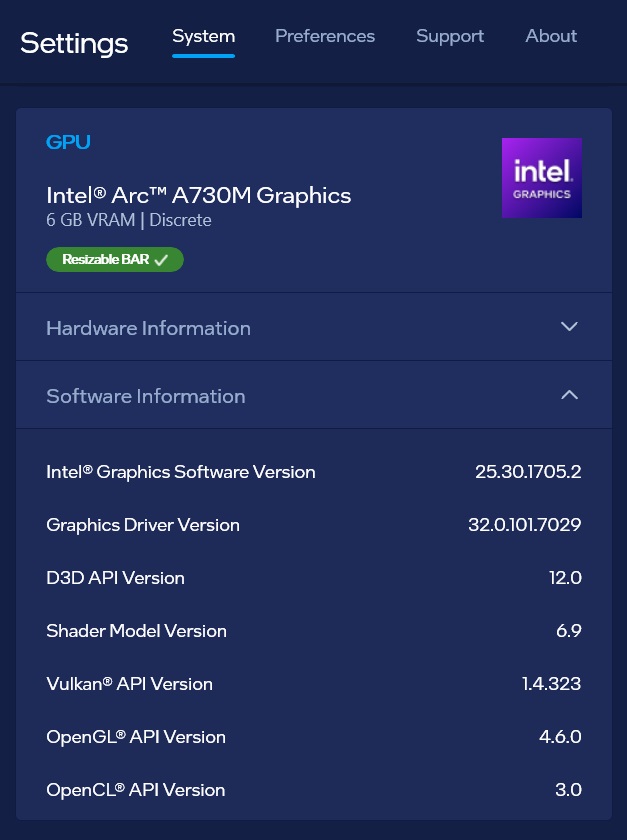
There is a separate driver version for both the Intel UHD and the A730m. The Intel UHD has a driver version of 32.0.101.7082
But as you can see from the screenshots (which I took today), the driver for the A730m is still on driver: 32.0.101.7029, because according to the Intel graphics app, there is no new driver for my A730m hardware.


- Mark as New
- Bookmark
- Subscribe
- Mute
- Subscribe to RSS Feed
- Permalink
- Report Inappropriate Content
Hello w0rn,
Thank you for your continued patience, and I appreciate you working with us on this.
I understand that the Intel Graphics Software on your system currently shows that your drivers are up to date — and I completely understand how that could be confusing. However, I wanted to bring to your attention that Intel has since released newer graphics drivers that may not yet be reflected through the software's automatic check. This is something we want to make sure you have access to, as it could be key to resolving the issue you've been experiencing.
To resolve this issue, I would kindly request that you first proceed with a clean installation using DDU (Display Driver Uninstaller), as recommended in my previous response. A clean installation ensures that any residual or conflicting driver files are completely removed before the new drivers are installed, which often makes a significant difference in resolving graphics-related issues.
For your convenience, I have attached the step-by-step guide for performing the clean installation using DDU: https://www.intel.com/content/www/us/en/support/articles/000091878/graphics.html
After completing the clean installation, please download and install the latest driver versions for your system using the links below: Intel Arc A730M Graphics: https://www.intel.com/content/www/us/en/products/sku/228340/intel-arc-a730m-graphics/downloads.html Intel UHD Graphics (Processor Graphics – 11th–14th Gen): https://www.intel.com/content/www/us/en/download/864990/intel-11th-14th-gen-processor-graphics-wind…
Please feel free to follow the guide at your own pace, and do not hesitate to reach out if you run into any questions along the way. Additionally, if you would prefer to have one of our agents walk you through this process in real time, we would be happy to schedule a remote support session or a callback at a time that works best for you — just let us know.
We truly want to get this resolved for you as smoothly as possible, and we are here every step of the way.
Thank you for your support and patience.
Tharun
Intel Customer Support Technician.
- Mark as New
- Bookmark
- Subscribe
- Mute
- Subscribe to RSS Feed
- Permalink
- Report Inappropriate Content
Hello w0rn,
I hope you're doing well! I wanted to take a moment to follow up with you regarding the support interaction we had recently.
During our last conversation, I shared some recommended steps to help resolve the issue you were experiencing with your Intel® Arc™ A730M Graphics. I just wanted to check in and see how things are going on your end — were you able to give those steps a try?
If everything is working smoothly now, that's wonderful to hear! On the other hand, if you're still running into any difficulties or the issue hasn't been fully resolved, please don't hesitate to reach out. I'm more than happy to assist further.
Your experience matters a great deal to us, and I want to make sure we get this sorted out completely for you.
Looking forward to hearing from you!
Tharun
Intel Customer Support Technician.
- Mark as New
- Bookmark
- Subscribe
- Mute
- Subscribe to RSS Feed
- Permalink
- Report Inappropriate Content
Helllo w0rn,
I hope this email finds you well. Thank you for reaching out to us.
We wanted to let you know that as we have not received a response from you since our last communication, we will be proceeding with the closure of this support thread as of April 15, 2026. This thread will no longer be actively monitored going forward.
We completely understand that circumstances change, and we want to assure you that we are always here to help. Should you have any new questions or require further assistance in the future, please do not hesitate to initiate a new support request, and we will be happy to assist you.
Thank you for giving us the opportunity to support you. We truly appreciate your time and hope to hear from you if you ever need us again.
Tharun
Intel Customer Support Technician.

- Subscribe to RSS Feed
- Mark Topic as New
- Mark Topic as Read
- Float this Topic for Current User
- Bookmark
- Subscribe
- Printer Friendly Page