
- Mark as New
- Bookmark
- Subscribe
- Mute
- Subscribe to RSS Feed
- Permalink
- Report Inappropriate Content
It would be really helpful if you please elaborate the solution. I am facing the same problem.

- Mark as New
- Bookmark
- Subscribe
- Mute
- Subscribe to RSS Feed
- Permalink
- Report Inappropriate Content
Hello Mzaman,
Let's try properly installing libsgx-uae-service:
$ sudo apt-get install libsgx-uae-service
Sincerely,
Jesus G.
Intel Customer Support
Link Copied
- Mark as New
- Bookmark
- Subscribe
- Mute
- Subscribe to RSS Feed
- Permalink
- Report Inappropriate Content
Hello mzaman,
Install the SGX SDK for Linux and the Intel SGX Platform Software (PSW) according to the instructions in the Intel SGX Installation Guide for Linux.
The file libsgx_uae_service.so is in sgxsdk/lib64. Add this path to the environment variable LD_LIBRARY_PATH using one of two methods:
$ source sgxsdk/environment (preferred so that all of your paths are set correctly)
or
$ export LD_LIBRARY_PATH=sgxsdk/lib64:$LD_LIBRARY_PATH
Sincerely,
Jesus G.
Intel Customer Support
- Mark as New
- Bookmark
- Subscribe
- Mute
- Subscribe to RSS Feed
- Permalink
- Report Inappropriate Content
Hi Jesus,
Thanks for replying. I follow all the steps.
- Installed SGX driver (not DCAP), SGX-SDK, SGX-PSW (deb)
- For aesm service I kept the proxy type default. So my aesmd.conf file is looked like:
- #proxy type = direct #direct type means no proxy used
proxy type = default #system default proxy
#proxy type = manual #aesm proxy should be specified for manual proxy type
#aesm proxy = http://proxy_url:proxy_port
#whitelist url = http://sample_while_list_url/
#default quoting type = ecdsa_256
#default quoting type = epid_linkable
#default quoting type = epid_unlinkable - My sgxsdk and sgx-aesm-service installed in /opt/intel. So I set the path as you said [source /opt/intel/sgxsdk/environment]
- Moreover all the sample code in sgxsdk is running properly
- For sgx-ra-sample I am still facing the same problem (This system does not support Intel SGX.) when running ./run-client
If you please me direct me what else I can do it would be helpful.
Thanks,
Mzaman
- Mark as New
- Bookmark
- Subscribe
- Mute
- Subscribe to RSS Feed
- Permalink
- Report Inappropriate Content
Hello Mzaman,
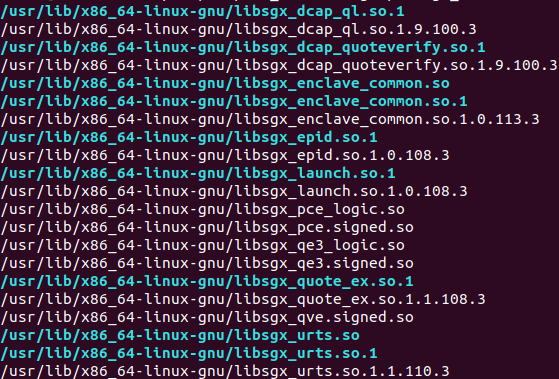
Send a screenshot of the output from:
ls /usr/lib/x86_64-linux-gnu/libsgx_*
It should look similar to the below. I installed all of the PSW components.

- Mark as New
- Bookmark
- Subscribe
- Mute
- Subscribe to RSS Feed
- Permalink
- Report Inappropriate Content
Hi Jesus,
Thanks for reply. Here is the screenshot
Thanks,
Mzaman
- Mark as New
- Bookmark
- Subscribe
- Mute
- Subscribe to RSS Feed
- Permalink
- Report Inappropriate Content
Hi,
I have two updates
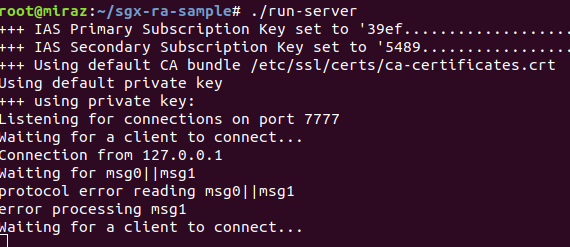
- I think client side is now working. I need to make again on the client side (my bad).
- Now in client side showing 'Please use the correct SGX EPID library from PSW package.' Here is the screen shot of client and server

Thanks,
Mzaman
- Mark as New
- Bookmark
- Subscribe
- Mute
- Subscribe to RSS Feed
- Permalink
- Report Inappropriate Content
Hello Mzaman,
I think I figured it out. We should not have added the path sgxsdk/lib64 to the LD_LIBRARY_PATH. Do not source sgxsdk/environment. Remove it using:
$ export MY_PATH=/opt/intel/sgxsdk/lib64
$ export LD_LIBRARY_PATH="${LD_LIBRARY_PATH/${MY_PATH}:/}"
Copy libsgx_uae_service.so from sgxsdk/lib64 to /usr/lib/x86_64-linux-gnu/
sudo cp ../sgxsdk/lib64/libsgx_uae_service.so /usr/lib/x86_64-linux-gnu/
make clean && make
./run-client
- Mark as New
- Bookmark
- Subscribe
- Mute
- Subscribe to RSS Feed
- Permalink
- Report Inappropriate Content
Hi Jesus,
Thanks for your reply. I remove the path and copy the libsgx_uae_service.so, still it's showing the same message Please use the correct SGX EPID library from PSW package. Can you please direct us what I am doing wrong?
Regards,
Mzaman
- Mark as New
- Bookmark
- Subscribe
- Mute
- Subscribe to RSS Feed
- Permalink
- Report Inappropriate Content
Hello Mzaman,
Let's try properly installing libsgx-uae-service:
$ sudo apt-get install libsgx-uae-service
Sincerely,
Jesus G.
Intel Customer Support
- Mark as New
- Bookmark
- Subscribe
- Mute
- Subscribe to RSS Feed
- Permalink
- Report Inappropriate Content
Hello Jesus,
Thanks for your reply. Now I am getting the following output from the client side:
---- Enclave Trust Status from Service Provider ----------------------------
Enclave Trust is NOT TRUSTED and COMPLICATED. The client is out of date.
----------------------------------------------------------------------------
---- Platform Update Required ----------------------------------------------
The following Platform Update(s) are required to bring this
platform's Trusted Computing Base (TCB) back into compliance:
* The CPU Microcode needs to be updated. Contact your OEM for a platform
BIOS Update.
----------------------------------------------------------------------------
Should I update my BIOS? Thanks again for your help.
Regards,
Mzaman
- Mark as New
- Bookmark
- Subscribe
- Mute
- Subscribe to RSS Feed
- Permalink
- Report Inappropriate Content
Hello Mzaman,
It works!
Yes, you should get the latest BIOS from your OEM. Note that the latest BIOS may not have all of the necessary mitigations so you may still get Security Advisory reports from IAS.
Let's close this thread since your initial problem is resolved. Please open a new thread for follow-up questions.
Sincerely,
Jesus G.
Intel Customer Support
- Mark as New
- Bookmark
- Subscribe
- Mute
- Subscribe to RSS Feed
- Permalink
- Report Inappropriate Content
Hi Jesus,
You are right. I am running the code with the updated bios still showing some IAS advisories. Thanks for helping to solve the problem.
We can close this thread.
Regards,
Mzaman

- Subscribe to RSS Feed
- Mark Topic as New
- Mark Topic as Read
- Float this Topic for Current User
- Bookmark
- Subscribe
- Printer Friendly Page