
- Mark as New
- Bookmark
- Subscribe
- Mute
- Subscribe to RSS Feed
- Permalink
- Report Inappropriate Content
Update from conda with problem...
"
conda update --all
The following packages will be DOWNGRADED:
setuptools: 36.5.0-py36h65f9e6e_0 --> 27.2.0-py36_intel_0 intel [intel]
"
Link Copied

- Mark as New
- Bookmark
- Subscribe
- Mute
- Subscribe to RSS Feed
- Permalink
- Report Inappropriate Content
Hi,
Didn't completely understand the issue you are facing. Are you telling, you were able to proceed and the update idp cond env was successfully?
I'm currently using IDP python 3.6 and have conda updated to 4.4.7 version.
Will you be able to share more details? "conda info" would do
- Mark as New
- Bookmark
- Subscribe
- Mute
- Subscribe to RSS Feed
- Permalink
- Report Inappropriate Content
I can explain: every day I check if it came out update for python modules, including the intel python, but after updating Conda and trying to check if it has update I get this indication that I should go back to previous versions ...
- Mark as New
- Bookmark
- Subscribe
- Mute
- Subscribe to RSS Feed
- Permalink
- Report Inappropriate Content
I assume you have intel channel in your .condarc file, so when packages are updated, intel channel takes precedence over defaults and there could be certain packages not updated in intel channel unlike the defaults.
When you are using Intel Distribution for Python, I would advise to have the latest versions available only in intel channel, although the package versions are older than that ones available in defaults to avoid any conflicts in dependencies . try to update your conda with "conda update --all -c intel"
So for the issue that I see here, this might resolve your problem
step 1. conda update -n base conda
updates root conda package manager based on defaults channel
step 2. conda update --all -c intel
upgrades/downgrades packages in IDP environment based on latest versions available in intel channel
- Mark as New
- Bookmark
- Subscribe
- Mute
- Subscribe to RSS Feed
- Permalink
- Report Inappropriate Content
Thanks for answer me.
I tried with:
"
Solving environment: done
The following packages will be downloaded:
---------------------------|-----------------
ruamel_yaml-0.15.35 | py36hfa6e2cd_1 260 KB
setuptools: 36.5.0-py36h65f9e6e_0 --> 27.2.0-py36_intel_0 intel [intel]
Should I go back to the old version of Conda?

- Mark as New
- Bookmark
- Subscribe
- Mute
- Subscribe to RSS Feed
- Permalink
- Report Inappropriate Content
Andre,
The conda solver has thousands of dependencies to attempt to resolve when executing a command such as "conda update all," and I have often found the results puzzling. Often, the best way I have found to find out *why* conda is *not* installing a package I think it should (such as conda=4.4.7 in your case) is to explicitly request that version:
> conda install conda=4.4.7
Asking for that version specifically will force the solver to give that package version the highest priority. If the problem with that version is an actual dependency conflict, you should get a good hint in the response as to which dependent package is causing the conflict. Sometimes, the reason the other version was chosen was a "preference", not a hard requirement, and in that case the explicit install command will work.
So, please try the statement above to install the specific conda version you want and send us the response if it is unsuccessful.
Best, Todd
- Mark as New
- Bookmark
- Subscribe
- Mute
- Subscribe to RSS Feed
- Permalink
- Report Inappropriate Content
Thanks for help me. But I already installed the latest version of Conda.
The problem is that after update the Conda I try get Updates I get only old versions of packages (even in Intel channel):
conda: 4.4.7-py36_0 --> 4.4.6-py36_0
setuptools: 36.5.0-py36h65f9e6e_0 --> 27.2.0-py36_intel_0 intel [intel]
It is like if the List of packages for Intel Distribution work only with old version of Conda.
- Mark as New
- Bookmark
- Subscribe
- Mute
- Subscribe to RSS Feed
- Permalink
- Report Inappropriate Content
Andre,
It is difficult to troubleshoot without a list of the exact commands you are issuing and the conda environment that is active. Can you attach the output of "conda list"?
If I understand you correctly, when you execute "conda update conda" you get 4.4.7, but when you later issue "conda update --all" it downgrades conda to 4.4.6. Is that correct? If so, try using "conda update conda --all" or, if that does not work, "conda update conda setuptools --all". Those should tell the solver the keep the latest conda (and setuptools) version while updating all others.
I cannot test it without a snapshot of your environment, so if the suggestion does not work, please attach the output of "conda list".
Best, Todd
- Mark as New
- Bookmark
- Subscribe
- Mute
- Subscribe to RSS Feed
- Permalink
- Report Inappropriate Content
Microsoft Windows [versão 10.0.17074.1002]
(c) 2017 Microsoft Corporation. Todos os direitos reservados.

C:\Users\andre>conda update conda --all
Solving environment: done

## Package Plan ##

  environment location: C:\IntelPython3

  added / updated specs:
    - conda


The following packages will be DOWNGRADED:

    conda:      4.4.7-py36_0          --> 4.4.6-py36_0
    setuptools: 36.5.0-py36h65f9e6e_0 --> 27.2.0-py36_intel_0 intel [intel]

Proceed (/n)? n


C:\Users\andre>conda update conda setuptools --all
Solving environment: done

## Package Plan ##

  environment location: C:\IntelPython3

  added / updated specs:
    - conda
    - setuptools


The following packages will be downloaded:

    package                    |            build
    ---------------------------|-----------------
    ruamel_yaml-0.15.35        |   py36hfa6e2cd_1         260 KB

The following packages will be UPDATED:

    ruamel_yaml: 0.11.14-py36h9b16331_2 --> 0.15.35-py36hfa6e2cd_1

The following packages will be DOWNGRADED:

    conda:       4.4.7-py36_0           --> 4.4.6-py36_0
    setuptools:  36.5.0-py36h65f9e6e_0  --> 27.2.0-py36_intel_0    intel [intel]

Proceed (/n)? n


C:\Users\andre>conda list
# packages in environment at C:\IntelPython3:
#
asn1crypto                0.22.0                   py36_0    intel
backports                 1.0                py36_intel_6  [intel]  intel
backports.weakref         1.0rc1                   py36_0
bkcharts                  0.2              py36h7e685f7_0
bleach                    1.5.0              py36_intel_0  [intel]  intel
bokeh                     0.12.13          py36h047fa9f_0
bzip2                     1.0.6             vc14_intel_13  [vc14 intel]  intel
cairo                     1.14.10              ha12b3d8_6
certifi                   2017.7.27.1        py36_intel_0  [intel]  intel
cffi                      1.10.0             py36_intel_0  [intel]  intel
chardet                   3.0.4              py36_intel_0  [intel]  intel
click                     6.7              py36hec8c647_0
cloudpickle               0.5.2            py36h6b1d831_0
colorama                  0.3.9              py36_intel_0  [intel]  intel
conda                     4.4.7                    py36_0
conda-env                 2.6.0                h36134e3_1
cryptography              2.0.3              py36_intel_0  [intel]  intel
cycler                    0.10.0             py36_intel_5  [intel]  intel
cython                    0.27.1             py36_intel_0  [intel]  intel
daal                      2018.0.1.20171012               1    intel
dask                      0.16.1                   py36_0
dask-core                 0.16.1                   py36_0
decorator                 4.1.2              py36_intel_0  [intel]  intel
distarray                 0.6.0              py36_intel_4  [intel]  intel
distributed               1.20.2                   py36_0
django                    1.11.8           py36hd476221_0
django-filter             1.1.0                     <pip>
djangorestframework       3.7.3                     <pip>
entrypoints               0.2.3              py36_intel_0  [intel]  intel
EoN                       0.98.2                    <pip>
freetype                  2.8                vc14_intel_0  [vc14 intel]  intel
get_terminal_size         1.0.0              py36_intel_5  [intel]  intel
hdf5                      1.10.1             vc14_intel_0  [vc14 intel]  intel
heapdict                  1.0.0            py36h21fa5f4_0
html5lib                  0.9999999                py36_0
icc_rt                    2018.0.0                intel_1  [intel]  intel
icu                       58.2                 ha66f8fd_1
idna                      2.6                py36_intel_0  [intel]  intel
impi_rt                   2018.0.1                intel_2  [intel]  intel
intelpython               2018.0.0                      3    intel
ipykernel                 4.6.1              py36_intel_0  [intel]  intel
ipyparallel               6.0.2              py36_intel_0  [intel]  intel
ipython                   6.1.0              py36_intel_0  [intel]  intel
ipython_genutils          0.2.0              py36_intel_0  [intel]  intel
ipywidgets                7.0.0              py36_intel_0  [intel]  intel
jinja2                    2.9.6              py36_intel_0  [intel]  intel
jsonschema                2.6.0              py36_intel_0  [intel]  intel
jupyter_client            5.1.0              py36_intel_0  [intel]  intel
jupyter_console           5.1.0              py36_intel_0  [intel]  intel
jupyter_core              4.3.0              py36_intel_1  [intel]  intel
libpng                    1.6.32             vc14_intel_0  [vc14 intel]  intel
libprotobuf               3.4.1                h3dba5dd_0
llvmlite                  0.20.0             py36_intel_0  [intel]  intel
locket                    0.2.0            py36hfed976d_1
markdown                  2.6.9                    py36_0
markupsafe                1.0                py36_intel_0  [intel]  intel
matplotlib                2.0.2           np113py36_intel_1  [intel]  intel
menuinst                  1.4.10           py36h42196fb_0
mistune                   0.7.4              py36_intel_1  [intel]  intel
mkl                       2018.0.1                intel_4    intel
mkl_fft                   1.0.0           np113py36_intel_15  [intel]  intel
mkl_random                1.0.0           np113py36_intel_6  [intel]  intel
mpi4py                    2.0.0             py36_intel_15  [intel]  intel
mpmath                    0.19               py36_intel_5  [intel]  intel
msgpack-python            0.5.1            py36he980bc4_0
nbconvert                 5.2.1              py36_intel_0  [intel]  intel
nbformat                  4.4.0              py36_intel_0  [intel]  intel
networkx                  2.0                       <pip>
nose                      1.3.7             py36_intel_16  [intel]  intel
notebook                  5.0.0              py36_intel_0  [intel]  intel
numba                     0.35.0             py36_intel_0  [intel]  intel
numexpr                   2.6.2           np113py36_intel_5  [intel]  intel
numpy                     1.13.3             py36_intel_6  [intel]  intel
openmp                    2018.0.0                intel_8    intel
openssl                   1.0.2l             vc14_intel_0  [vc14 intel]  intel
packaging                 16.8             py36ha0986f6_1
pandas                    0.20.3          np113py36_intel_4  [intel]  intel
pandocfilters             1.4.1              py36_intel_0  [intel]  intel
partd                     0.3.8            py36hc8e763b_0
path.py                   10.3.1             py36_intel_0  [intel]  intel
pickleshare               0.7.4              py36_intel_1  [intel]  intel
pip                       9.0.1              py36_intel_0  [intel]  intel
pixman                    0.34.0               hcef7cb0_3
prompt_toolkit            1.0.15             py36_intel_0  [intel]  intel
protobuf                  3.4.1            py36h07fa351_0
psutil                    5.4.3            py36hfa6e2cd_0
pycairo                   1.13.3           py36h21e00d2_1
pycosat                   0.6.3            py36h413d8a4_0
pycparser                 2.18               py36_intel_0  [intel]  intel
pydaal                    2018.0.1.20171012 np113py36_intel_1  [intel]  intel
pygments                  2.2.0              py36_intel_1  [intel]  intel
pyopenssl                 17.2.0             py36_intel_0  [intel]  intel
pyparsing                 2.2.0              py36_intel_0  [intel]  intel
pysocks                   1.6.7              py36_intel_0  [intel]  intel
pytables                  3.4.2           np113py36_intel_2  [intel]  intel
python                    3.6.3                   intel_3  [intel]  intel
python-dateutil           2.6.0              py36_intel_3  [intel]  intel
pytz                      2017.2             py36_intel_3  [intel]  intel
pywin32                   221              py36h9c10281_0
pyyaml                    3.12               py36_intel_3  [intel]  intel
pyzmq                     16.0.2             py36_intel_4  [intel]  intel
requests                  2.18.4             py36_intel_0  [intel]  intel
rpy2                      2.8.6                     <pip>
ruamel_yaml               0.11.14          py36h9b16331_2
scikit-learn              0.19.0          np113py36_intel_6  [intel]  intel
scipy                     1.0.0                     <pip>
scipy                     0.19.1          np113py36_intel_23  [intel]  intel
setuptools                36.5.0           py36h65f9e6e_0
simplegeneric             0.8.1              py36_intel_5  [intel]  intel
six                       1.10.0             py36_intel_8  [intel]  intel
sortedcontainers          1.5.9                    py36_0
sqlite                    3.20.1             vc14_intel_0  [vc14 intel]  intel
sympy                     1.1.1              py36_intel_0  [intel]  intel
tbb                       2018.0.1           py36_intel_4  [intel]  intel
tblib                     1.3.2            py36h30f5020_0
tcl                       8.6.4             vc14_intel_17  [vc14 intel]  intel
tensorflow                1.2.1                    py36_0
testpath                  0.3.1              py36_intel_0  [intel]  intel
tk                        8.6.4             vc14_intel_26  [vc14 intel]  intel
toolz                     0.9.0                    py36_0
tornado                   4.5.2              py36_intel_0  [intel]  intel
traitlets                 4.3.2              py36_intel_1  [intel]  intel
urllib3                   1.22               py36_intel_0  [intel]  intel
vc                        14.0                          2    intel
vs2015_runtime            14.0.25420                    0
wcwidth                   0.1.7              py36_intel_5  [intel]  intel
werkzeug                  0.14.1                   py36_0
wheel                     0.29.0             py36_intel_5  [intel]  intel
widgetsnbextension        3.0.2                    py36_0    intel
win_inet_pton             1.0.1              py36_intel_0  [intel]  intel
win_unicode_console       0.5                py36_intel_0  [intel]  intel
wincertstore              0.2              py36h7fe50ca_0
xz                        5.2.3              vc14_intel_0  [vc14 intel]  intel
yaml                      0.1.7                hc54c509_2
zict                      0.1.3            py36h2d8e73e_0
zlib                      1.2.11             vc14_intel_3  [vc14 intel]  intel

C:\Users\andre>
- Mark as New
- Bookmark
- Subscribe
- Mute
- Subscribe to RSS Feed
- Permalink
- Report Inappropriate Content
Hi andre,
I would clone the environment ("conda create --name myclone --clone myenv"), downgrade the packages that are prompted and once that is complete, upgrade to conda 4.4.7.
hope that works.
-preethi
- Mark as New
- Bookmark
- Subscribe
- Mute
- Subscribe to RSS Feed
- Permalink
- Report Inappropriate Content
Hi Andre,
Is this issue resolved?
-Preethi
- Mark as New
- Bookmark
- Subscribe
- Mute
- Subscribe to RSS Feed
- Permalink
- Report Inappropriate Content
Preethi V. (Intel) wrote:
Hi Andre,
Is this issue resolved?
-Preethi
Of course not!
- Mark as New
- Bookmark
- Subscribe
- Mute
- Subscribe to RSS Feed
- Permalink
- Report Inappropriate Content
Preethi V. (Intel) wrote:
Hi Andre,
Is this issue resolved?
-Preethi
The Last update of Python Distribution the Conda fix all problems of "conda updated --all"
but now the backend : TkAgg of matplotlib crashes Python after to close the Figure window
- Mark as New
- Bookmark
- Subscribe
- Mute
- Subscribe to RSS Feed
- Permalink
- Report Inappropriate Content
Hi andre,
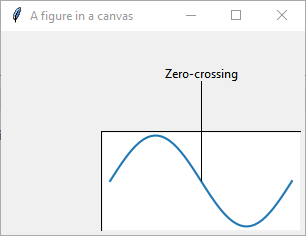
Can you send the reproducer. I ran a sample code in IDP U2 on windows 10 and backed worked fine for me.
# -*- noplot -*-

import matplotlib as mpl
import numpy as np
import sys
if sys.version_info[0] < 3:
    import Tkinter as tk
else:
    import tkinter as tk
import matplotlib.backends.tkagg as tkagg
from matplotlib.backends.backend_agg import FigureCanvasAgg


def draw_figure(canvas, figure, loc=(0, 0)):
    """ Draw a matplotlib figure onto a Tk canvas

    loc: location of top-left corner of figure on canvas in pixels.

    Inspired by matplotlib source: lib/matplotlib/backends/backend_tkagg.py
    """
    figure_canvas_agg = FigureCanvasAgg(figure)
    figure_canvas_agg.draw()
    figure_x, figure_y, figure_w, figure_h = figure.bbox.bounds
    figure_w, figure_h = int(figure_w), int(figure_h)
    photo = tk.PhotoImage(master=canvas, width=figure_w, height=figure_h)

    # Position: convert from top-left anchor to center anchor
    canvas.create_image(loc[0] + figure_w/2, loc[1] + figure_h/2, image=photo)

    # Unfortunately, there's no accessor for the pointer to the native renderer
    tkagg.blit(photo, figure_canvas_agg.get_renderer()._renderer, colormode=2)

    # Return a handle which contains a reference to the photo object
    # which must be kept live or else the picture disappears
    return photo

# Create a canvas
w, h = 300, 200
window = tk.Tk()
window.title("A figure in a canvas")
canvas = tk.Canvas(window, width=w, height=h)
canvas.pack()

# Generate some example data
X = np.linspace(0, 2.0*3.14, 50)
Y = np.sin(X)

# Create the figure we desire to add to an existing canvas
fig = mpl.figure.Figure(figsize=(2, 1))
ax = fig.add_axes([0, 0, 1, 1])
ax.plot(X, Y)

# Keep this handle alive, or else figure will disappear
fig_x, fig_y = 100, 100
fig_photo = draw_figure(canvas, fig, loc=(fig_x, fig_y))
fig_w, fig_h = fig_photo.width(), fig_photo.height()

# Add more elements to the canvas, potentially on top of the figure
canvas.create_line(200, 50, fig_x + fig_w / 2, fig_y + fig_h / 2)
canvas.create_text(200, 50, text="Zero-crossing", anchor="s")

# Let Tk take over
tk.mainloop()
- Mark as New
- Bookmark
- Subscribe
- Mute
- Subscribe to RSS Feed
- Permalink
- Report Inappropriate Content
worked. Look for Attach picture ...
But my script didn't work (pictures)... I get this sample of Matplotlib site:
import numpy as np
import matplotlib.pyplot as plt
import matplotlib.animation as animation

def data_gen(t=0):
    cnt = 0
    while cnt < 1000:
        cnt += 1
        t += 0.1
        yield t, np.sin(2*np.pi*t) * np.exp(-t/10.)


def init():
    ax.set_ylim(-1.1, 1.1)
    ax.set_xlim(0, 10)
    del xdata[:]
    del ydata[:]
    line.set_data(xdata, ydata)
    return line,

fig, ax = plt.subplots()
line, = ax.plot([], [], lw=2)
ax.grid()
xdata, ydata = [], []


def run(data):
    # update the data
    t, y = data
    xdata.append(t)
    ydata.append(y)
    xmin, xmax = ax.get_xlim()

    if t >= xmax:
        ax.set_xlim(xmin, 2*xmax)
        ax.figure.canvas.draw()
    line.set_data(xdata, ydata)

    return line,

ani = animation.FuncAnimation(fig, run, data_gen, blit=False, interval=1,
                              repeat=False, init_func=init)
plt.show(block = False)
Edited: The problem was the Pyzo editor... bad version! In iPython the Script works very well !
%20-%20Copia.png)
%20-%20Copia.png)
%20-%20Copia.png)

- Subscribe to RSS Feed
- Mark Topic as New
- Mark Topic as Read
- Float this Topic for Current User
- Bookmark
- Subscribe
- Printer Friendly Page