
- Mark as New
- Bookmark
- Subscribe
- Mute
- Subscribe to RSS Feed
- Permalink
- Report Inappropriate Content
Hi,
I run setupvars.bat and set the path that I saw in the Community but still get this error.
w_openvino_toolkit_p_2020.3.194.exe, Visual Studio Community 2019, CMake 3.19.2
# ===============================================================
File "01_object_detection_openvino_module.py", line 17, in <module>
from openvino.inference_engine import IECore
File "C:\Program Files (x86)\IntelSWTools\openvino\python\python3.6\openvino\inference_engine\__init__.py", line 1, in <module>
from .ie_api import *
ImportError: DLL load failed: 找不到指定的模組。
# ================================================================
| C:\Program Files (x86)\IntelSWTools\openvino\python\python3.6\openvino\inference_engine |
| C:\Program Files (x86)\IntelSWTools\openvino\python\python3.6\openvino |
| C:\Program Files (x86)\IntelSWTools\openvino\deployment_tools\inference_engine\bin |
| C:\Program Files (x86)\IntelSWTools\openvino\opencv\bin |
| C:\Program Files (x86)\IntelSWTools\openvino\deployment_tools\inference_engine\bin\intel64\Release |
| C:\Program Files (x86)\IntelSWTools\openvino\deployment_tools\inference_engine\bin\intel64\Debug |
| C:\Program Files (x86)\IntelSWTools\openvino\deployment_tools\inference_engine\external\hddl\bin |
| C:\Program Files (x86)\IntelSWTools\openvino\opencv\bin |
Best regards
Brian
- Mark as New
- Bookmark
- Subscribe
- Mute
- Subscribe to RSS Feed
- Permalink
- Report Inappropriate Content
Aznie,
Thanks! I solved the issue cause the powershell could not get right path(I don't know why.)
I use pure command line to enable VSCode then it could work based on the setting from community.
Best regards
Brian
Link Copied

- Mark as New
- Bookmark
- Subscribe
- Mute
- Subscribe to RSS Feed
- Permalink
- Report Inappropriate Content
Hi Brian,
Let me confirm my understanding first. Did this issue arise during the initialization of the OpenVINO environment or you are running any OpenVINO sample? If you are running the OpenVINO sample, make sure to run the sample on a terminal that you have set up the environment variables by running the setupvars.bat script under _C:\Program Files (x86)\IntelSWTools\openvino\bin_ directory.
Please note there is a newer release available (2021.2 release note)
Regards,
Aznie
- Mark as New
- Bookmark
- Subscribe
- Mute
- Subscribe to RSS Feed
- Permalink
- Report Inappropriate Content
Hi,
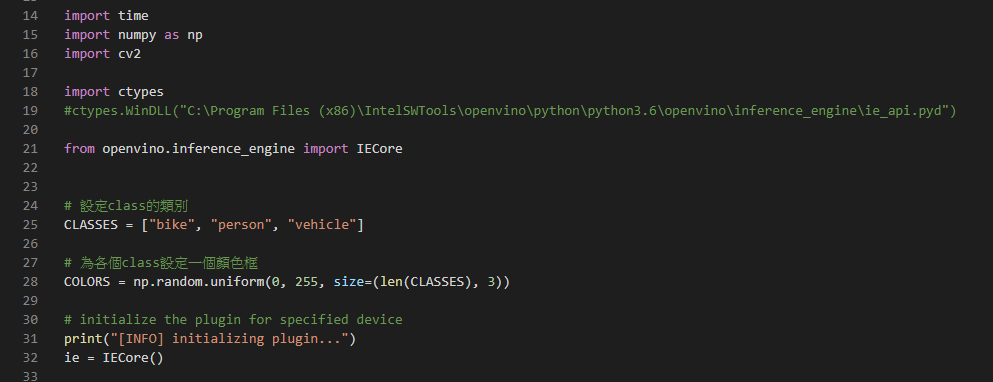
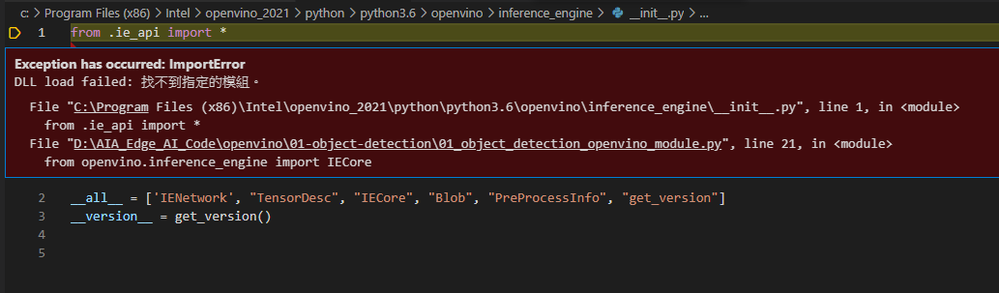
I am trying to use my python about deploy the model. and I re-install OS and use newest openvino 2021, But still get same situation.
Best regards
Brian
- Mark as New
- Bookmark
- Subscribe
- Mute
- Subscribe to RSS Feed
- Permalink
- Report Inappropriate Content
Hi,
Let me confirm my understanding first. Did this issue arise during the initialization of the OpenVINO environment or you are running any OpenVINO sample? << Run the .py as above picture.
If you are running the OpenVINO sample, make sure to run the sample on a terminal that you have set up the environment variables by running the setupvars.bat script under _C:\Program Files (x86)\IntelSWTools\openvino\bin_ directory. << Yes, I had ran the setupvars.bat, still get the issue
Thanks
Brian
- Mark as New
- Bookmark
- Subscribe
- Mute
- Subscribe to RSS Feed
- Permalink
- Report Inappropriate Content
Hi Brian,
Are you running your own sample code or using any OpenVINO toolkit sample? If you run your own sample code, could you please share the related file of your application for us to test the code at our end? You can share your Github link or in a zip file.
Hence, have you tried to run the verification script to verify your OpenVINO Toolkit installation? If not, please try to run the demo_squeezenet_download_convert-run.bat file to verify the installation by following the instruction from the documentation.
Regards,
Aznie
- Mark as New
- Bookmark
- Subscribe
- Mute
- Subscribe to RSS Feed
- Permalink
- Report Inappropriate Content
Aznie,
Thanks! Below what I verify result for your reference.
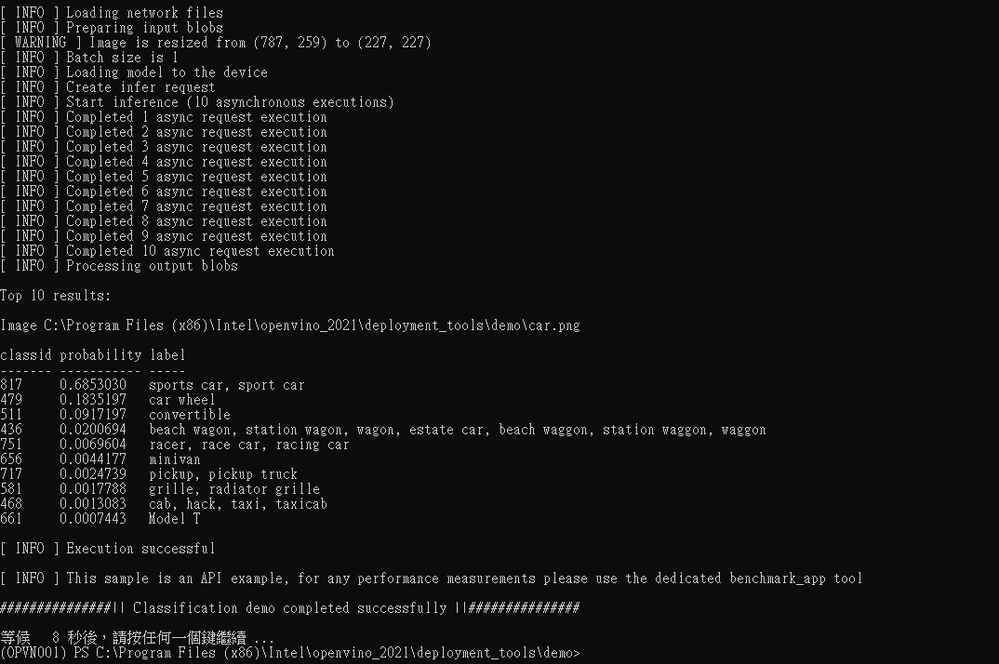
Even I just use new .py or in python command line for below instruction (just 2 lines)
>>> import openvino
>>> from openvino.inference_engine import IECore
Traceback (most recent call last):
File "<stdin>", line 1, in <module>
File "C:\Program Files (x86)\Intel\openvino_2021\python\python3.6\openvino\inference_engine\__init__.py", line 1, in <module>
from .ie_api import *
ImportError: DLL load failed: 找不到指定的模組。
Best regards
Brian
- Mark as New
- Bookmark
- Subscribe
- Mute
- Subscribe to RSS Feed
- Permalink
- Report Inappropriate Content
Aznie,
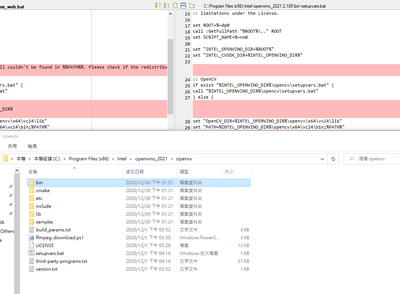
I saw the setupvars.bat the settign has ["OpenCV_DIR=%INTEL_OPENVINO_DIR%\opencv\x64\vc14\lib"]
But in my installation folder has no this folder, not sure if this is relative to my issue.
Best regards
Brian
- Mark as New
- Bookmark
- Subscribe
- Mute
- Subscribe to RSS Feed
- Permalink
- Report Inappropriate Content
Aznie,
Thanks! I solved the issue cause the powershell could not get right path(I don't know why.)
I use pure command line to enable VSCode then it could work based on the setting from community.
Best regards
Brian
- Mark as New
- Bookmark
- Subscribe
- Mute
- Subscribe to RSS Feed
- Permalink
- Report Inappropriate Content
Hi Brian,
I glad that you are able to solve the issue and thank you for sharing the solution. This thread will no longer be monitored since this issue has been resolved. If you need any additional information from Intel, please submit a new question.
Regards,
Aznie
Intel Customer Support

- Subscribe to RSS Feed
- Mark Topic as New
- Mark Topic as Read
- Float this Topic for Current User
- Bookmark
- Subscribe
- Printer Friendly Page