
링크가 복사됨
- 신규로 표시
- 북마크
- 구독
- 소거
- RSS 피드 구독
- 강조
- 인쇄
- 부적절한 컨텐트 신고
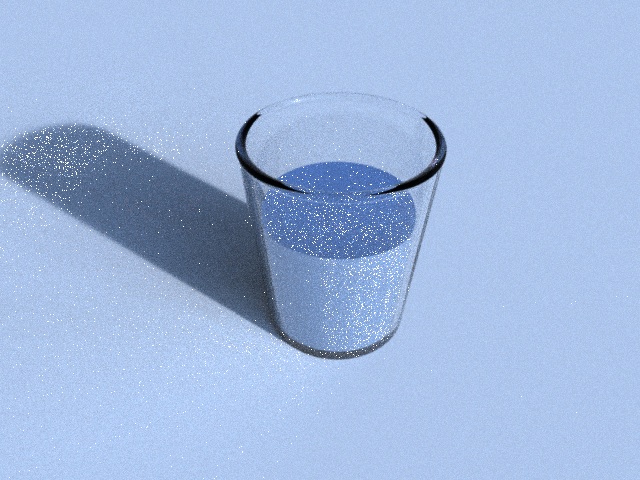
The Embree renderer is only an example to demonstrate the ray tracing kernels. As such it lacks many features one would expect from a production quality renderer. To render the caustics in your image you need a photon mapping algorithm, which is not supported by the Embree renderer. However, as a workaround you can reduce the noise by increasing the size of your light source.
- 신규로 표시
- 북마크
- 구독
- 소거
- RSS 피드 구독
- 강조
- 인쇄
- 부적절한 컨텐트 신고
Sven,
Thank you for the quick reply. I understand the included renderer is just an example, but I wouldn't have expected this much noise. It appears in every render that uses a material other than matte. I don't see these artifacts in other renders posted online (like the crown here: http://embree.github.io/images/crown.jpg)
I was planning to use the ray tracing kernel in a photon mapper, so that is good news. Thanks again for the help.
-Andrew
- 신규로 표시
- 북마크
- 구독
- 소거
- RSS 피드 구독
- 강조
- 인쇄
- 부적절한 컨텐트 신고
Update: I switched my HDRI light source to the same one used in the crown scene, and it works much better. So it seems your suggestion of enlarging the light source (in this case, larger areas of the image acting as a light source) worked.


- 신규로 표시
- 북마크
- 구독
- 소거
- RSS 피드 구독
- 강조
- 인쇄
- 부적절한 컨텐트 신고
You didn't expect noise probably because all renderers, even those claiming to be unbiased, clamp the noise away by introducing bias. But since the embree sample renderer is (looks) truly unbiased path tracer, there will by ALWAYS some noise if you have specular objects and small light sources.
