
- Mark as New
- Bookmark
- Subscribe
- Mute
- Subscribe to RSS Feed
- Permalink
- Report Inappropriate Content
This is a bump-up from a thread here:
http://software.intel.com/en-us/forums/showthread.php?t=71215&o=d&s=lr
Anthony R. kindly provided a jpeg exemplar here:
http://software.intel.com/en-us/forums/showthread.php?t=71059&o=d&s=lr
as well as some notes on his procedue.
As I say, I finally get his point. You use TWO different calling subroutines (e.g., BackColorSub1 & BackColorSub2) and - respectively - TWO different MyDlgProcs. I applied that concept to my system and still have the trouble I reported before (I either get the Main Dialog to colorize (and the tabs are UNcolored and their controls disappeared) , or I get the tabs to colorize but the Main Dlg (in the background) is UNcolorized.
If you see this post, Anthony, would you be please be so kind as to post your source code for that demo (jpeg) so I can trace your procedure?
Link Copied
- Mark as New
- Bookmark
- Subscribe
- Mute
- Subscribe to RSS Feed
- Permalink
- Report Inappropriate Content
- Mark as New
- Bookmark
- Subscribe
- Mute
- Subscribe to RSS Feed
- Permalink
- Report Inappropriate Content
After tracing your code, I discovered a very subtle omission I made in my code; its working fine now. I couldnt have resolved this any other way - gracias Anthony!
A few comments/differences (your TabDialog.f90 code vs. your earlier example and vs. my system) - mostly academic:
I) At L540, in function Edit3Proc(), this line:
Edit3proc=CallWindowProc(hproctab2,hDlg, message, wParam, lParam)
should be:
Edit3proc=CallWindowProc(hproctab3,hDlg, message, wParam, lParam)
{This is probably a typo.}
II) DFWINTY was not used in your earlier example, and doesnt appear to be necessary.
III) Your calling lines in TabDialogSub(), Tab1DialogSub(), Tab2DialogSub()_, Tab3DialogSub() have this form:
hProc* = SetWindowLong(dlg%hWnd,GWL_WndProc , LOC(*Proc))
In your earlier example, this line looked like this:
hDlg* = SetWindowLong(dlg%hWnd, DWL_DlgProc, LOC(*Proc))
GWL_WndProc vs. DWL_DlgProc
From MSDN (http://msdn.microsoft.com/en-us/library/ms633591%28VS.85%29.aspx),
GWL_WndProc Sets a new address for the window procedure.
DWL_DlgProc Sets the new address of the dialog box procedure.
I substituted DWL_DlgProc in your code and it seemed to work fine.
IV) I noticed something interesting from a style point. Your call to MainDlgProc (to add background color to the main dialog) came not from a usual calling routine (like BackColorSub or Tab*DialogSub) but from within the callback routine for the Main Dialog:
i.e., lret = DlgSetSub(gDlg, IDD_TabDialog_Dialog, TabDialogSub)
In this way, you avoided having to create an extra code module, and I suppose you could get away w/ it since there were no controls to color or other special edits. I used a parallel approach in my system.
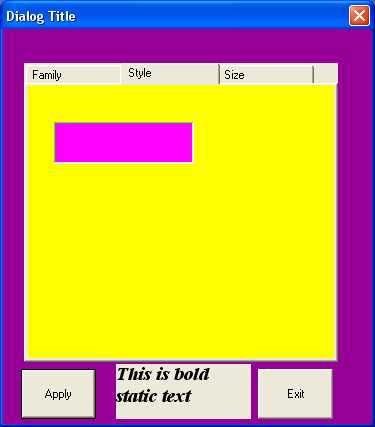
What would be really hot is if you would please take this exact code, place a static control on the Main Dialog and on one of the tabs, and impose a FONT change to the label (e.g., Times Roman 22pt.; BOLD).
That would be extremely helpful!
- Mark as New
- Bookmark
- Subscribe
- Mute
- Subscribe to RSS Feed
- Permalink
- Report Inappropriate Content
Thanks for your comments. I have found that the following will permit you to change
the text font on a static control:
1) add a static text box to the main dialog, giving it ID = IDC_MAINDLG_STATIC (for example).
Make it big enough to take 22pt text 'This is bold static text'
2) add this code to tabdialogglobals (add use DFWINTY if necessary to define type T_LOGFONT)
!
! font stuff
!
type (T_LOGFONT) lf
integer*4 hfont, hfontold
integer*4 alignText
integer*4 sizeFont
integer*4 directionText
integer*4 fontFamily
integer*4 fontWeight
logical*4 fontItalic
3) Add this initialization code to TabDialogSub in the dlg_init section
!
! Create a font for the static text. Store handle in global hfont
! font variables are stored in tabdialogglobals module
! destroy the font using DeleteObject when the dialog is destroyed
!
! create 22 point Times Roman italic font
!
sizeFont = 22
directionText = 0
fontWeight = 700
fontItalic = .true.
fontFamily = FF_ROMAN
lf%lfHeight = sizeFont
lf%lfWidth = 0
lf%lfEscapement = directionText
lf%lfOrientation = directionText
lf%lfWeight = fontWeight
lf%lfItalic = fontItalic
lf%lfUnderline = 0
lf%lfStrikeout = 0
lf%lfCharSet = 1
lf%lfOutPrecision = 0
lf%lfClipPrecision = 0
lf%lfQuality = 0
lf%lfPitchAndFamily = fontFamily
lf%lfFaceName = "Times New Roman"C
hfont = CreateFontIndirect(lf)
and this code to the dlg_destroy section
hfontold = DeleteObject(hfont)
4) Add this code to MainDlgSub
case(WM_CTLCOLORSTATIC)
! set the font for the static text inthe main dialog
!
if(GetDlgItem(hDlg,IDC_MAINDLG_STATIC).EQ.hwndcontrol) then
hfontOld = SelectObject(hDCcontrol, hfont)
endif
MainDlgProc=CallWindowProc(hprocdlg,hDlg, message, wParam, lParam)
5)Then every time the static control IDC_MAINDLG_STATIC is redrawn, the new fontwill beused for the text (see JPG attached)
- Mark as New
- Bookmark
- Subscribe
- Mute
- Subscribe to RSS Feed
- Permalink
- Report Inappropriate Content
Tony,
I appreciate the help. I applied your code sections to your earlier triple-tab exemplar (BackColor) and was able to duplicate the result you showed in the jpeg. I even set the Font Code aside and called it as a subroutine (successful, btw, either from TabDialogSub OR from MainDlgSub).
On my side, though, the MainDlg I'm trying to adjust static text on is Modal (yours is Modeless). I think that's presenting a problem using your logic. (My font is not adjusting.) Any thoughts?
Also, is there a way to change the color, as well?
TC
p.s.
I sent a note to your private messaging box.
- Mark as New
- Bookmark
- Subscribe
- Mute
- Subscribe to RSS Feed
- Permalink
- Report Inappropriate Content
I changed my code from modeless to modal and still got the static text font to set ok.
What color are you referring to? The text, the Text box?
P.S. you can set the text font for the tabs by sending the tab control the WM_SETFONT message during
dialog initialization e.g.
lret=SendDlgItemMessage(hDlg,IDC_TAB,WM_SETFONT, hfont, MAKELPARAM(1, 0) )
- Mark as New
- Bookmark
- Subscribe
- Mute
- Subscribe to RSS Feed
- Permalink
- Report Inappropriate Content
OK Tony, I finally got it to work. Af few coments:
1) In MainDlgProc, in the case(WM_CTLColorStatic) block, this code:
[bash]! Set the font for the static text in the main dialog:
!
if(GetDlgItem(hDlg,IDC_MainDlg_Static).EQ.hWndControl) then
hFontOld = SelectObject(hdcControl, hFont)
endif[/bash]
MUST be placed before this piece:
[bash]! Make background to all other static text the same as the dialog background:
hBackBrush = CreateSolidBrush(RGB(187, 255, 255)) !PaleTurquoise1 background brush (Static Box BKG color)
ret = SetBkMode(hdcControl,Transparent)           !Ditto for Text BKG color

MyDlgProc  = hBackBrush    ! Return the window background brush handle immediately
return[/bash]
which precedes:
[bash]! Pass all other messages on to the default window procedure:
case default

MyDlgProc = CallWindowProc(hDlgProc, hDlg, message, wParam, lParam) [/bash]
at the end of the subroutine. If the first 2 pieces are reversed, nothing happens.
2) It appears that your:
MainDlgProc = CallWindowProc(hProcDlg,hDlg, message, wParam, lParam)
{which should have been
MainDlgProc = CallWindowProc(hDlgProc,hDlg, message, wParam, lParam) }
is already met in the CASE DEFAULT section at the end, and so is obviated.
3) I really think packaging the 20-line Font Code into subroutines is the cleanest way and in so doing, I noticed an interesting behavior. Instead of making the call from (what I call) the "calling subroutine" (e.g., your TabDialogSub) - as you suggested, it can be made just before the font-set code in the subclassing subroutine (e.g., your MainDlgSub) in the WM_CTLColorStatic block. In this way, one may create these 2 subroutines:
SetFontBold30 (30-pt. Bold)
SetFontBold30Ital (30-pt. Bold Italic)
Then, the WM_CTLColorStatic block may look like this:
[bash]case (WM_CTLColorStatic)
! Set the font for the static text in the About Window:

call SetFontBold30
if(hWndControl.eq.GetDlgItem(hDlg,IDC_STATIC_About_TextString1)) then
  hFontOld = SelectObject(hdcControl, hFont)
endif

if(hWndControl.eq.GetDlgItem(hDlg,IDC_STATIC_About_TextString2)) then
  hFontOld = SelectObject(hdcControl, hFont)
endif

call SetFontBold30Ital
if(hWndControl.eq.GetDlgItem(hDlg,IDC_STATIC_About_TextString3)) then
  hTextColor = MSFWIN$SetTextColor(hdcControl,RGB(255,0,0) ) ! Make the text RED
  hFontOld = SelectObject(hdcControl, hFont)
endif[/bash]
TextString1 &2 get 30-pt Bold, and TextSting3 gets 30-pt Bold red! Very manageable.
4) Your final piece was to add this code to the Dlg_Destroy section:
hFontOld = DeleteObject(hFont)
This section is presumably at the end of (what I call) the calling subroutine (e.g., your TabDialogSub), such that this piece of code:
[bash]if (callbacktype == Dlg_Destroy) then
! Delete the background brush if created
  if(hBackBrush.ne.0) then
    ret = DeleteObject(hBackBrush)
  endif
  call PostQuitMessage(0)
endif[/bash]
would be revised to look something like this (6th line):
[bash]if (callbacktype == Dlg_Destroy) then
! Delete the background brush if created
  if(hBackBrush.ne.0) then
    ret = DeleteObject(hBackBrush)
  endif
  hFontOld = DeleteObject(hFont)
  call PostQuitMessage(0)
endif[/bash]
Unfortunately, at least in my world, my about window will not even display if this section is intact. In order for things to work, I have to us this:
[bash]!!  if (callbacktype == Dlg_Destroy) then
! Delete the background brush if created
	if(hBackBrush.ne.0) then
      ret = DeleteObject(hBackBrush)
	endif
!!    call PostQuitMessage(0)
!!  endif[/bash]
This might be "cheating" or sometihing but this is what I've found. Regardless of what you think of this, the
hFontOld = DeleteObject(hFont)
appears to be UNnecessary (at least in my build).
Glad I finally got things worked out. Thoughts are welcome.
P.S.I did leave a note for you (ARichards) in the Private Messaging box (hint).
- Mark as New
- Bookmark
- Subscribe
- Mute
- Subscribe to RSS Feed
- Permalink
- Report Inappropriate Content

- Mark as New
- Bookmark
- Subscribe
- Mute
- Subscribe to RSS Feed
- Permalink
- Report Inappropriate Content
From MSDN (http://msdn.microsoft.com/en-us/library/ms633591%28VS.85%29.aspx),
GWL_WndProc Sets a new address for the window procedure.
DWL_DlgProc Sets the new address of the dialog box procedure.
I substituted DWL_DlgProc in your code and it seemed to work fine.
I didn't follow the details of this thread too carefully, but I thought I could offer an explanation here: for a dialog window, GWL_WNDPROC (window procedure) and DWL_WNDPROC (dialog procedure) are not the same thing.
All dialogs (window class "#32770", "Dialog") share the same window procedure (GWL_WNDPROC); it is called DefDlgProc, and it is a window procedure like any else; it is generic and does not do much by itself (for example, I think it handles WM_CTLCOLOR* messages, Esc and Enter keys, and stuff like that). So, you can check that:
GetWindowLong (hDlg, GWL_WNDPROC) == LOC(DefDlgProc).
However, DefDlgProc takes the address of DWL_DLGPROC (the dialog procedure that the programmer provided in the call to DialogBox; for IFLOGM, it lies somewhere in IFLOGM.f90), and calls it. This function is generically called DialogProc; if DialogProc returns TRUE, DefDlgProc does not do any further processing. (Note that DialogProc should not call DefWindowProc or CallWindowProc, because it might end up in endless recursion).
Thus, when you subclass a dialog, you should replace the DefDlgProc (i.e. returned by GWL_WNDPROC), to handle the messages your way; instead of calling CallWindowProc(lpOldProc...), you can call DefDlgProc(...) -- because they refer to the same procedure. However, it is seldom needed, because you can do 99% things in your DialogProc. Here, you have another legitimate reason -- you don't have access to the DialogProc (which is written in IFLOGM.f90); I used a similar technique in the MenuDialog sample.
- Subscribe to RSS Feed
- Mark Topic as New
- Mark Topic as Read
- Float this Topic for Current User
- Bookmark
- Subscribe
- Printer Friendly Page