
- Mark as New
- Bookmark
- Subscribe
- Mute
- Subscribe to RSS Feed
- Permalink
- Report Inappropriate Content
Windows 11; VS 2022 17.4.3; IFORT 2023.0.0
Installation proceeded smoothly, and compiler seems to work properly, but when I start execution of my C++ MFC project + Fortran library, I get hundreds of messages in the output window like
INTEL_GT_DEBUGGER: (36479) Exception thrown in method IsRemoteDebugging: Not implemented (Exception from HRESULT: 0x80004001 (E_NOTIMPL))What is the meaning of these, and how can I fix the cause so I don't get them. They appear all throughout the pgms's execution.
Link Copied
- Mark as New
- Bookmark
- Subscribe
- Mute
- Subscribe to RSS Feed
- Permalink
- Report Inappropriate Content
Can anyone help me with this? It causes long delays in debugging.

- Mark as New
- Bookmark
- Subscribe
- Mute
- Subscribe to RSS Feed
- Permalink
- Report Inappropriate Content
Can't say much without seeing the project.
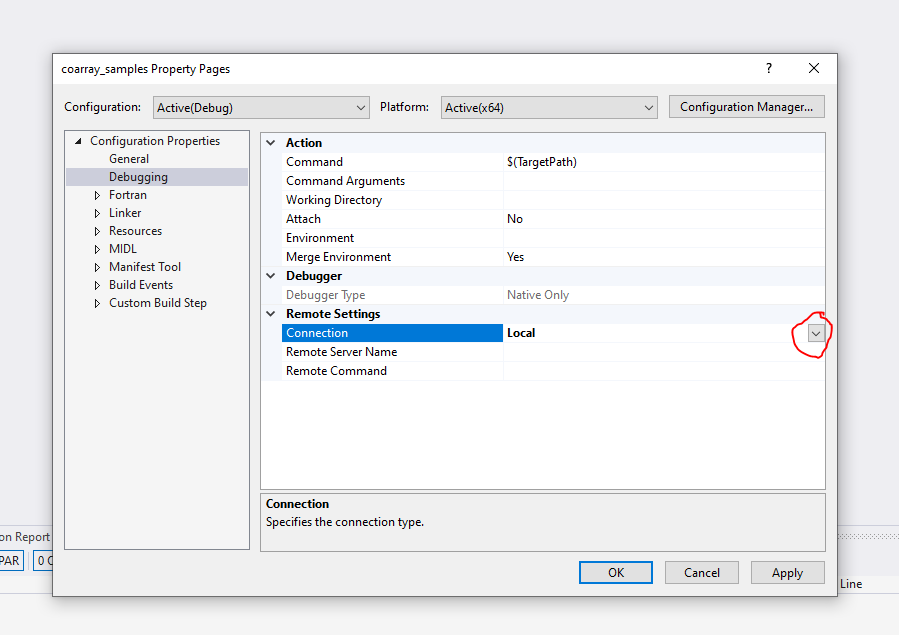
Maybe check these settings in VS.
- Mark as New
- Bookmark
- Subscribe
- Mute
- Subscribe to RSS Feed
- Permalink
- Report Inappropriate Content
@Devorah_H_Intel: Here are my settings. This is VS 2022 17.4.4, so my properties window is slightly different from yours. As you can see, it's set to local (I've never used the remote debugger for this project).
I can't find any info on
INTEL_GT_DEBUGGER: (36479) Exception thrown in method IsRemoteDebugging either INTEL_GT_DEBUGGER or IsRemoteDebugging. The 36479 looks like an identifier in the Fortran runtime, and it is different for each message.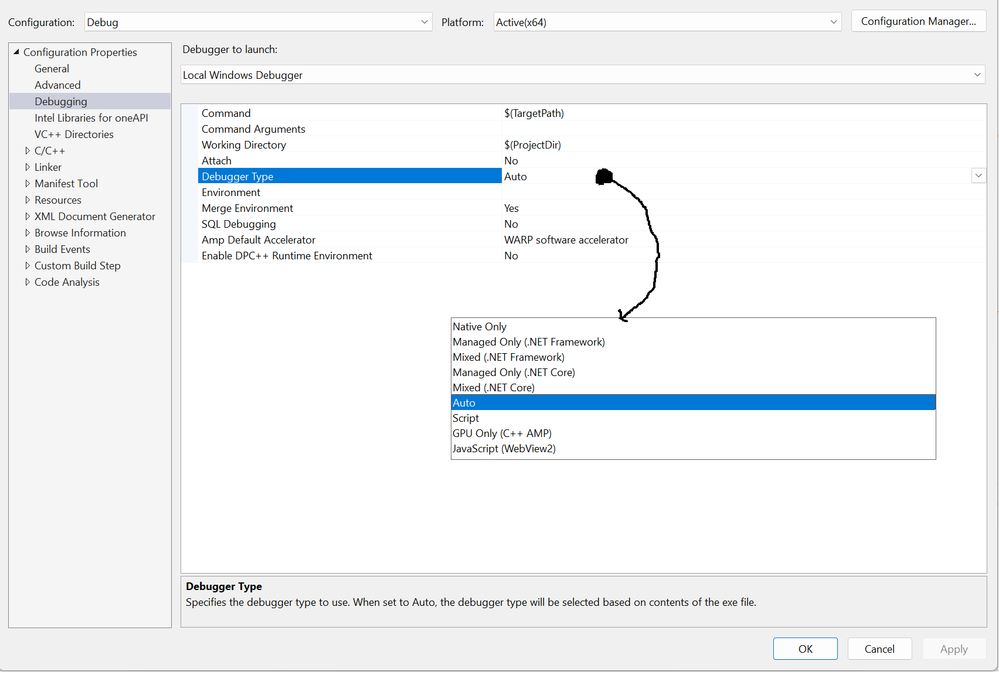

- Mark as New
- Bookmark
- Subscribe
- Mute
- Subscribe to RSS Feed
- Permalink
- Report Inappropriate Content
You could try changing that value to Native Only, but my advice would be to "Modify" the Intel oneAPI Base Toolkit and remove Intel Distribution for GDB.
The message you are seeing is not related to Fortran.
- Mark as New
- Bookmark
- Subscribe
- Mute
- Subscribe to RSS Feed
- Permalink
- Report Inappropriate Content
Steve -
Changing the value to Native Only doesn't get rid of the messages. Leaving the Debugger Type set to Native Only, I then used "Modify" to remove the Intel Distribution for GDB, which also removed the DPC C++ compiler, but after restarting VS, I still get the same stream of messages when I start debugging my executable.
Any other suggestions?
- Mark as New
- Bookmark
- Subscribe
- Mute
- Subscribe to RSS Feed
- Permalink
- Report Inappropriate Content
Sorry, no. I'm puzzled that you still get this error after my suggestions, but perhaps the problem is elsewhere. FYI, "GT" here refers to the Intel processor's integrated GPU.
- Mark as New
- Bookmark
- Subscribe
- Mute
- Subscribe to RSS Feed
- Permalink
- Report Inappropriate Content
Processor is Intel i9-12900K. Its integrated GPU is UHD Graphics 770.
I changed Tools/Options/Debugging/General/"Ignore GPU memory access exceptions if the data written didn't change the value", but this didn't fix the problem. This was the only VS option I could find that referenced the GPU.
- Mark as New
- Bookmark
- Subscribe
- Mute
- Subscribe to RSS Feed
- Permalink
- Report Inappropriate Content
C:\Program Files\Microsoft Visual Studio\2022\Community\Common7\IDE\Extensions\u1lk5yn5.4ab\Intel.IntelGfxDebug.dll contains the string "INTEL_GT_DEBUGGER:"

- Mark as New
- Bookmark
- Subscribe
- Mute
- Subscribe to RSS Feed
- Permalink
- Report Inappropriate Content
I had the same issue, but I think it was caused by old versions of intel libraries. I had some subprojects with nuget references to old versions and when I upgraded them the problems disappeared.
- Mark as New
- Bookmark
- Subscribe
- Mute
- Subscribe to RSS Feed
- Permalink
- Report Inappropriate Content
I don't think this could be my problem, since I installed oneAPI and VS on a new machine. Nonetheless, how can I check for outdated libraries?
- Mark as New
- Bookmark
- Subscribe
- Mute
- Subscribe to RSS Feed
- Permalink
- Report Inappropriate Content
In my case the outdated nuget packages put its own dll files (like openmp and mkl) in the application folder.
- Mark as New
- Bookmark
- Subscribe
- Mute
- Subscribe to RSS Feed
- Permalink
- Report Inappropriate Content
I don't find any DLLs in the application, and the only OpenMP files I have are the current versions, 14.34.31933, from VS. The mkl libraries are coming from `C:\Program Files (x86)\Intel\oneAPI\mkl\latest\lib\intel64`.
- Mark as New
- Bookmark
- Subscribe
- Mute
- Subscribe to RSS Feed
- Permalink
- Report Inappropriate Content
I think you still have Intel Distribution for gdb installed. Please check again - this is part of the oneAPI Base toolkit.
Alternatively, uninstall all the oneAPI toolkits, then install just the Fortran compiler - see Solved: The Easy and Fast Way to Install JUST Fortran with Intel® oneAPI - Intel Communities
- Mark as New
- Bookmark
- Subscribe
- Mute
- Subscribe to RSS Feed
- Permalink
- Report Inappropriate Content
Here is what the oneAPI installer shows. I previously did a Modify and unchecked Intel Distribution for GDB.
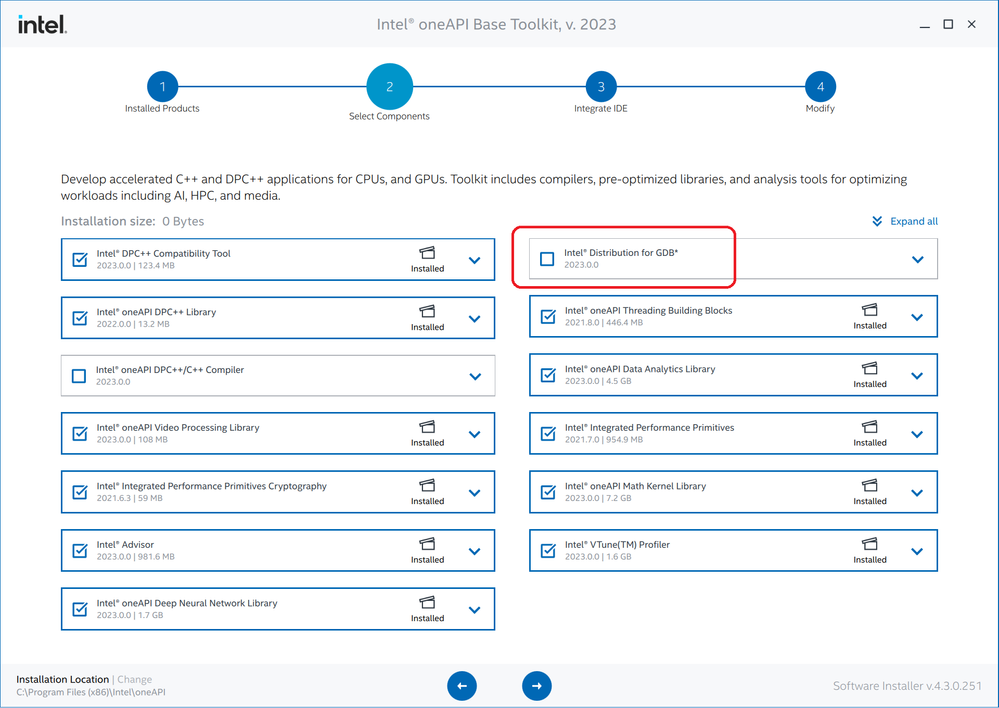
I've also attached the logs from the base kit Modify, and the original HPC kit install.
- Mark as New
- Bookmark
- Subscribe
- Mute
- Subscribe to RSS Feed
- Permalink
- Report Inappropriate Content
Do you use any of those still-checked things? If not, uninstall the Base toolkit entirely.
- Mark as New
- Bookmark
- Subscribe
- Mute
- Subscribe to RSS Feed
- Permalink
- Report Inappropriate Content
I use mkl, and would like to be able to use VTune, TBB, and IPP.
- Mark as New
- Bookmark
- Subscribe
- Mute
- Subscribe to RSS Feed
- Permalink
- Report Inappropriate Content
Remove the components you don't use. One of them is the cause, I'm fairly certain.
- Mark as New
- Bookmark
- Subscribe
- Mute
- Subscribe to RSS Feed
- Permalink
- Report Inappropriate Content
I have all components installed and did somehow manage to get rid of the problems. Perhaps it was the other way around though. Maybe the new nuget packages provide some dll file that wasn't found before?
- Mark as New
- Bookmark
- Subscribe
- Mute
- Subscribe to RSS Feed
- Permalink
- Report Inappropriate Content
In that case I think intelopenmp.
The runtime libraries provided are:
libiomp5md.dll
libiompstubs5md.dll
tbb12.dll
tbbbind.dll
tbbbind_2_0.dll
tbbbind_2_5.dll
tbbmalloc.dll
tbbmalloc_proxy.dll

- Mark as New
- Bookmark
- Subscribe
- Mute
- Subscribe to RSS Feed
- Permalink
- Report Inappropriate Content
Dear AONym,
Recently, when I was compiling Fortran code using VS2019, I encountered the same error. Have you solved this problem? If it has been resolved, how did you handle it?
In fact, I tried several methods suggested in this post, but none of them solved the problem.

- Subscribe to RSS Feed
- Mark Topic as New
- Mark Topic as Read
- Float this Topic for Current User
- Bookmark
- Subscribe
- Printer Friendly Page