
- Mark as New
- Bookmark
- Subscribe
- Mute
- Subscribe to RSS Feed
- Permalink
- Report Inappropriate Content
Dear administrator,
When I update the Intel OneAPI to 2022.03, the following message box popped up every time I build a project:
The samples feed is empty.
What could lead to this problem?
Link Copied

- Mark as New
- Bookmark
- Subscribe
- Mute
- Subscribe to RSS Feed
- Permalink
- Report Inappropriate Content
A similar question is how turn the notification off?

- Mark as New
- Bookmark
- Subscribe
- Mute
- Subscribe to RSS Feed
- Permalink
- Report Inappropriate Content
- Mark as New
- Bookmark
- Subscribe
- Mute
- Subscribe to RSS Feed
- Permalink
- Report Inappropriate Content
I had downloaded the samples and tried to change location in oneAPI options in VS2022, and it would crass VS2022. Disabled one API Menu.

- Mark as New
- Bookmark
- Subscribe
- Mute
- Subscribe to RSS Feed
- Permalink
- Report Inappropriate Content

- Mark as New
- Bookmark
- Subscribe
- Mute
- Subscribe to RSS Feed
- Permalink
- Report Inappropriate Content
@Zhanghong_T_ wrote:
Dear administrator,
When I update the Intel OneAPI to 2022.03,
Could you elaborate on which Toolkit is that? Base or HPC or both? I have never seen this type of message, but I normally install only HPC Toolkit on my machine.
- Mark as New
- Bookmark
- Subscribe
- Mute
- Subscribe to RSS Feed
- Permalink
- Report Inappropriate Content
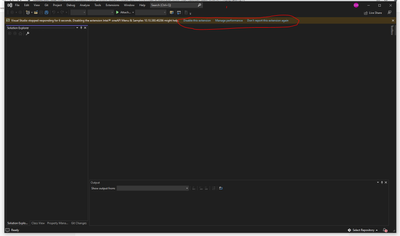
I will take it back. I do see this pop up when opening VS2022. I also see the following message on the top of the VS
- Mark as New
- Bookmark
- Subscribe
- Mute
- Subscribe to RSS Feed
- Permalink
- Report Inappropriate Content
A colleague found the solution somewhere on the Internet. Here is the receipe:
- In Visual Studio open the Extensions/Manage extensions menu item
- Select the category Installed
- Look for "Intel oneAPI Menu & Samples"
- Press the "Disable" button
- The message will not appear again
Of course, this assumes that you do not need the samples.
- Mark as New
- Bookmark
- Subscribe
- Mute
- Subscribe to RSS Feed
- Permalink
- Report Inappropriate Content
if you reinstall you have to do it again, sorry I was aware of the solution, but thanks for finding it again.

- Subscribe to RSS Feed
- Mark Topic as New
- Mark Topic as Read
- Float this Topic for Current User
- Bookmark
- Subscribe
- Printer Friendly Page