
- Mark as New
- Bookmark
- Subscribe
- Mute
- Subscribe to RSS Feed
- Permalink
- Report Inappropriate Content
I am running fortran code from last 3-4 years using intel fortran student version with visual studio. My compiler parallel XE 2020 student version has expired last week and now there is oneAPI system for intel compiler.
Here is what i did for installation ...
1) First uninstall visual studio and then install visual studio community 2019
2) Then I install oneAPI base tool kit
3) Then I install oneAPI HPC toolkit ...
The compier then integrate on visual studio ...while I compile it compiles well ..as in screenshot
But when I debug it ....the compiler works but donot show the value of variables on debug.. I screen shot it here too..
As I see the intel community there is uninstall and intall basekit tool,HPC VS will solve unfortunately it did not work...
I always intall first VS then compilers and uninstall it..
I am looking forward of your help..it really trouble me from last week. Thank you


- Mark as New
- Bookmark
- Subscribe
- Mute
- Subscribe to RSS Feed
- Permalink
- Report Inappropriate Content
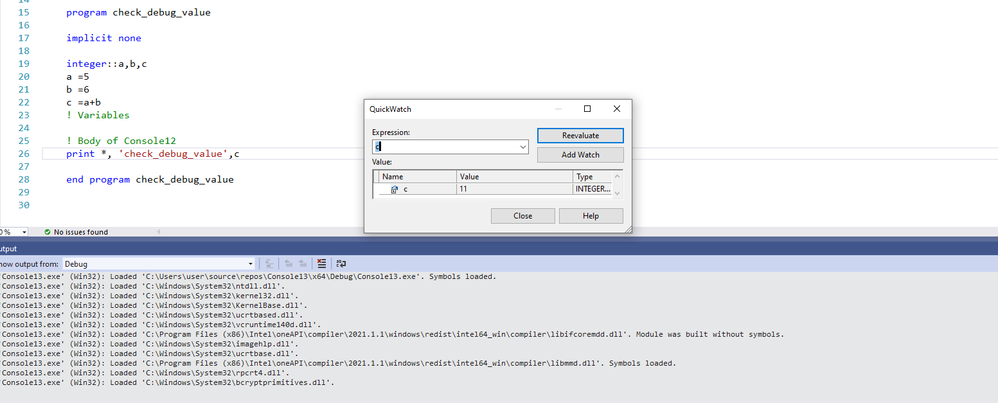
After intalling and uninstalling many times now the problem has SOLVED about debugging value not showing. but did not know about the cause.. successful screenshot with local window in debugger is attached here..thank you!
Link Copied

- Mark as New
- Bookmark
- Subscribe
- Mute
- Subscribe to RSS Feed
- Permalink
- Report Inappropriate Content
This looks to me as if the Fortran debugging support isn't installed. When you installed the Base toolkit, did you select "Intel Distribution for GDB"? For now, that's where the VS debugging support is (supposedly this will change in a future update.)
Go back to the Base Toolkit installer and make sure that is selected.
- Mark as New
- Bookmark
- Subscribe
- Mute
- Subscribe to RSS Feed
- Permalink
- Report Inappropriate Content
I selected GDB tool too on basekit .....I have attach screenshot here...
In HPC all thing i selected ...still not solve issue ...
I install and uninstall mor than 5-6 times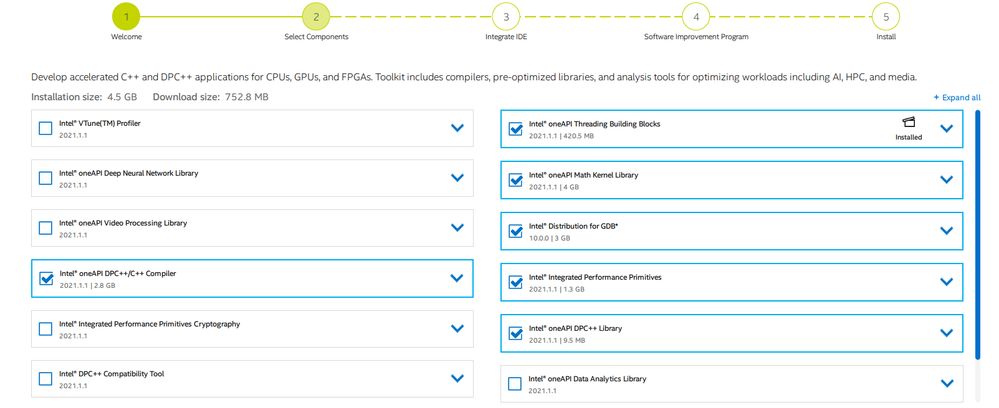
- Mark as New
- Bookmark
- Subscribe
- Mute
- Subscribe to RSS Feed
- Permalink
- Report Inappropriate Content
Please show a screenshot of the Locals window in the debugger.
- Mark as New
- Bookmark
- Subscribe
- Mute
- Subscribe to RSS Feed
- Permalink
- Report Inappropriate Content
Sorry for late reply ...
When I uninstall and reinstall base and hpc toolkit compiling has no issuse show
Compiling with Intel® Fortran Compiler Classic 2021.1.1 [Intel(R) 64]...
Console12.f90
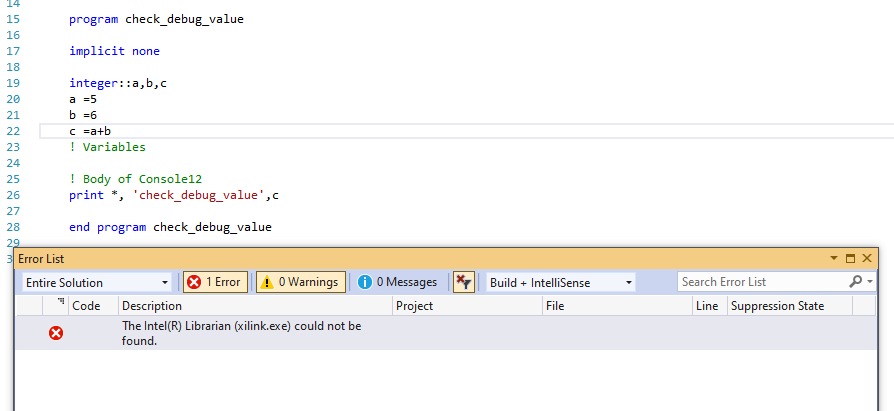
but ...i got error while running program now
Severity Code Description Project File Line Suppression State
Error The Intel(R) Librarian (xilink.exe) could not be found.
previously also this error came then i uninstall and install the toolkit and vs now it again reappears ...
How to solve it...
- Mark as New
- Bookmark
- Subscribe
- Mute
- Subscribe to RSS Feed
- Permalink
- Report Inappropriate Content
xilink is used in the link step of application building. I'm not sure how that would be missing but everything else was there. It is not used when running an application.
Just to verify, you have installed VS2019 with "Desktop Development with C++" selected? See Installing Microsoft Visual Studio* 2019 for Use with Intel® Compilers
I would be interested in having you do a Rebuild of the solution, then put the buildlog.htm from the Debug folder into a Zip file and attach the Zip to a reply here.
- Mark as New
- Bookmark
- Subscribe
- Mute
- Subscribe to RSS Feed
- Permalink
- Report Inappropriate Content
Yes, I have installed VS2019 with "Desktop Development with C++" ..now I can not see the debug file ...
but i have previous case debuge folder is there and i attaced build.html in zip format herewith....
- Mark as New
- Bookmark
- Subscribe
- Mute
- Subscribe to RSS Feed
- Permalink
- Report Inappropriate Content
That log shows a normal, successful build. I was trying to help with the xilink issue.
- Mark as New
- Bookmark
- Subscribe
- Mute
- Subscribe to RSS Feed
- Permalink
- Report Inappropriate Content
Now the problem of xlink has removed the main problem is did not show the value while debugging. I attached the buildlog file for latest version.....
could you suggest me what is the exact cause not showing values while debugging....
- Mark as New
- Bookmark
- Subscribe
- Mute
- Subscribe to RSS Feed
- Permalink
- Report Inappropriate Content
I asked for a screenshot of the Locals window in the debugger. Please attach one.
- Mark as New
- Bookmark
- Subscribe
- Mute
- Subscribe to RSS Feed
- Permalink
- Report Inappropriate Content
After intalling and uninstalling many times now the problem has SOLVED about debugging value not showing. but did not know about the cause.. successful screenshot with local window in debugger is attached here..thank you!
- Mark as New
- Bookmark
- Subscribe
- Mute
- Subscribe to RSS Feed
- Permalink
- Report Inappropriate Content

- Subscribe to RSS Feed
- Mark Topic as New
- Mark Topic as Read
- Float this Topic for Current User
- Bookmark
- Subscribe
- Printer Friendly Page