
- Mark as New
- Bookmark
- Subscribe
- Mute
- Subscribe to RSS Feed
- Permalink
- Report Inappropriate Content
This tool seems awesome but I can't get metrics to show up for any of my test devices. Guessing it's because none of them have an intel GPU (though I do have an Asus Zoom running an intel chipset). Are there any Android devices I can use to get metrics in the frame analyzer?
Link Copied

- Mark as New
- Bookmark
- Subscribe
- Mute
- Subscribe to RSS Feed
- Permalink
- Report Inappropriate Content
Hi Trevor,
I don't have a comprehensive list that I can provide you with, but I have a couple of devices that have the Intel® Atom processor in them:
- Asus* ZenFone 1, 2, 4, certain 5 models, 6
- Lenovo* K900
These are just a few that I could quickly find after searching the web, you can probably find some more out there by searching for devices that have the Intel® Atom processor in them. Just know that as long as they have the specific processor they support metrics in Frame Analyzer.
- Mark as New
- Bookmark
- Subscribe
- Mute
- Subscribe to RSS Feed
- Permalink
- Report Inappropriate Content
I have an Asus Zenfone Zoom (http://www.gsmarena.com/asus_zenfone_zoom_zx550-6918.php), which is using an Intel Atom processor, but I don't get metric data. I assumed it was because it uses a powervr gpu, but so do the other zenfones. Am I missing something?
- Mark as New
- Bookmark
- Subscribe
- Mute
- Subscribe to RSS Feed
- Permalink
- Report Inappropriate Content
Trevor,
It should in fact be getting metrics if that is the case. Here is a table with the requirements needed to see metrics in Frame Analyzer.
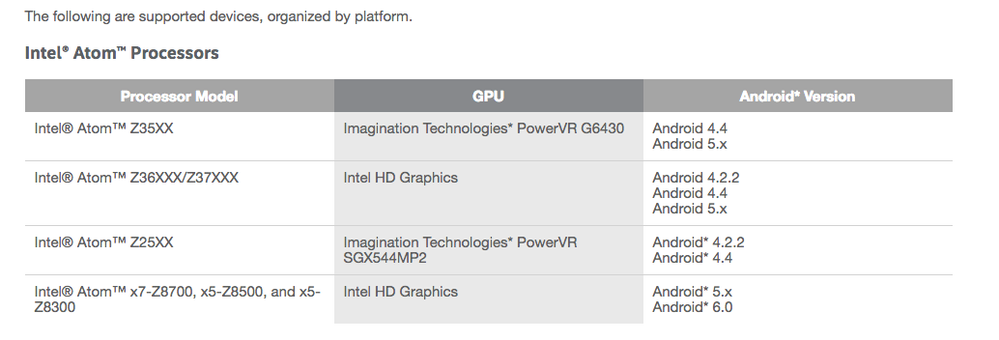
Could you possibly give me the "About Info" for Graphics Monitor? It's found by right clicking on the icon once it's running and selecting "Info".
What is the graphics API you are using for the application on the device as well?
- Mark as New
- Bookmark
- Subscribe
- Mute
- Subscribe to RSS Feed
- Permalink
- Report Inappropriate Content
I'm using OpenGL ES 2.0. This phone came out of the box running Android 6.0, which isn't in the list of supported versions for that chipset. Guessing that's the problem.
- Mark as New
- Bookmark
- Subscribe
- Mute
- Subscribe to RSS Feed
- Permalink
- Report Inappropriate Content
Trevor,
Unfortunately the Android version does seem to be the problem. After talking to our product owner, it was confirmed that Android 6.0 will not show metrics in Frame Analyzer. The driver version that comes with Android* 6.0 (for this platform) doesn't appear to support the metrics APIs that we need to show metrics in Frame Analyzer.
To add the support would take significant effort on the part of our engineering team. Is this something that is a significant road block for you/stopping your development process?
- Mark as New
- Bookmark
- Subscribe
- Mute
- Subscribe to RSS Feed
- Permalink
- Report Inappropriate Content
Ok thanks for the quick responses. Not a major blocker, just would be nice for performance analysis. I'll try to find something compatible.
- Mark as New
- Bookmark
- Subscribe
- Mute
- Subscribe to RSS Feed
- Permalink
- Report Inappropriate Content
Trevor,
I'm sorry we weren't able to find a solution for you. If you're able to downgrade the Android version and get the equivalent drivers, you may be able to see metrics. Let us know if you happen to try that or find some other solution. Good luck with your game development!
- Mark as New
- Bookmark
- Subscribe
- Mute
- Subscribe to RSS Feed
- Permalink
- Report Inappropriate Content
Ok so I now have a Zenfone 2 which uses a Z35xx chip with G6430 GPU and it's running Android 5.0 and I still don't get any metrics.
- Mark as New
- Bookmark
- Subscribe
- Mute
- Subscribe to RSS Feed
- Permalink
- Report Inappropriate Content
Can you send me the "About" info for your Graphics Monitor? You find that by right clicking on the Graphics Monitor icon in the system tray and selecting "About". This will give me a better idea of what's going on.
- Mark as New
- Bookmark
- Subscribe
- Mute
- Subscribe to RSS Feed
- Permalink
- Report Inappropriate Content
I'm on a mac and I don't see About anywhere in the GpaMonitor app.
- Mark as New
- Bookmark
- Subscribe
- Mute
- Subscribe to RSS Feed
- Permalink
- Report Inappropriate Content
Trevor,
Oh, that makes sense. I was assuming that you were on a Windows* machine. In order to get that same information you'll need to open System Analyzer and check the bottom right-hand corner of the tool - this will give you the build and version of GPA. I'll also need the specs for your machine: macOS* version, GPU, and CPU. The full CPU name is found by running the following command within the Utilities folder through Terminal:
sysctl -n machdep.cpu.brand_string
This will help me recreate your environment so I can reproduce what you're seeing.

- Subscribe to RSS Feed
- Mark Topic as New
- Mark Topic as Read
- Float this Topic for Current User
- Bookmark
- Subscribe
- Printer Friendly Page