
- Mark as New
- Bookmark
- Subscribe
- Mute
- Subscribe to RSS Feed
- Permalink
- Report Inappropriate Content
- Mark as New
- Bookmark
- Subscribe
- Mute
- Subscribe to RSS Feed
- Permalink
- Report Inappropriate Content
Hi DiegoV_Intel,
The problem has been resolved.
I have change my bios settings to AHCI and then put back RCT mode and it all worked but I don't know why..
Thank you for the help!
Have a nice day.
Link Copied

- Mark as New
- Bookmark
- Subscribe
- Mute
- Subscribe to RSS Feed
- Permalink
- Report Inappropriate Content
Your bios must be set for Intel RST, if it has it. If it does not, then you cannot use optane.
Doc
- Mark as New
- Bookmark
- Subscribe
- Mute
- Subscribe to RSS Feed
- Permalink
- Report Inappropriate Content
- Mark as New
- Bookmark
- Subscribe
- Mute
- Subscribe to RSS Feed
- Permalink
- Report Inappropriate Content
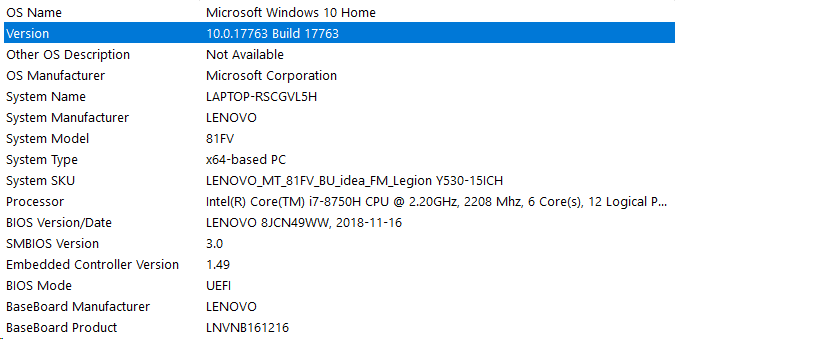
Your very first photo says bios is in legacy mode. Your later photo says UEFI.
What transpired between those two photos?
Doc
- Mark as New
- Bookmark
- Subscribe
- Mute
- Subscribe to RSS Feed
- Permalink
- Report Inappropriate Content
That's what I can't understand.. in the third photo we can see that my BIOS is in UEFI mode.
Another person as the same problem that I have with the same laptop but he hasn't told what the answer:
https://forums.intel.com/s/question/0D50P0000490YJ9SAM/error-enabling-intel-optane-memory
- Mark as New
- Bookmark
- Subscribe
- Mute
- Subscribe to RSS Feed
- Permalink
- Report Inappropriate Content
You may want to join that thread. Or, perhaps I can get @DiegoV_Intel to help you here.
Optane installation, on its best days, is tricky. Diego is a master at helping with these problems.
Doc
- Mark as New
- Bookmark
- Subscribe
- Mute
- Subscribe to RSS Feed
- Permalink
- Report Inappropriate Content




- Mark as New
- Bookmark
- Subscribe
- Mute
- Subscribe to RSS Feed
- Permalink
- Report Inappropriate Content
Hi MKama6,
Thank you for posting in the Intel® communities.
I can see that you are getting the error code 0xA008002D, which as it’s seen in the error message, it’s related to the BIOS configuration.
Considering that you are using a laptop, the best recommendation is to contact the manufacturer (Lenovo*) to get better assistance on configuring the BIOS correctly.
I can take a look at your system settings just to check if there is something unusual, but for laptop configurations, you should contact the manufacture directly.
Having said this, please download the Intel® System Support Utility (SSU) from the following site and run the full report. This report will include all details of your system. Please export the data in a text file and share it in your response: https://downloadcenter.intel.com/download/25293/Intel-System-Support-Utility-for-Windows-
Additionally, please run the following commands in the Command Prompt to take a screenshot of your drive’s status:
- Open the Command Prompt as Administrator.
- Run the command diskpart.
- Run the command list disk. Please take a screenshot of this output.
I will be waiting for your response.
Have a nice day.
Regards,
Diego V.
Intel Customer Support Technician
Under Contract to Intel Corporation
- Mark as New
- Bookmark
- Subscribe
- Mute
- Subscribe to RSS Feed
- Permalink
- Report Inappropriate Content
Hi DiegoV_Intel,
The problem has been resolved.
I have change my bios settings to AHCI and then put back RCT mode and it all worked but I don't know why..
Thank you for the help!
Have a nice day.
- Mark as New
- Bookmark
- Subscribe
- Mute
- Subscribe to RSS Feed
- Permalink
- Report Inappropriate Content
Hi MKama6,
That’s great!
Thank you for confirming the issue is solved.
Sometimes the BIOS configuration is tricky and things like this happens, but if the module is enabled and the system is up and running, then everything is working fine.
If you ever have another issue or concern about the module, feel free to open a new thread. We’ll try to help you in any way we can.
Have a nice day.
Regards,
Diego V.
Intel Customer Support Technician
Under Contract to Intel Corporation

- Subscribe to RSS Feed
- Mark Topic as New
- Mark Topic as Read
- Float this Topic for Current User
- Bookmark
- Subscribe
- Printer Friendly Page