
- Mark as New
- Bookmark
- Subscribe
- Mute
- Subscribe to RSS Feed
- Permalink
- Report Inappropriate Content
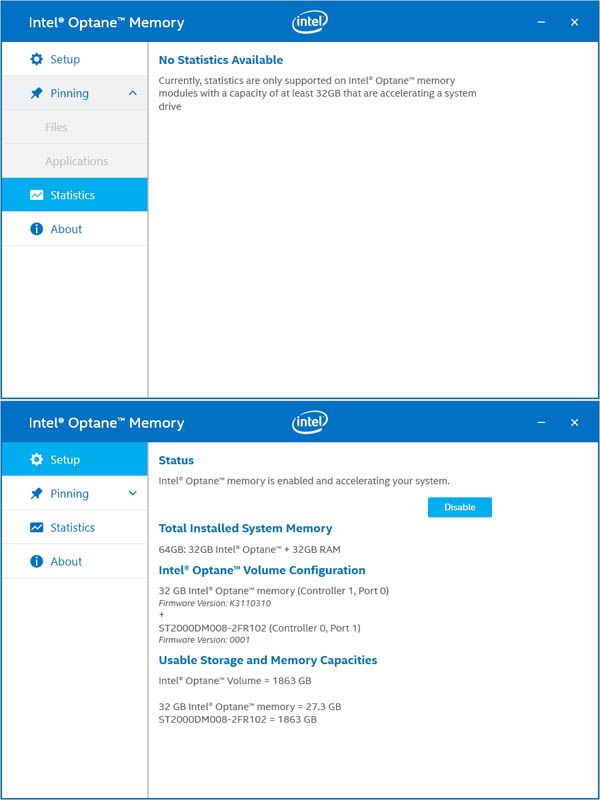
Why are statistics not available to me?

- Mark as New
- Bookmark
- Subscribe
- Mute
- Subscribe to RSS Feed
- Permalink
- Report Inappropriate Content
Hi TopCat25,
Thank you for your contact to Intel® SSD support group with your request for assistance with your Intel® Optane™ Memory.
We have received your request you’ve sent to us privately. We will proceed to post our reply in the community.
We have available for your convenience, several alternatives for support; please find the best option for private communication with an Intel support agent in your area, by following this link: https://www.intel.co.uk/content/www/uk/en/support/contact-support.html?_ga=2.80069717.314050557.1561743072-1186146026.1559835501&erpm_id=7828463#@12
As per your inquiry, please note, currently there are no Firmware updates for the Intel® Optane™ Memory, meaning your module has current firmware; in order to verify for future updates, you can access information by following this link: https://www.intel.com/content/www/us/en/support/articles/000017245/memory-and-storage.html?_ga=2.197741287.99842470.1561742777-1186146026.1559835501&erpm_id=7828463
If there is anything else we can help you with, please let us know.
Best regards,
Santiago A.
Intel® Customer Support Technician
Under Contract to Intel Corporation
Link Copied

- Mark as New
- Bookmark
- Subscribe
- Mute
- Subscribe to RSS Feed
- Permalink
- Report Inappropriate Content
- I would agree with you.
- However please see the topic: "The Statistics page in the Intel® Optane™ memory application states there's no information to provide, as I don't have a 32GB module installed. But I do, so why is this the case?" on this page: https://www.intel.com/content/www/us/en/support/articles/000024018/memory-and-storage/intel-optane-memory.html
Leon
- Mark as New
- Bookmark
- Subscribe
- Mute
- Subscribe to RSS Feed
- Permalink
- Report Inappropriate Content
Thanks, I'm glad I'm not completely crazy!
Having viewed Task Scheduler I'm stuck as to what to expect/how to action the necessary task.
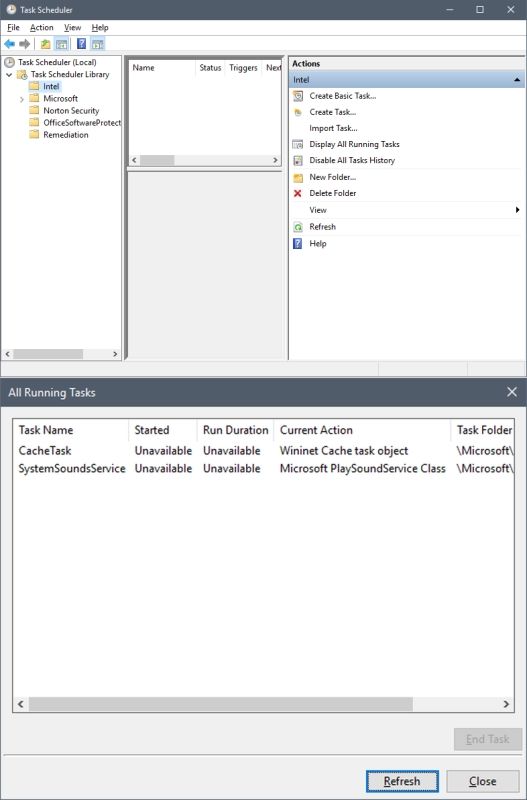
How do I initiate the task required to enable stats to be visible?
--
TC
- Mark as New
- Bookmark
- Subscribe
- Mute
- Subscribe to RSS Feed
- Permalink
- Report Inappropriate Content
Hi TC,
- You are not the first asking this question. See this thread: https://forums.intel.com/s/question/0D50P0000490WFBSA2/intel-optane-memory-service-is-not-running
- I understand that the intention is to schedule Intel Optane Service, but I'm not sure and I don't see there any solution neither.
Leon
- Mark as New
- Bookmark
- Subscribe
- Mute
- Subscribe to RSS Feed
- Permalink
- Report Inappropriate Content
OK, thanks.
Perhaps someone from Intel would look at resolving this, seeing that others have the issue too. But I won't hold my breath... 😴
- Mark as New
- Bookmark
- Subscribe
- Mute
- Subscribe to RSS Feed
- Permalink
- Report Inappropriate Content
Hi TopCat25,
Thank you for contacting Intel® SSD support group with your request for assistance with your Intel® Optane™ Memory.
Since we don’t have sufficient details about your system, we are asking for your cooperation to provide us with some information about it.
To do this, Intel® has available, the Intel® System Support Utility for Windows*; you’ll be able to download it on the following link: https://downloadcenter.intel.com/download/25293/Intel-System-Support-Utility-for-Windows-
· Please download the software.
· When finished downloading it, open it and follow instructions
· Please attach the SSU Log text file obtained on your next your reply.
To help you further with your request, It will be very helpful to receive from you, a screenshot of the “Disk Management” of windows, showing all your HDDs and partitions. To access the disk manager you can choose from the following 2 ways:
# 1: Open it from the Quick Access Menu.
Right-click the bottom-left corner (or Start button) on the desktop to open Quick Access Menu, and then choose Disk Management.
# 2: Access Disk Management via Run.
Use Windows+R to open Run, type “diskmgmt.msc” in the empty box and tap OK.
We will be looking forward to your reply.
Best regards,
Santiago A.
Intel® Customer Support Technician
Under Contract to Intel Corporation
- Mark as New
- Bookmark
- Subscribe
- Mute
- Subscribe to RSS Feed
- Permalink
- Report Inappropriate Content
While responding with the info you requested this came back...
Something went wrong while processing your email reply to Forums.
We couldn't read the text in your email reply.
Obviously I can't submit personal info via the forum. Pls advise.

- Mark as New
- Bookmark
- Subscribe
- Mute
- Subscribe to RSS Feed
- Permalink
- Report Inappropriate Content
I see this error from time to time. I simply repeat the submission operation (hit the Submit/Reply/Comment button again) a time or two and it will go through.
There is some debate regarding whether the IDSA tool is collecting information that is too personal. Feel free to edit the log file and remove any information that you think is too personal. The worst thing that will happen is that the support folks will indicate that this information is needed to complete the analysis. In this case, you can provide it - but only via non-public delivery (i.e. direct message to the specific Intel Support Engineer).
Just a reminder that attachments should be provided using the attachment tool (paperclip icon), which supports the upload of the attachment to the Intel servers. Placing them on file sharing sites is not supported (I certainly will not follow a link that is to a site I consider untrustable).
...S
- Mark as New
- Bookmark
- Subscribe
- Mute
- Subscribe to RSS Feed
- Permalink
- Report Inappropriate Content
I initially tried to send by replying to the email but that failed. Using a direct message to the support agent has apparently worked. Hoping it will produce the desired result.
I did look through the log file for any personal info but found nothing of concern, but thanks for the heads-up. 👍
I would never go through a file sharing site for something like this.
Cheers!
- Mark as New
- Bookmark
- Subscribe
- Mute
- Subscribe to RSS Feed
- Permalink
- Report Inappropriate Content
Hi TopCat25,
Thank you for your reply to Intel® SSD support group with your request for assistance with your Intel® Optane™ Memory.
We have received the information provided to us privately. Based on the information sent, we can see you are accelerating a secondary drive, therefore features such as statistics and Pinning functions are disabled.
Requirements for Pinning Once Acceleration is Enabled
· Device with 32GB or greater Intel® Optane™ memory capacity
· Pinning is only available when accelerating the system/boot drive (the drive/media that contains the OS)
Please refer to the following link for additional information: https://www.intel.com/content/www/us/en/support/articles/000028779/memory-and-storage.html.
If there is anything else we can help you with, please let us know.
Best regards,
Santiago A.
Intel® Customer Support Technician
Under Contract to Intel Corporation
- Mark as New
- Bookmark
- Subscribe
- Mute
- Subscribe to RSS Feed
- Permalink
- Report Inappropriate Content
- Mark as New
- Bookmark
- Subscribe
- Mute
- Subscribe to RSS Feed
- Permalink
- Report Inappropriate Content
Hi TopCat25,
Thank you for your contact to Intel® SSD support group with your request for assistance with your Intel® Optane™ Memory.
We have received your request you’ve sent to us privately. We will proceed to post our reply in the community.
We have available for your convenience, several alternatives for support; please find the best option for private communication with an Intel support agent in your area, by following this link: https://www.intel.co.uk/content/www/uk/en/support/contact-support.html?_ga=2.80069717.314050557.1561743072-1186146026.1559835501&erpm_id=7828463#@12
As per your inquiry, please note, currently there are no Firmware updates for the Intel® Optane™ Memory, meaning your module has current firmware; in order to verify for future updates, you can access information by following this link: https://www.intel.com/content/www/us/en/support/articles/000017245/memory-and-storage.html?_ga=2.197741287.99842470.1561742777-1186146026.1559835501&erpm_id=7828463
If there is anything else we can help you with, please let us know.
Best regards,
Santiago A.
Intel® Customer Support Technician
Under Contract to Intel Corporation

- Subscribe to RSS Feed
- Mark Topic as New
- Mark Topic as Read
- Float this Topic for Current User
- Bookmark
- Subscribe
- Printer Friendly Page