
링크가 복사됨

- 신규로 표시
- 북마크
- 구독
- 소거
- RSS 피드 구독
- 강조
- 인쇄
- 부적절한 컨텐트 신고
He replaced each drive individually, and allowed the SCM to rebuild after each drive replacement. Once all of the smaller drives had been replaced, the SCM recognized the additional space on the new drives and he was able to utilize that space in the storage pool.
- 신규로 표시
- 북마크
- 구독
- 소거
- RSS 피드 구독
- 강조
- 인쇄
- 부적절한 컨텐트 신고
I Replace all the drive with new HDD but it not showing Additional space , i mentaning the step which i Folow
i mark the HDD as Force off line it start rebuiled the Raid with Hotspare , in that way i replace all the Drive but it Showing old size ,
if i see the HDD propertey it showing HDD capacity is 557.6 gb but usable space is 137.9 gb
please help me to resolve the issue

- 신규로 표시
- 북마크
- 구독
- 소거
- RSS 피드 구독
- 강조
- 인쇄
- 부적절한 컨텐트 신고
I was able to perform this process in our box recently.
Which firmware version does the system have? And, does the unit have any Feature activated such as Intel® Shared LUN, Intel® Modular Server Storage Management Pack, etc?
- 신규로 표시
- 북마크
- 구독
- 소거
- RSS 피드 구독
- 강조
- 인쇄
- 부적절한 컨텐트 신고
Just to give you an update, I was able to perform the same process on our unit but I noticed it is an Intel® Modular Server System MFSYS25V2, with firmware 10.18.
I am currently running the process in an Intel® Modular Server System MFSYS25, with firmware 6.10. I will post the results soon.
- 신규로 표시
- 북마크
- 구독
- 소거
- RSS 피드 구독
- 강조
- 인쇄
- 부적절한 컨텐트 신고
I just completed the process in our Intel® Modular Server System MFSYS25 and after the rebuild I do not see the new available space.
I am currently investigating to see if this process is only viable on the Intel® Modular Server System MFSYS25V2.
- 신규로 표시
- 북마크
- 구독
- 소거
- RSS 피드 구독
- 강조
- 인쇄
- 부적절한 컨텐트 신고
The solution listed by jasolution is possible with the Intel® Modular Server System MFSYS25V2. This is not the case for the Intel® Modular Server MFSYS25. You would need to backup your data, delete the storage pool, recreate the storage pool, and then recreate your virtual drives.
- 신규로 표시
- 북마크
- 구독
- 소거
- RSS 피드 구독
- 강조
- 인쇄
- 부적절한 컨텐트 신고
I fallow the below mention Prosess
i) First we put a 600 GB HDD as a global hotspare and replace the all 146 gb HDD one by one after rebiled compleated in each drive every time one 600 gb HDD are hot spare after replace the all HDD & rebuilding compleated our pool space not update
ii) After it I Make HDD force offline and put a Fresh 600 GB HDD on that place and start Manually Rebuilding of raid but not hotspare diffend that time , after doning same Prosses in all HDD i am able to Access the Increassed space

- 신규로 표시
- 북마크
- 구독
- 소거
- RSS 피드 구독
- 강조
- 인쇄
- 부적절한 컨텐트 신고
David,
I am looking to upgrade our drives as well, where in the web ui can I check if we have a MFSYS25V2 instead of a non-V2 chassis?
- 신규로 표시
- 북마크
- 구독
- 소거
- RSS 피드 구독
- 강조
- 인쇄
- 부적절한 컨텐트 신고
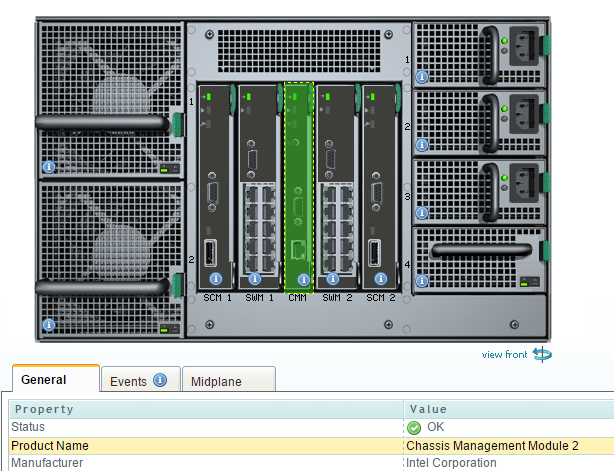
In this particular case, we need to check which Chassis Management Module (CMM) is installed. If it is listed as "Chassis Management Module" then you have a MFSYS25, if it is listed as "Chassis Management Module 2", then you have a MFSYS25V2.
To check which version you have, you need to click on Chassis Back; then, click on CMM and under the General Tab it would tell you the version of the CMM. In my case, I have the CMM2.
- 신규로 표시
- 북마크
- 구독
- 소거
- RSS 피드 구독
- 강조
- 인쇄
- 부적절한 컨텐트 신고
Great! We have a v2. Is there a step by step on the hard drive upgrade? We want to do it in our environment but don't have a lab unit to test with. Anyway to get you to help us?
- 신규로 표시
- 북마크
- 구독
- 소거
- RSS 피드 구독
- 강조
- 인쇄
- 부적절한 컨텐트 신고
You should be able to replace one drive at the time, let it rebuild and once is Online you should be able to replace the next drive. You should see the new available space once all of the drives of the storage pool have been replaced.
You may contact our http://www.intel.com/p/en_US/support/contactsupport Customer Support Group and I am pretty sure they can further assist us with this process.
- 신규로 표시
- 북마크
- 구독
- 소거
- RSS 피드 구독
- 강조
- 인쇄
- 부적절한 컨텐트 신고
This is good feedback. I just tried on our end and it did work. I am able to see the new available space.
Thank you Sanjay for sharing this workaround.
- 신규로 표시
- 북마크
- 구독
- 소거
- RSS 피드 구독
- 강조
- 인쇄
- 부적절한 컨텐트 신고
I fallow the below mention Prosess
i) First we put a 600 GB HDD as a global hotspare and replace the all 146 gb HDD one by one after rebiled compleated in each drive every time one 600 gb HDD are hot spare after replace the all HDD & rebuilding compleated our pool space not update
ii) After it I Make HDD force offline and put a Fresh 600 GB HDD on that place and start Manually Rebuilding of raid but not hotspare diffend that time , after doning same Prosses in all HDD i am able to Access the Increassed space

- 신규로 표시
- 북마크
- 구독
- 소거
- RSS 피드 구독
- 강조
- 인쇄
- 부적절한 컨텐트 신고
Hello, can someone who has completed this process please explain how the extra storage pool space shows up? Or how to get it to show up after each drive is replaced. I just spent the past week replacing one drive each night until all 7 where swapped out and I do not see the extra space. We have the MFSYS25V2. Is there something that I am possibly missing such as some kind of restart or power down that has to be done before the space shows up? Thanks for any responses and help with this matter.
- 신규로 표시
- 북마크
- 구독
- 소거
- RSS 피드 구독
- 강조
- 인쇄
- 부적절한 컨텐트 신고
Based on the feedback provided, it should not be required a restart or power down of the unit to see the new available space. Once the process is ended, you should be able to see the new available space in your storage pool. Otherwise, you might need to consider resetting the CMM or the SCM to refresh the reporting of the storage.
If the problem remains, you might consider a full power down to the chassis.
- 신규로 표시
- 북마크
- 구독
- 소거
- RSS 피드 구독
- 강조
- 인쇄
- 부적절한 컨텐트 신고
Thank you David for you feedback and response. Resetting the SCM and/or the CMM to me makes sense and is worth a try. I personally have never reset either one of these and was curious how long they usually take to reset and if there is anything I need to watch out for while doing so. Also, is this a recommended after hours type reset or can it be performed during working hours. Sorry, I am a little new to working directly with the Mod Server. We have had it a few years, but we have had to do very little after the initial setup.
Thanks,
Bryan
- 신규로 표시
- 북마크
- 구독
- 소거
- RSS 피드 구독
- 강조
- 인쇄
- 부적절한 컨텐트 신고
The process may take around 10-20 minutes and yes, the storage will be unavailable during this process. In this case, you need to consider doing this after hours. Feel free to contact our http://www.intel.com/p/en_US/support/contactsupport Intel® Customer Support team when ready to perform this action.
