
- 신규로 표시
- 북마크
- 구독
- 소거
- RSS 피드 구독
- 강조
- 인쇄
- 부적절한 컨텐트 신고
I have a couple of C++ 11 <array> examples that compile and run successfully with the Intel classic C++ compiler (2021.7.0) on Windows, and compile and terminate without generating any output using DPC++ 2022.2.0.
Has anyone else had problems moving their C++ code to use the new DPC++ compiler with the <array> class?
I can't attach all of the source files, I get the following error
The attachment's ch3802.cpp content type (text/plain) does not match its file extension and has been removed.
링크가 복사됨

- 신규로 표시
- 북마크
- 구독
- 소거
- RSS 피드 구독
- 강조
- 인쇄
- 부적절한 컨텐트 신고
I tried the print_time.cpp with no problems, and re-reading post I realize I need the array use?
- 신규로 표시
- 북마크
- 구독
- 소거
- RSS 피드 구독
- 강조
- 인쇄
- 부적절한 컨텐트 신고
Apologies for the incomplete post. It looks like a stack problem on Windows. This is the classic compile command.
icl /EHsc /nologo /F0xffffffff /O2 /Qstd=c++20 ch3802.cxx -o ch3802_intel_classic.exe
and this generates an executable that runs.
Here is the output.
C:\document\cpp\examples>ch3802_intel_classic.exe
Program starts : 0.000002
C++ 11 <array>
134217728
1073741824 bytes
Random numbers : 0.781101
STL sort - <array> : 13.513962
Total time : 14.298434
Here is the dp c++ compiler command line, with messages.
C:\document\cpp\examples>icx /EHsc /nologo /F 0xffffffff /O2 /Qstd=c++20 ch3802.cxx -o ch3802_intel_new.exe
icx: warning: argument unused during compilation: '-F 0xffffffff' [-Wunused-command-line-argument]
C:\document\cpp\examples>ch3802_intel_new.exe
No output or error message.
Here are the required files. I can't attach them.
timer.cpp
#######
#include <chrono>
using namespace std;
class timer
{
public:
timer() : start_timing(hi_res_clock::now()) {}
void reset()
{
start_timing = hi_res_clock::now();
}
double elapsed() const
{
return(std::chrono::duration_cast<second_>
(hi_res_clock::now() - start_timing).count());
}
private:
typedef std::chrono::high_resolution_clock hi_res_clock;
typedef std::chrono::duration<double, std::ratio<1> >
second_;
std::chrono::time_point<hi_res_clock> start_timing;
};
Main driving program
#################
#include <iostream>
#include <algorithm>
#include <array>
#include <random>
#include <string>
#include <chrono>
using namespace std;
#include "timer.cxx"
#include "print_time.cxx"
// #include "swap.cxx"
// #include "quicksort.cxx"
// #include "print_10.cxx"
int main()
{
unsigned seed = std::chrono::system_clock::now().time_since_epoch().count();
default_random_engine engine_01(seed);
uniform_real_distribution<double> distribution_01(0.0, 1.0);
string heading;
double t;
timer timer_01;
timer timer_02;
heading = "Program starts";
t = timer_01.elapsed();
print_time(heading, t);
timer_01.reset();
// Size
const int mega_byte = 1024 * 1024;
const int array_size = 128 * mega_byte;
int i;
array<double, array_size> x;
cout << "\n C++ 11 <array> \n" << endl;
cout.width(16);
cout << array_size << endl;
cout.width(16);
cout << (array_size * 8);
cout << " bytes " << endl;
for (i = 0; i < array_size; i++)
x[i] = distribution_01(engine_01);
heading = "Random numbers";
t = timer_01.elapsed();
print_time(heading, t);
timer_01.reset();
sort(x.begin(), x.end());
heading = "STL sort - <array> ";
t = timer_01.elapsed();
print_time(heading, t);
timer_01.reset();
heading = "Total time";
t = timer_02.elapsed();
print_time(heading, t);
return(0);
}
############################
The print_time source file is in the original post.
I am in the process of trying to find any compiler switches
that will set the stack size under windows.
- 신규로 표시
- 북마크
- 구독
- 소거
- RSS 피드 구독
- 강조
- 인쇄
- 부적절한 컨텐트 신고
Apologies for 'claiming' the solution. I can't find a way to undo that.

- 신규로 표시
- 북마크
- 구독
- 소거
- RSS 피드 구독
- 강조
- 인쇄
- 부적절한 컨텐트 신고
Hi,
Thanks for posting in the Intel forums.
We were able to reproduce the issue from our end. The issue is with the hexadecimal value being used with the /F option. The use of the hexadecimal value is not being parsed. You can try passing the equivalent integer value which would work fine.
Example:
icx /nologo /O2 main.cpp -o main_icx.exe /F4294967295
Output:
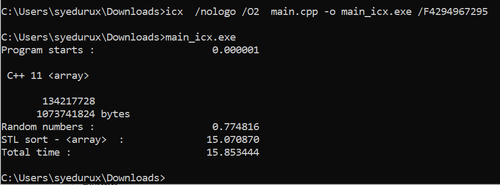
workaround to pass hexadecimal values:
We can use the option: /link -stack:0xffffffff
Example:
icx /nologo /O2 main.cpp -o main_icx.exe /link -stack:0xffffffff
output:
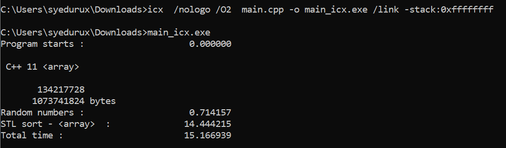
If this resolves your issue, make sure to accept this as a solution. This would help others with similar issues. Thank you!
Thanks & Regards,
Santosh
- 신규로 표시
- 북마크
- 구독
- 소거
- RSS 피드 구독
- 강조
- 인쇄
- 부적절한 컨텐트 신고
Hi,
Thanks for accepting our solution. If you need any additional information, please post a new question as this thread will no longer be monitored by Intel.
Thanks & Regards,
Santosh
