
- Mark as New
- Bookmark
- Subscribe
- Mute
- Subscribe to RSS Feed
- Permalink
- Report Inappropriate Content
First I tried installing the toolkit on a Windows 7 machine. The installation failed immediately because api-ms-win-shcore-scaling-l1-1-1.dll was missing.
I then installed successfully on a Windows 10 machine. I don't know if this is because it's W10 or because it also has VS 2019 installed. Anyway, so far so good.
I built the vector-add sample program (I first had to unset 'read-only' on the directory to allow mkdir), but when I run it the program fails:
info: internal compiler error
NMAKE : fatal error U1077: '.\vector-add-buffers.exe' : return code '0x01'
Link Copied

- Mark as New
- Bookmark
- Subscribe
- Mute
- Subscribe to RSS Feed
- Permalink
- Report Inappropriate Content
Hi,
Windows 7 is not supported by oneAPI. Please check the system requirements here:
Could you please specify your Visual Studio version on Windows 10?
Also, mention the steps you have followed to build/run the sample.
Please refer to the link below to build/run the samples on the command line:
Get started link (Windows):
Thanks,
Rahul
- Mark as New
- Bookmark
- Subscribe
- Mute
- Subscribe to RSS Feed
- Permalink
- Report Inappropriate Content
Thanks for responding, Rahul.
I followed these command line build and run instructions:
To build: nmake -f makefile.win
To run: nmake -f makefile.win run
The build was successful, creating vector-add-buffers.exe (339 KB)
I have both VS2012 and VS2019 - I don't know which nmake was used.
For some reason two VS project files were created, vector-add-buffers.vcxproj and vector-add-usm.vcxproj. They both contain the same two projects, and build x64\release\vector-add-buffers.exe and x64\release\vector-add-usm.exe.
I can't recall where I saw the instructions to use nmake for the build and run, but now I have done this with MSBuild:
MSBuild vector-add.sln /t:Rebuild /p:Configuration="Release"
This uses VS2019 creates vector-add-buffers.exe and vector-add-usm.exe, but not vector-add.exe. There is one warning but no errors.
- Mark as New
- Bookmark
- Subscribe
- Mute
- Subscribe to RSS Feed
- Permalink
- Report Inappropriate Content
Hi,
>>This uses VS2019 creates vector-add-buffers.exe and vector-add-usm.exe, but not vector-add.exe. There is one warning but no errors.
Does it run in the scenario or are you facing the same issue again?
Could you please try to build/run the simple vector add code below:
#include <CL/sycl.hpp>
#include <iostream>
#include <vector>

using namespace sycl;

#define size 1024

int main() {
    std::vector<int> A(size, size), B(size, size), C(size, 0);

    { //SYCL scope begins
        queue q;
        range<1> R(size);
        buffer<int,1> buffA(A.data(), R);
        buffer<int,1> buffB(B.data(), R);
        buffer<int,1> buffC(C.data(), R);
		std::cout<< "Running on: "<<q.get_device().get_info<info::device::name>()<<"\n";
        q.submit([&](handler &cgh) {
            auto acc_buffA = buffA.get_access<access::mode::read>(cgh);
            auto acc_buffB = buffB.get_access<access::mode::read>(cgh);
            auto acc_buffC = buffC.get_access<access::mode::write>(cgh);
            cgh.parallel_for(R, [=](id<1> i) {
                acc_buffC[i] = acc_buffA[i] + acc_buffB[i];
                }
            );
        });
    } //SYCL scope ends

    std::vector<int> vecValidate(size, 2*size);
    (C==vecValidate) ? std::cout << "Success\n" : std::cout<<"Failure\n";
    return 0;
}
Steps to build and run the code:
- Open the "Intel oneAPI command prompt for Visual Studio-19" in order to automatically source the oneAPI environment.
- If you do not find the oneAPI command prompt, to manually source the oneAPi environment, open the usual Microsoft command prompt and execute the below command (From oneAPI_root installation directory):
cd "C:\Program Files (x86)\Intel\oneAPI" && setvars.bat- To build and run:
dpcpp simplevecadd.cpp -o sva.exe && sva.exe
Let us know if you face any issues.
Regards,
Rahul
- Mark as New
- Bookmark
- Subscribe
- Mute
- Subscribe to RSS Feed
- Permalink
- Report Inappropriate Content
Hi,
Were you able to run the vector-add code sample? (attached in the previous post)
Let us know if you face any issues.
Thanks,
Rahul
- Mark as New
- Bookmark
- Subscribe
- Mute
- Subscribe to RSS Feed
- Permalink
- Report Inappropriate Content
Hi Rahul,
- I tried to make the directory for vector-add a subdirectory of oneAPI. I did not have permission for this. So I created that directory first, then ran oneapi-cli again. This led to another permission issue - no permission to write there. So I changed the permissions and was able to run oneapi-cli and finally run MSBUILD. I have attached the output from the build. Both vector-add-buffers.exe and vector-add-usm.exe are created.
- When I run either of the executables I get an error message saying that sycl.dll is not found.
I should add (in case it's not obvious) that I didn't install oneAPI at the default location, because my C drive is pretty full. Instead I installed it at F:\oneAPI.
- Mark as New
- Bookmark
- Subscribe
- Mute
- Subscribe to RSS Feed
- Permalink
- Report Inappropriate Content
I increased the permissions on the bin directory, and now both executables fail with a different message - an exception is caught.
The permissions issues are a pain, because the user doesn't know what is needed. I have never had this problem before when installing software. Maybe it works on Linux but nobody has paid much attention to Windows.
- Tags:
- i
- Mark as New
- Bookmark
- Subscribe
- Mute
- Subscribe to RSS Feed
- Permalink
- Report Inappropriate Content
Hi,
>> The permissions issues are a pain because the user doesn't know what is needed.
Running the command prompt as an administrator might help in this case. (Right-click on the cmd application and select "Run as administrator")
>> I increased the permissions on the bin directory, and now both executables fail with a different message - an exception is caught.
Could you please attach a screenshot of the message displayed?
Thanks,
Rahul
- Mark as New
- Bookmark
- Subscribe
- Mute
- Subscribe to RSS Feed
- Permalink
- Report Inappropriate Content
- Mark as New
- Bookmark
- Subscribe
- Mute
- Subscribe to RSS Feed
- Permalink
- Report Inappropriate Content
Hi,
Could you please attach the SYCL_PI_TRACE logs by setting the environment variable as follows:
set SYCL_PI_TRACE=2
Once you set this environment variable, run the executable as usual to see the Debug output.
Thanks,
Rahul
- Mark as New
- Bookmark
- Subscribe
- Mute
- Subscribe to RSS Feed
- Permalink
- Report Inappropriate Content
There is no output. It would help if you told me where to find the log file.
- Mark as New
- Bookmark
- Subscribe
- Mute
- Subscribe to RSS Feed
- Permalink
- Report Inappropriate Content
Hi,
Since you are facing the issues at runtime, the SYCL_PI_TRACE log will contain information about the low-level API invoked during runtime.
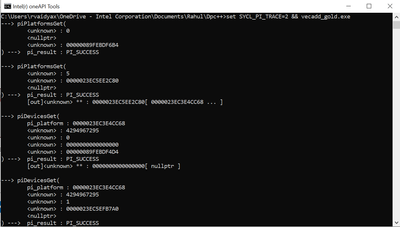
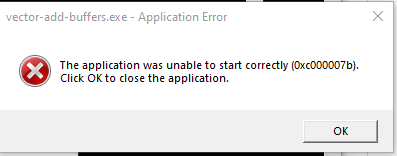
Please redirect the output to a text file and attach the same.
Command:
set SYCL_PI_TRACE=2 && your_app.exe
Thanks,
Rahul
- Mark as New
- Bookmark
- Subscribe
- Mute
- Subscribe to RSS Feed
- Permalink
- Report Inappropriate Content
Hi,
Just a quick reminder to attach the PI_TRACE logs.
Thanks,
Rahul
- Mark as New
- Bookmark
- Subscribe
- Mute
- Subscribe to RSS Feed
- Permalink
- Report Inappropriate Content
As I said before, I do not know where to find these logs. There is no program output as it fails immediately.
- Mark as New
- Bookmark
- Subscribe
- Mute
- Subscribe to RSS Feed
- Permalink
- Report Inappropriate Content
Can you let us know which version of VS2019 you have?
Thanks,
- Mark as New
- Bookmark
- Subscribe
- Mute
- Subscribe to RSS Feed
- Permalink
- Report Inappropriate Content
Is your issue resolved? if not, can you let us know which VS2019 version you are currently using? The reason I asked is because some versions of VS are not yet supported by Intel compiler. Please see this link https://software.intel.com/content/www/us/en/develop/articles/intel-compilers-compatibility-with-microsoft-visual-studio-and-xcode.html
Thanks,
- Mark as New
- Bookmark
- Subscribe
- Mute
- Subscribe to RSS Feed
- Permalink
- Report Inappropriate Content
Let us know if you still having issue. If not, we would like to close this thread in the next few days.
Thanks,
- Mark as New
- Bookmark
- Subscribe
- Mute
- Subscribe to RSS Feed
- Permalink
- Report Inappropriate Content
Let's close this case. We will no longer respond to this thread. If you require additional assistance from Intel, please start a new thread. Any further interaction in this thread will be considered community only.
Thanks,

- Subscribe to RSS Feed
- Mark Topic as New
- Mark Topic as Read
- Float this Topic for Current User
- Bookmark
- Subscribe
- Printer Friendly Page