
- Mark as New
- Bookmark
- Subscribe
- Mute
- Subscribe to RSS Feed
- Permalink
- Report Inappropriate Content
Hi,
Previously I had tested mkl cblas_dgemm for m=n=k=10000 and found a performance of approximately 2 TFlop but now the same give me a performance of around 0.8 TFlops.
Case 1:
CentOS 7.2.* and Intel Parallel Studio XE
MKL cblas_dgemm
m=n=k=10000
Performance: 1900+ GFlops
Case 2:
CentOS 8.5.* and Intel OneAPI
MKL cblas_dgemm
m=n=k=1000
Performance: 750+ GFlops
Why this is the huge gap. something is wrong
What is the reason?
Please assist and guide
Link Copied

- Mark as New
- Bookmark
- Subscribe
- Mute
- Subscribe to RSS Feed
- Permalink
- Report Inappropriate Content
Hi,
Thanks for reaching out to us.
Could you please let us know with what versions of Intel parallel studio xe and oneAPI you have observed the differences in performance and also how did you calculate the performance (gflops) so that it would help us to investigate your issue from our end?
Regards,
Vidya.
- Mark as New
- Bookmark
- Subscribe
- Mute
- Subscribe to RSS Feed
- Permalink
- Report Inappropriate Content
In 2017, Intel Parallel Studio XE Update 1 was used, and the performance of cblas_dgemm was about 2+ TFlops.
In the next step, I used the MKL and OpenMP libraries that came with the previous installation, and the Intel C compiler that came with HPC kit version 2021. I still got a performance of about 1.95 TTFlops. This setup was on CentOS 7.2
Now I have installed CentOS 8.5 on Intel Xeon Phi 7250, the performance of cblas_dgemm is around 0.75 TFlops, which is worse than before. I have installed oneAPI through GUI Installer
- Mark as New
- Bookmark
- Subscribe
- Mute
- Subscribe to RSS Feed
- Permalink
- Report Inappropriate Content
Hi,
Could you please provide us with the timings that you are getting for both cases?
Time taken when working with >> In 2017, Intel Parallel Studio XE Update 1.
Time taken when working with >> installed oneAPI through GUI Installer
Regards,
Vidya.
- Mark as New
- Bookmark
- Subscribe
- Mute
- Subscribe to RSS Feed
- Permalink
- Report Inappropriate Content
Time taken when working with >> In 2017, Intel Parallel Studio XE Update 1.
I can't provide the exact timing information because an other researcher work at that time. But the rough estimate is about its near October 2017.
Time taken when working with >> installed oneAPI through GUI Installer
I have installed oneAPI just couple of days ago less that one week from the current date
Thanks
Regards
- Mark as New
- Bookmark
- Subscribe
- Mute
- Subscribe to RSS Feed
- Permalink
- Report Inappropriate Content
Hi,
Let me rephrase my question.
The execution time of your code with the latest oneMKL 2022 and also with MKL 2017 (if possible)?
Regards,
Vidya.
- Mark as New
- Bookmark
- Subscribe
- Mute
- Subscribe to RSS Feed
- Permalink
- Report Inappropriate Content
For MKL2017
OS: CentOS 7.2
M=N=K=10000
Execution Time 1.02 Seconds on Intel Xeon Phi 7250 with 68 Cores
For OneMKL2022
OS: CentOS 8.5
M=N=K=10000
Execution Time 3.17 Seconds on Intel Xeon Phi 7250 with 68 Cores
Regards
Muhammad Rizwan

- Mark as New
- Bookmark
- Subscribe
- Mute
- Subscribe to RSS Feed
- Permalink
- Report Inappropriate Content
These performance comparisons are likely to be quite variable depending on system load, number of active users, etc.
On a Windows PC with an i7-10710U (low power) NUC, here are my timing results for DGEMM with m=n=k=2000, alpha = 1, beta = 2:
| 2014 | 0.445 s |
| 2016 U8 | 0.242 |
| 2019.1 U3 | 0.151 |
| 2021.5 | 0.152 |
For each case, I compiled with /Qopenmp /Qxhost and ran the program three or four times. The reported times above are the best of these three or four runs.
For comparison purposes, it would be useful if you were to run the following program on your system and provide the results.
program xdgemm
implicit none
integer, parameter :: N = 2000
double precision, allocatable, dimension(:,:) :: A, B, C
integer :: m,k
double precision :: alpha = 1d0, beta = 2d0
real t1,t2
!
allocate (A(N,N),B(N,N),C(N,N))
m = N
k = N
call random_number(A)
call random_number(B)
call random_number(C)
call cpu_time(t1)
call dgemm('N','N',m,n,k,alpha,A,N,B,N,beta,C,N)
call cpu_time(t2)
print *,t2-t1,' secs'
end- Mark as New
- Bookmark
- Subscribe
- Mute
- Subscribe to RSS Feed
- Permalink
- Report Inappropriate Content
Dear
Are you kidding me?
I am informing issue for Linux system CentOS and highlighting totally different platform and you are sharing the script for the windows system.
Please understand the context and problem first.
- Mark as New
- Bookmark
- Subscribe
- Mute
- Subscribe to RSS Feed
- Permalink
- Report Inappropriate Content
Hi,
Thanks for providing the details.
We are looking into this issue internally, we will get back to you soon.
Regards,
Vidya.

- Mark as New
- Bookmark
- Subscribe
- Mute
- Subscribe to RSS Feed
- Permalink
- Report Inappropriate Content
checking the problem on RH7 ( no CentOS available right now ) with MKL 2020.0.1 (the current) and MKL 2017.0 Update 2 on Intel(R) Xeon(R) Gold 6148 CPU @ 2.40GHz ( SkyLake CPU), I see ~ the same performance on my end:
MKL 2017 u2:
[gfedorov@skx2 05339303]$ MKL_VERBOSE=0 ./a.out 10000
size == 10000, GFlops == 2343.43
[gfedorov@skx2 05339303]$ MKL_VERBOSE=0 ./a.out 10000
size == 10000, GFlops == 2251.49
lscpu, as well both MKL_VERBOSE=1 logs are attached for your reference.
I noticed you said about Xeon Phi CPU. Then It should be noted, that since MKL 2022, this CPU type has been deprecated. Please check the latest Release Notes following this link: https://cqpreview.intel.com/content/www/us/en/developer/articles/release-notes/onemkl-release-notes.html
- Mark as New
- Bookmark
- Subscribe
- Mute
- Subscribe to RSS Feed
- Permalink
- Report Inappropriate Content
PLease share the valid url
Thanks for the update.
Please share, what version of oneAPI BaseKIT and HPCKit best fit for Intel Xeon Phi 7250 and CentOS 8.5. How can I get the previous versions
- Mark as New
- Bookmark
- Subscribe
- Mute
- Subscribe to RSS Feed
- Permalink
- Report Inappropriate Content
Could you please give a little favour and share the a.out binary file so that I can test it at my system
This will be a great help
Thanks
Regards
- Mark as New
- Bookmark
- Subscribe
- Mute
- Subscribe to RSS Feed
- Permalink
- Report Inappropriate Content
see the _stat2020.log attached. This is a statically linked executable.
I zipped _stat2020.out as *.log due to the *.out attachments are not acceptable by the forum engine.
the password - intelmklforum
- Mark as New
- Bookmark
- Subscribe
- Mute
- Subscribe to RSS Feed
- Permalink
- Report Inappropriate Content
- Mark as New
- Bookmark
- Subscribe
- Mute
- Subscribe to RSS Feed
- Permalink
- Report Inappropriate Content
Thanks but is this compressed in the windows environment or Linux environment
- Mark as New
- Bookmark
- Subscribe
- Mute
- Subscribe to RSS Feed
- Permalink
- Report Inappropriate Content
Dear
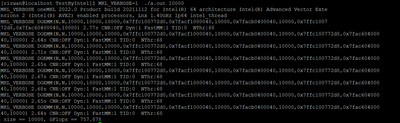
Thanks for sharing the executable file. I executed it but I still get 762.311 GFlops on Intel Xeon Phi and CentOS 8.5.
Could you please also give me one favour? Could you please tell me the environment variable set up at your end?
I don't know why files that give 2+ TFlops previously now give less than 800 GFlops
I have installed intel one API 2022.0.1
- Mark as New
- Bookmark
- Subscribe
- Mute
- Subscribe to RSS Feed
- Permalink
- Report Inappropriate Content
Could you run this 2022 executable with verbose mode enabled and share the output?
how to run: MKL_VERBOSE=1 ./a.out 10000
- Mark as New
- Bookmark
- Subscribe
- Mute
- Subscribe to RSS Feed
- Permalink
- Report Inappropriate Content
- Mark as New
- Bookmark
- Subscribe
- Mute
- Subscribe to RSS Feed
- Permalink
- Report Inappropriate Content
Ok and then link your example against MKL 2017 and run with the same MKL_VERBOSE=1 on the same machine and share the log file, please.
- Mark as New
- Bookmark
- Subscribe
- Mute
- Subscribe to RSS Feed
- Permalink
- Report Inappropriate Content


- Subscribe to RSS Feed
- Mark Topic as New
- Mark Topic as Read
- Float this Topic for Current User
- Bookmark
- Subscribe
- Printer Friendly Page