
- Mark as New
- Bookmark
- Subscribe
- Mute
- Subscribe to RSS Feed
- Permalink
- Report Inappropriate Content
Hi,
Is MSVS2012 a supported environment for MKL 11.0 update 5? I am trying to get MKL 11.0 update 5 working with Visual Studio 2012. To get my environment variables setup, I have followed the setup instructions here:
http://software.intel.com/en-us/articles/intel-mkl-110-getting-started/#Environment
and I started following the instructions here:
However, when I right click on a C++ project in visual studio 2012, I do not have the "Intel C++ Composer XE 2013 -> Select Build Components" options. MSVS2012 does have the option "HELP -> Intel C++ Composer XE 2013 -> Intel C++ Composer XE Help", but I cannot find any of the select build components options that the tutorials use. Any help would be appreciated.
Cheers,
Matt
Link Copied

- Mark as New
- Bookmark
- Subscribe
- Mute
- Subscribe to RSS Feed
- Permalink
- Report Inappropriate Content
- Mark as New
- Bookmark
- Subscribe
- Mute
- Subscribe to RSS Feed
- Permalink
- Report Inappropriate Content

- Mark as New
- Bookmark
- Subscribe
- Mute
- Subscribe to RSS Feed
- Permalink
- Report Inappropriate Content
Just in case, if the Microsoft C++ wasn't available when you installed Intel C++, you will need to repeat the latter installation, including the MKL option.
- Mark as New
- Bookmark
- Subscribe
- Mute
- Subscribe to RSS Feed
- Permalink
- Report Inappropriate Content
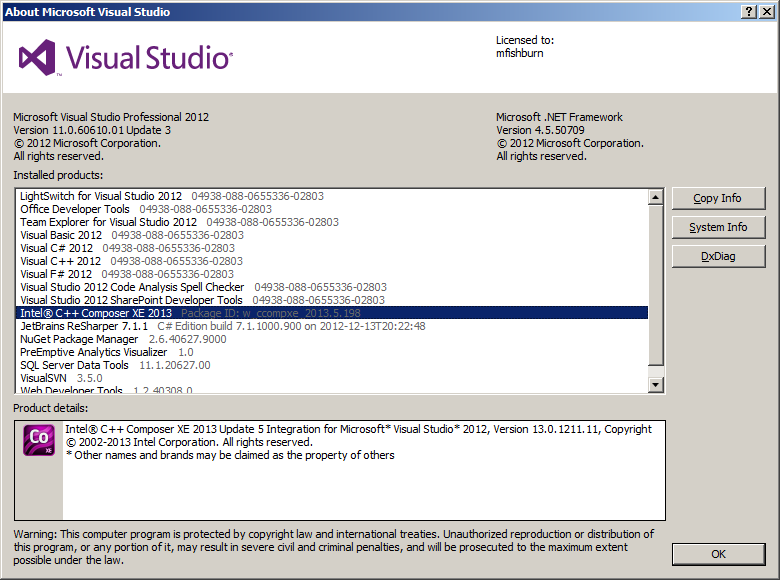
Microsoft C++ was installed when I installed Intel C++. I was building M$ C++ projects prior to the Intel MKL install.


- Mark as New
- Bookmark
- Subscribe
- Mute
- Subscribe to RSS Feed
- Permalink
- Report Inappropriate Content
I'll double-check with the MKL engineering team. But according to the online document "Intel MKL 11.0 System Requirements" (http://software.intel.com/en-us/articles/intel-mkl-110-system-requirements/), MS Visual Studio 2012 is not on the list:
Supported C/C++ and Fortran compilers for Windows*:
- Intel® Visual Fortran Composer XE 2013 for Windows* OS
- Intel® Visual Fortran Compiler 13.0 for Windows* OS
- Intel® Visual Fortran Compiler 13.1 for Windows* OS
- Intel® C++ Composer XE 2013 for Windows* OS
- Intel® C++ Compiler 13.0 for Windows* OS
- Intel® C++ Compiler 13.1 for Windows* OS
- Microsoft Visual Studio* 2011 - help file and environment integration
- Microsoft Visual Studio* 2010 - help file and environment integration
- Microsoft Visual Studio* 2008 - help file and environment integration
- Microsoft Visual Studio* 2005 Team Suite Edition - help file and environment integration
- Microsoft Windows* SDK for Windows* 7 (Intel® 64)
- Microsoft Windows* Software Development Kit Update for Windows Vista* (Intel® 64)
- Microsoft Windows Server* 2003 R2 Platform SDK (Intel® 64)
- Microsoft Windows* Software Development Kit for Windows Server* 2008
- PGI* Workstation Complete version 12.5
- Mark as New
- Bookmark
- Subscribe
- Mute
- Subscribe to RSS Feed
- Permalink
- Report Inappropriate Content
Is Visual Studio 2010 Express edition supported?
- Mark as New
- Bookmark
- Subscribe
- Mute
- Subscribe to RSS Feed
- Permalink
- Report Inappropriate Content
- Mark as New
- Bookmark
- Subscribe
- Mute
- Subscribe to RSS Feed
- Permalink
- Report Inappropriate Content
Hi,
I'm a bit confused about the different products here. Zhang Z. posted that Intel MKL does not have MSVS2012 listed as a supported product. However, Intel C++ Composer XE 2013 has MSVS2012 "standard edition or higher" listed as a supported product:
http://software.intel.com/sites/default/files/article/251095/release-notes-c-2013-w-en.pdf
and on the main page for the C++ composer, it is stated that Intel MKL 11.0 is included with C++. If I install c++ composer xe 2013, will I be able to use version 11.0 of MKL with VS2012 integration?
Cheers,Matt
- Mark as New
- Bookmark
- Subscribe
- Mute
- Subscribe to RSS Feed
- Permalink
- Report Inappropriate Content
- Mark as New
- Bookmark
- Subscribe
- Mute
- Subscribe to RSS Feed
- Permalink
- Report Inappropriate Content
Matt,
The MKL engineering team has confirmed that VS 2012 is indeed supported by MKL 11.0. The product validation was actually done using VS 2012 on Windows platforms. It's a mistake of the Release Notes that it doesn't list VS 2012. We will get it fixed.
To use Intel C++ Composer XE (including MKL) with VS 2012, please first try to start VS 2012 by choosing Start Menue -> Programs -> Intel Parallel Studio XE 2013 -> Intel Parallel Studio XE 2013 with VS 2012. Then, once you open your solution and right-click your project, you will be able to see the "Intel Composer XE 2013" option.
- Mark as New
- Bookmark
- Subscribe
- Mute
- Subscribe to RSS Feed
- Permalink
- Report Inappropriate Content
Hi,
I'm not sure exactly what fixed it (I uninstalled the MKL and used Composer Intel64 instead, as well as restarting everything a few times), but now the GUI has the Intel compiler listed as an option when right-clicking on a c++ project.
Thank you for all the help! I've already got code that calls the MKL convolver and the fft code, your documentation has been a huge boon. I'll let you know if I have any more questions.
Cheers, Matt

- Subscribe to RSS Feed
- Mark Topic as New
- Mark Topic as Read
- Float this Topic for Current User
- Bookmark
- Subscribe
- Printer Friendly Page