
- Mark as New
- Bookmark
- Subscribe
- Mute
- Subscribe to RSS Feed
- Permalink
- Report Inappropriate Content
Yesterday, I installed the OneAPI MKL and Fortran. I use the Microsoft Visual Studio Community 2019+Intel oneAPI Base + Intel oneAPI HPC.
I have some code and projects using MKL were done with Microsoft Visual Studio Community 2019+ Intel Parallel Studio XE 2019. When I open these projects with the computer that has Intel oneAPI, it gives "error #7002: Error in opening the compiled module file. Check INCLUDE paths.". Then, I checked files and setting, everything seems to be correct. Finally, I manually add the following dictionary to the compiling option in Visual Studio, then it works.
"C:\Program Files (x86)\Intel\oneAPI\mkl\2021.1.1\include\ia32" for ia32
"C:\Program Files (x86)\Intel\oneAPI\mkl\2021.1.1\include\intel64\lp64" for 64
Is it the issue of newly released oneAPI base toolkit and HPC toolkit? Since MKL and FORTRAN are installed separately in two package, we have to add this additional include direction every time manually? This didn't happen when I use previous versions of Intel Parallel Studio or Intel Fortran Compiler.
Link Copied

- Mark as New
- Bookmark
- Subscribe
- Mute
- Subscribe to RSS Feed
- Permalink
- Report Inappropriate Content
In earlier versions of Parallel Studio, the startup batch file ifortvars.bat for the compiler contains the line
if exist "%BIN_ROOT%..\mkl\bin\mklvars.bat" @call "%BIN_ROOT%..\mkl\bin\mklvars.bat" %C_TARGET_ARCH% %TARGET_VS% %LP64_ILP64%for MKL, and similar lines for the other optional packages such as IMSL, IPP, TBB, etc.
I have not yet downloaded and installed OneAPI, but I guess that you could look for the file mklvars.bat, and add a line for it to ifortvars.bat with the correct path.
Your manual addition of the MKL include directory path to %INCLUDE% is fine, but you have to make corresponding additions to %LIB% and %PATH% for linking and execution, respectively.
- Mark as New
- Bookmark
- Subscribe
- Mute
- Subscribe to RSS Feed
- Permalink
- Report Inappropriate Content
Thanks for the comments. Following your comments, I looked the enviromental setting scripts. Now, oneAPI has vars.bat scripts under env folder of other package, and the oneAPI use setvars.bat to call everything.
servars.bat do call MKL enviromental variables. But it only call that without any arguments. So, it only add the top level path,
C:\Program Files (x86)\Intel\oneAPI\mkl\2021.1.1
Since I was using MKL Fortran modules, vars.bat of MKL should be called as
vars modThis command will be able to add
C:\Program Files (x86)\Intel\oneAPI\mkl\2021.1.1\include\intel64\lp64
I tried to complie with command prompt, by setting the enviroment with "servars.bat" and "vars mod". It works well. In earlier versions of Parallel Studio, ifortvars.bat has arguments such as ia32, lp64. But the oneAPI setvars.bat does not. I am not sure whether there are other ways to set the enviroment variables, instead of adding lines to the setvars.bat.

- Mark as New
- Bookmark
- Subscribe
- Mute
- Subscribe to RSS Feed
- Permalink
- Report Inappropriate Content
Hi,
Since there is a migration from the PSXE project to the oneAPI project, it may not be able the find the required include paths.
As an alternate solution:
- Open the property pages of the project, expand the Configuration properties tab (on the left side)
- Choose Intel libraries for oneMKL. Under Intel oneMKL, set the Use oneMKL option to either parallel or sequential.
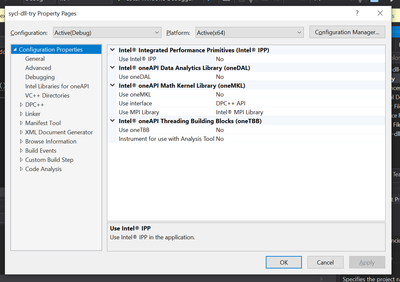
Let me know if it helps.
Thanks,
Rahul
- Mark as New
- Bookmark
- Subscribe
- Mute
- Subscribe to RSS Feed
- Permalink
- Report Inappropriate Content
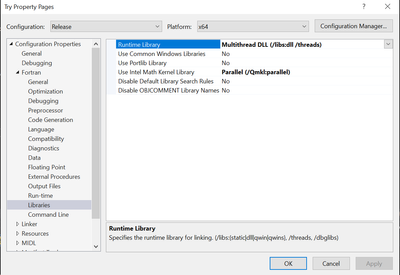
Thanks for the reply. However, there is no such option in my visual studio when I create a intel fortran project. I am using the latest Microsoft Visual Studio Community 2019, Version 16.8.3. The MKL library is located under the Fortran tab/libraries. I installed Visual studio first, then OneAPI basic, then OneAPI HPC.
However, similar options as you have can be found when I create a C++ project with my visual studio.
This screenshot is the properties tab of a Fortran project.
- Mark as New
- Bookmark
- Subscribe
- Mute
- Subscribe to RSS Feed
- Permalink
- Report Inappropriate Content
Hi,
As per the Fortran-MKL tutorial,
You may choose to enable the "Use Intel Math Kernel Library option" present in Open Project → Property Pages →Fortran → Libraries →Use Intel Math Kernel Library (Just like you did in the screenshot above, set it to either parallel or sequential). Once selected all of the environment settings and required libraries are ready for your project (Step 3 in the above tutorial link).
Instead of manually adding extra lines to the bat file, this option is quicker and easier to use.
Alternatively, you may set the MKL Include/Library paths additionally in the VS property pages (Optional. Step 4 in the above tutorial link).
Regards,
Rahul
- Mark as New
- Bookmark
- Subscribe
- Mute
- Subscribe to RSS Feed
- Permalink
- Report Inappropriate Content
Hi Rahul,
Thanks for the tutorial. I do follow this tutorial when I use VS and FORTRAN-MKL. It works well with previous verisions of intel parallel studio.
After I install the oneAPI basic and HPC, same procedures does not work. That is to say, choose to "enable the "Use Intel Math Kernel Library option" present in Open Project → Property Pages →Fortran → Libraries →Use Intel Math Kernel Library" when I use VS 2019 + oneAPI FORTRAN + oneAPI MKL.
It only works when I do following three together:
1. enable the "Use Intel Math Kernel Library option" present in Open Project → Property Pages →Fortran → Libraries →Use Intel Math Kernel Library
2. add mkl_lapack95_lp64.lib to OpenProject → Property Pages → Linker → Additional Dependencies, as I am using FORTRAN95 interface
3. add additional include path "C:\Program Files (x86)\Intel\oneAPI\mkl\2021.1.1\include\intel64\lp64" to Open Project → Property Pages →Fortran →General. 'Additional Include Directories'
Previously, I only need to do step 1 and 2 when I was using intel parallel studio. But, now, after I use oneAPI, I have to do step 3.
- Mark as New
- Bookmark
- Subscribe
- Mute
- Subscribe to RSS Feed
- Permalink
- Report Inappropriate Content
Hi,
Surprisingly, I don't see any missing header files warning when I create a new Fortran project (PSXE + oneAPI environment) and set "Use MKL" to parallel/sequential. I was able to build the sample.
Do you see this missing header files warning only for those projects which were initially configured using PSXE alone? or do you see it even for the new projects configured using the PSXE + oneAPI environment?
Thanks,
Rahul
- Mark as New
- Bookmark
- Subscribe
- Mute
- Subscribe to RSS Feed
- Permalink
- Report Inappropriate Content
Hi,
Thanks. When I using VS+OneAPI, the MKL does work.
The error only happens when using MKL fortran 95 interface. Thus, in additional to the set "Use MKL" to parallel/sequential, I also need to manually add "C:\Program Files (x86)\Intel\oneAPI\mkl\2021.1.1\include\intel64\lp64", which is for the fortran 95 interface. There is no such problem when I use previous PSXE.
Then, I compared "servars.bat" in PSXE and "vars.bat" in OneAPI. I noticed that
"C:\Program Files (x86)\Intel\oneAPI\mkl\2021.1.1\include\intel64\lp64" ,
or
"%BIN_ROOT%..\mkl\bin\mklvars.bat" @call "%BIN_ROOT%..\mkl\bin\mklvars.bat" %C_TARGET_ARCH% %TARGET_VS% %LP64_ILP64%
are missing in the new OneAPI. That is to say, when oneAPI run vars.bat to set enviroment everything, it didn't include the MKL Fortran 95 interface.

- Mark as New
- Bookmark
- Subscribe
- Mute
- Subscribe to RSS Feed
- Permalink
- Report Inappropriate Content
Hi,
thank you!
I had the same issue with my project and I solve it following your steps!
- Mark as New
- Bookmark
- Subscribe
- Mute
- Subscribe to RSS Feed
- Permalink
- Report Inappropriate Content
Hi,
Could you please attach your VS solution file and a minimal reproducible source code (project folder of VS)?
Thanks,
Rahul
- Mark as New
- Bookmark
- Subscribe
- Mute
- Subscribe to RSS Feed
- Permalink
- Report Inappropriate Content
Hi Rahul,
Thanks for reply. The example project is attached blow. I run it in release X64.
If "C:\Program Files (x86)\Intel\oneAPI\mkl\2021.1.1\include\intel64\lp64" is removed from the additional include in Properties->Fortran-> General-> Additional Include Directories, it will give the error.
PS: I install the VS first, then the OneAPI basic tool kits, then the OneAPI HPC tool kits.
Thanks,
- Mark as New
- Bookmark
- Subscribe
- Mute
- Subscribe to RSS Feed
- Permalink
- Report Inappropriate Content
Hi,
Thanks for attaching the sample code. The issue is reproducible with your code sample.
I've escalated this issue to the concerned team. Thanks for reporting this.
Regards,
Rahul
- Mark as New
- Bookmark
- Subscribe
- Mute
- Subscribe to RSS Feed
- Permalink
- Report Inappropriate Content

- Subscribe to RSS Feed
- Mark Topic as New
- Mark Topic as Read
- Float this Topic for Current User
- Bookmark
- Subscribe
- Printer Friendly Page