
- Marcar como nuevo
- Favorito
- Suscribir
- Silenciar
- Suscribirse a un feed RSS
- Resaltar
- Imprimir
- Informe de contenido inapropiado
Hello,
I was wondering if there was more specific documentation as to the versions of SCCM that are compatible with the manageability commander and the SCS addon? We are on Server 2016 running SCCM Version 1806. I don't know if there is a compatibility issue, but the SCS Console and RCS are working fine. We can remote provision and unprovision PCs. However, when we attempt to integrate the SCCM Addon it doesn't seem to do anything. It added the hardware classes and installed, but doesn't seem to do anything in terms of finding devices to provision, or provisioning devices. The Manageability Commander Utility also doesn't seem to be recognizing that SCCM is installed on the machines at all, so it will not install the addon for SCCM. We were hoping that everything would work together cohesively.
Is this a compatibility issue or am I just doing something wrong?
Enlace copiado

- Marcar como nuevo
- Favorito
- Suscribir
- Silenciar
- Suscribirse a un feed RSS
- Resaltar
- Imprimir
- Informe de contenido inapropiado

- Marcar como nuevo
- Favorito
- Suscribir
- Silenciar
- Suscribirse a un feed RSS
- Resaltar
- Imprimir
- Informe de contenido inapropiado
You have to run the installer with administrator rights (actually right click on it, etc). If not, it can't detect if the SCCM console is installed.
- Marcar como nuevo
- Favorito
- Suscribir
- Silenciar
- Suscribirse a un feed RSS
- Resaltar
- Imprimir
- Informe de contenido inapropiado
- Marcar como nuevo
- Favorito
- Suscribir
- Silenciar
- Suscribirse a un feed RSS
- Resaltar
- Imprimir
- Informe de contenido inapropiado
HI Jose, I just wanted to follow up on this. From the release notes for the SCS Addon under the prerequisites section it notes the following:
What is that referencing?
Thanks,
- Marcar como nuevo
- Favorito
- Suscribir
- Silenciar
- Suscribirse a un feed RSS
- Resaltar
- Imprimir
- Informe de contenido inapropiado
Apologies Jose, I wasn't aware we couldn't paste photos. I included it in the previous post but I don't see it. It stated the required software was Microsoft System Configuration Manger current build 1806.
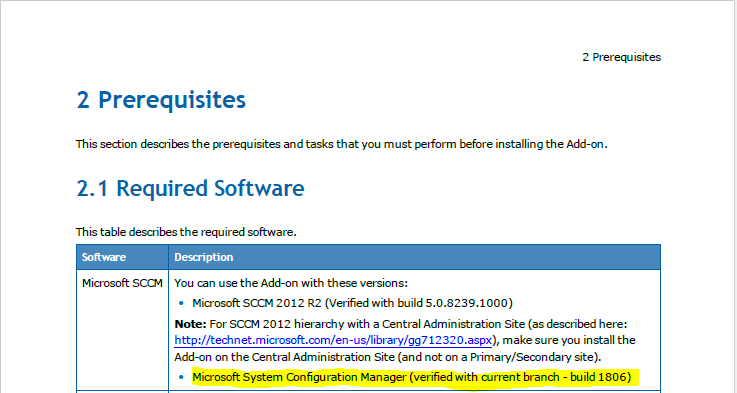
- Marcar como nuevo
- Favorito
- Suscribir
- Silenciar
- Suscribirse a un feed RSS
- Resaltar
- Imprimir
- Informe de contenido inapropiado
- Marcar como nuevo
- Favorito
- Suscribir
- Silenciar
- Suscribirse a un feed RSS
- Resaltar
- Imprimir
- Informe de contenido inapropiado
Thank you for the reply Jose! I guess my followup question is, why doesn't it do anything when installed on SCCM then? Also, I would really like to know why when I install the manageability commander even though I have SCCM installed on my machine I don't get the option for the plugin?
Thanks,
- Marcar como nuevo
- Favorito
- Suscribir
- Silenciar
- Suscribirse a un feed RSS
- Resaltar
- Imprimir
- Informe de contenido inapropiado
- Marcar como nuevo
- Favorito
- Suscribir
- Silenciar
- Suscribirse a un feed RSS
- Resaltar
- Imprimir
- Informe de contenido inapropiado
yes sir, it doesn't give the option for the SCCM addon at all
- Marcar como nuevo
- Favorito
- Suscribir
- Silenciar
- Suscribirse a un feed RSS
- Resaltar
- Imprimir
- Informe de contenido inapropiado
- Marcar como nuevo
- Favorito
- Suscribir
- Silenciar
- Suscribirse a un feed RSS
- Resaltar
- Imprimir
- Informe de contenido inapropiado
I have tried that but still no luck. It is an msi installer, so I can't just right click and run as an administrator, but I have tried various different methods to call it as an administrator. Would you have one in particular you would like me to attempt?
Thanks,
- Marcar como nuevo
- Favorito
- Suscribir
- Silenciar
- Suscribirse a un feed RSS
- Resaltar
- Imprimir
- Informe de contenido inapropiado
Launch a command prompt as administrator and call the msi that way.
- Marcar como nuevo
- Favorito
- Suscribir
- Silenciar
- Suscribirse a un feed RSS
- Resaltar
- Imprimir
- Informe de contenido inapropiado

- Suscribirse a un feed RSS
- Marcar tema como nuevo
- Marcar tema como leído
- Flotar este Tema para el usuario actual
- Favorito
- Suscribir
- Página de impresión sencilla