
- Marcar como nuevo
- Favorito
- Suscribir
- Silenciar
- Suscribirse a un feed RSS
- Resaltar
- Imprimir
- Informe de contenido inapropiado
Hello,
I've just purchased the new RS300 camera.
I'm using Microsoft Surface Win 10 with processor i7-6650U 2.2GHz
I installed driver intel_rs_dcm_sr300_3.3.27.5718, and sdk's:
intel_rs_sdk_mw_core_offline_11.0.27.1384
intel_rs_sdk_mw_face_hybrid_11.0.28.2787
intel_rs_sdk_mw_scan3d_hybrid_11.0.27.8892
When running Intel RealSense SDK Sample Browser, I get only c# application for 3D scan (in some video tutorials I saw there's a c++ example as well, but I dont get it).
Then, from the "Scanning Area" drop-down menu I choose "Face" and press the "Start Camera" button and I get "Configuration not supported".
Is that an expected behavior? Does it mean I can't scan3D faces?
In addition, I tried a different "Scanning area", Head, and the results were extremely bad even though I quite sure I followed the right steps (based on several tutorial videos I saw which demonstrated a much higher res and higher quality 3D output).
Any suggestions?
Based on tutorials I've read and saw, I expected the results to be much better, but unfortunately I fail to produce something that is even close to "good" 3D object.
Thanks,
A.

- Marcar como nuevo
- Favorito
- Suscribir
- Silenciar
- Suscribirse a un feed RSS
- Resaltar
- Imprimir
- Informe de contenido inapropiado
If I remember correctly, in the options side panel of the 3Dscan sample you need to at least tick the Landmark option before it can scan
Enlace copiado
- Marcar como nuevo
- Favorito
- Suscribir
- Silenciar
- Suscribirse a un feed RSS
- Resaltar
- Imprimir
- Informe de contenido inapropiado
If I remember correctly, in the options side panel of the 3Dscan sample you need to at least tick the Landmark option before it can scan
- Marcar como nuevo
- Favorito
- Suscribir
- Silenciar
- Suscribirse a un feed RSS
- Resaltar
- Imprimir
- Informe de contenido inapropiado
Thank you MartyG - it worked!
One more question though - I still get a very low res and poor quality 3d obj.
I'm using SDK R3, and on most youtube videos I saw people were using R2, do you think I should "downgrade" and try again?
Thanks again,
A.
- Marcar como nuevo
- Favorito
- Suscribir
- Silenciar
- Suscribirse a un feed RSS
- Resaltar
- Imprimir
- Informe de contenido inapropiado
I don't have insight on whether 3Dscan is better or worse in R3 than R2 as I have not done a comparison. If reliability is a key need then R2 is always a good choice as it is battle tested, whereas R3 is newer and more of an unknown at present, as it has a different structure to previous SDKs
- Marcar como nuevo
- Favorito
- Suscribir
- Silenciar
- Suscribirse a un feed RSS
- Resaltar
- Imprimir
- Informe de contenido inapropiado
- Marcar como nuevo
- Favorito
- Suscribir
- Silenciar
- Suscribirse a un feed RSS
- Resaltar
- Imprimir
- Informe de contenido inapropiado
Have you tried increasing the Max Triangles and Max Vertices using the up-down arrow icons next to their values in the side-pan of 3DScan? Increasing the triangles and vertices in a 3D model ought to give a more detailed model.
- Marcar como nuevo
- Favorito
- Suscribir
- Silenciar
- Suscribirse a un feed RSS
- Resaltar
- Imprimir
- Informe de contenido inapropiado
I tried to increase the Max Triangles and Max Vertices but still - the reconstruction doesn't look good.
I can try and upload a scanned 3D model if you think it might help.
- Marcar como nuevo
- Favorito
- Suscribir
- Silenciar
- Suscribirse a un feed RSS
- Resaltar
- Imprimir
- Informe de contenido inapropiado
I can take a look at your scan. It would be useful too if you could provide a comparison image of the kind of quality level you are aiming for.
- Marcar como nuevo
- Favorito
- Suscribir
- Silenciar
- Suscribirse a un feed RSS
- Resaltar
- Imprimir
- Informe de contenido inapropiado
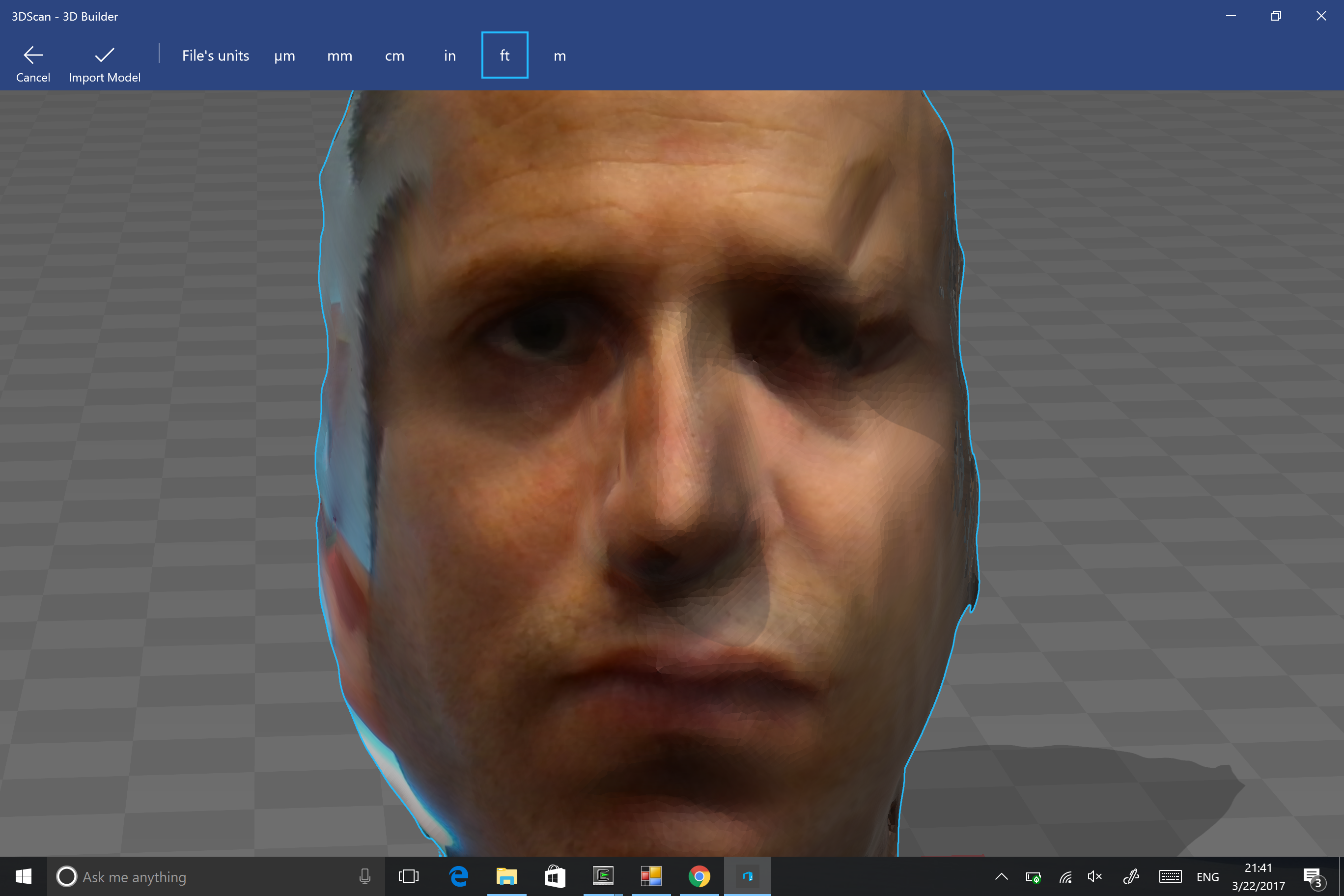
I can't upload files other than images, so I uploaded a snapshot of the 3D obj I got.
I assume I can send the obj, mtl and png file via email if needed.
Here're two links of the kind of quality level I'm aiming for.
https://www.youtube.com/watch?v=SW-SqE7HyPQ Intel® RealSense™ 3D Scanning Code Sample Demo - YouTube
https://www.youtube.com/watch?v=WEl9UgdGGCc Scan and Merge Your Face onto a Model Using the Intel® RealSense™ Face Scanning Code Sample - YouTube
- Marcar como nuevo
- Favorito
- Suscribir
- Silenciar
- Suscribirse a un feed RSS
- Resaltar
- Imprimir
- Informe de contenido inapropiado
I believe both of those samples you showed are done with the R200 camera. The SR300 is suited to scanning small objects, whilst the R200 is suited to larger objects and the human body
- Marcar como nuevo
- Favorito
- Suscribir
- Silenciar
- Suscribirse a un feed RSS
- Resaltar
- Imprimir
- Informe de contenido inapropiado
I don't think I saw this distinguish in any spec.
I'm aiming for face 3D scans, so I should have purchased the R200 in your opinion? After all, there is a "face" sample for R300?!
Do you consider face as "large" object?
In any case, given that I'm using my R300 camera - do you find the result I previously uploaded here acceptable?
Thanks!
- Marcar como nuevo
- Favorito
- Suscribir
- Silenciar
- Suscribirse a un feed RSS
- Resaltar
- Imprimir
- Informe de contenido inapropiado
There is not a camera called the R300. Currently, there is the R200 and SR300. I believe you have the SR300. The SR300 can do face scanning, but the R200 seems to be able to do it better.
I saw one information source that believed the quality of results was partly based on the camera algorithm being used, so a third-party 3D scanning software may get better results with the SR300 than the 3DScan application packaged free with the SDK.
Here is an interesting post from someone who was doing face scanning with the SR300 and also getting results that they considered unsatisfactory.
https://software.intel.com/en-us/forums/realsense/topic/672116 New SR300 face scanning problem
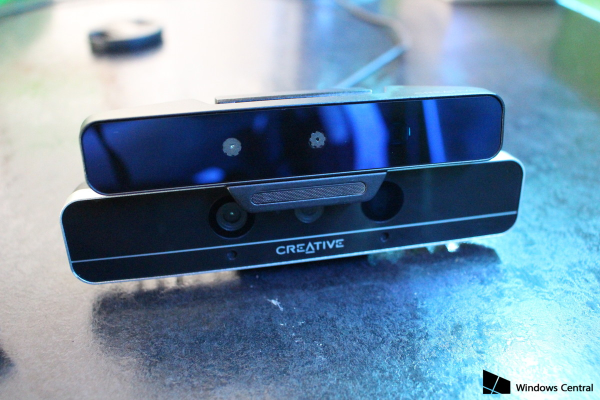
They noted that they had got non-ideal results with the original version of the SR300 camera (that has a case that looks the same as the F200 camera) but scanning had got worse with the second version of the SR300, which is smaller. I read a similar report in the past week, in which a user reported that they had problems with the SR300 version 2 that they had not got with the original.
Looking at your face image, one eye seems to have the same skewing that was present in the mouth of the face shown in the linked 'New SR300 face scanning problem' article that was produced with the second version of the SR300.
This image shows the two models, with original on bottom and version 2 on top. Which model do you have, please?
- Marcar como nuevo
- Favorito
- Suscribir
- Silenciar
- Suscribirse a un feed RSS
- Resaltar
- Imprimir
- Informe de contenido inapropiado
- Marcar como nuevo
- Favorito
- Suscribir
- Silenciar
- Suscribirse a un feed RSS
- Resaltar
- Imprimir
- Informe de contenido inapropiado
Ok, the one on top is the newer second version of the SR300.
Maybe you could download a free trial version of another 3D scanning software package that is compatible with the SR300 and see if it has better results than the free 3DScan sample packaged with the SDK. ReconstructMe works with the SR300.
http://reconstructme.net/reconstructme-ui/ About | ReconstructMe
http://reconstructme.net/2017/03/13/reconstructme-sdk-support-for-intel-realsense/ ReconstructMe SDK support for Intel RealSense | ReconstructMe
- Marcar como nuevo
- Favorito
- Suscribir
- Silenciar
- Suscribirse a un feed RSS
- Resaltar
- Imprimir
- Informe de contenido inapropiado
Hi MartyG,
Thanks for your suggestion to try ReconstructMe.
Unfortunately, it doesn't seem to support RS300. Are you familiar with any other software that might help us?
Thanks!
- Marcar como nuevo
- Favorito
- Suscribir
- Silenciar
- Suscribirse a un feed RSS
- Resaltar
- Imprimir
- Informe de contenido inapropiado
Did you download it from the 'Reconstructive SDK support' link above? That page says the version downloadable from a link on that page works with SR300

- Suscribirse a un feed RSS
- Marcar tema como nuevo
- Marcar tema como leído
- Flotar este Tema para el usuario actual
- Favorito
- Suscribir
- Página de impresión sencilla