
- 신규로 표시
- 북마크
- 구독
- 소거
- RSS 피드 구독
- 강조
- 인쇄
- 부적절한 컨텐트 신고
As you know, to get the proper scene for using Realsense, I clicked the file(:RealSenseTextures.unity) and opened it.@
It works very well, in latest unity (x64)
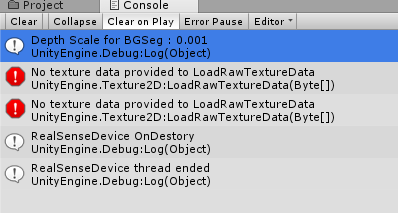
there are some warning message, but it works well.
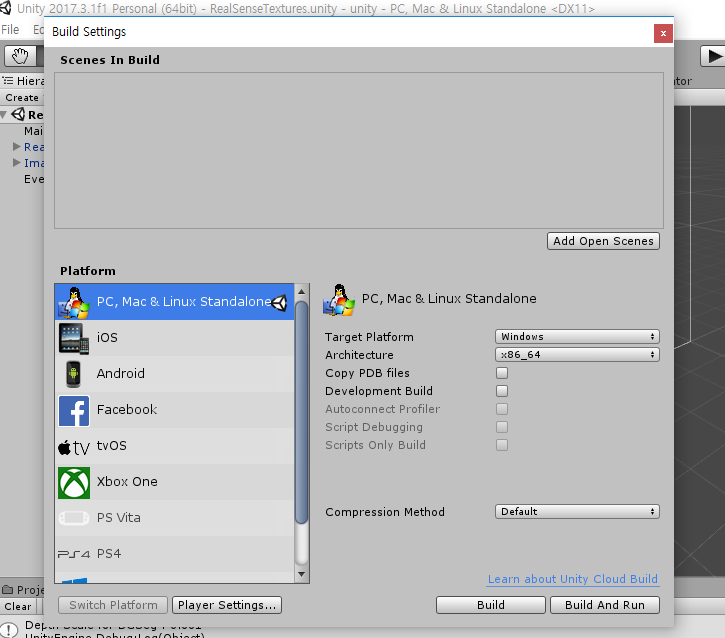
However, I tried to build,
it does not work. (Fail to build)
How am i supposed to do?
Thank you in advance. @
링크가 복사됨

- 신규로 표시
- 북마크
- 구독
- 소거
- RSS 피드 구독
- 강조
- 인쇄
- 부적절한 컨텐트 신고
I looked carefully at your case but I do not have SDK 2.0's version of Unity support set up on my own PC so I am unable to run tests. I apologize and hope a member of Intel's support team can help you with this later. Good luck!

- 신규로 표시
- 북마크
- 구독
- 소거
- RSS 피드 구독
- 강조
- 인쇄
- 부적절한 컨텐트 신고
Hello,
Did you post to answers.unity.com/questions/?
You may also rise an issue to https://github.com/IntelRealSense/librealsense/issues Issues · IntelRealSense/librealsense · GitHub
References:
http://lmgtfy.com/?q=error+buildplayerwindowbuildmethods.cs:181 LMGTFY
https://answers.unity.com/questions/1453168/0x0020e-0x00065-errors2-unity-built-error-0x0020e0.html [0x0020e], [0x00065] errors,2 Unity built error [0x0020e],[0x00065] - Unity Answers
https://answers.unity.com/questions/1464770/how-to-fix-error-0x0020e-and-other-errors.html https://answers.unity.com/questions/1464770/how-to-fix-error-0x0020e-and-other-errors.html
https://github.com/IntelRealSense/librealsense/issues Issues · IntelRealSense/librealsense · GitHub
https://stackoverflow.com/questions/tagged/realsense Newest 'realsense' Questions - Stack Overflow
- 신규로 표시
- 북마크
- 구독
- 소거
- RSS 피드 구독
- 강조
- 인쇄
- 부적절한 컨텐트 신고
it seems that it is not a fault of Unity's
in my terms of view,
the given scene (by Realsense sdk 2.0) is "using UnityEditior"
so it work well in the test , however, it cannot be built.
Actually, i removed the code related with unityeditor, it can be built.
However, it crash down in a minute.
Thank you for your advice, I will try it later on.



- 신규로 표시
- 북마크
- 구독
- 소거
- RSS 피드 구독
- 강조
- 인쇄
- 부적절한 컨텐트 신고
Hello qwerty.2944,
Building a game app cannot use the UnityEditor namespace. This namespace comes with the UnityEditor.dll assembly that is not shipped (and not compatible) with any build made by Unity. Scripts that use this namespace are only meant to be executed inside Unity Editor.
Therefore, need to create a new script in Assets/Editor folder and move below code to that script. Then, the Windows app can be built successfully.
-------
public class RealSenseDeviceInspectorEditor : Editor
{
public static void DrawHorizontal(string field, string value)
{
EditorGUILayout.BeginHorizontal();
{
EditorGUILayout.LabelField(field, GUILayout.Width(EditorGUIUtility.labelWidth - 4));
EditorGUILayout.SelectableLabel(value, EditorStyles.textField, GUILayout.Height(EditorGUIUtility.singleLineHeight));
}
EditorGUILayout.EndHorizontal();
}
public override void OnInspectorGUI()
{
RealSenseDeviceInspector deviceInspector = (RealSenseDeviceInspector)target;
if (!deviceInspector.streaming)
return;
EditorGUILayout.Space();
var devName = deviceInspector.device.Info[CameraInfo.Name];
var devSerial = deviceInspector.device.Info[CameraInfo.SerialNumber];
DrawHorizontal("Device", devName);
DrawHorizontal("Device S/N", devSerial);
EditorGUILayout.Space();
foreach (var kvp in deviceInspector.sensors)
{
string sensorName = kvp.Key;
var sensor = kvp.Value;
EditorGUILayout.Space();
EditorGUILayout.LabelField(sensorName);
foreach (var opt in sensor.Options)
{
if(opt.IsCheckbox())
...
