
- Mark as New
- Bookmark
- Subscribe
- Mute
- Subscribe to RSS Feed
- Permalink
- Report Inappropriate Content
Hi , Can anybody tell me how to Capture Screen continuously and do encode it using Intel Media SDK ?

- Mark as New
- Bookmark
- Subscribe
- Mute
- Subscribe to RSS Feed
- Permalink
- Report Inappropriate Content
Hello Mohammad,
Screen capture plugin continuosly captures display front buffer. In order to capture only specific number of frames to a surface you will need to add "-n (number for frames to capture)" and if you want direct it to a file (in nv12 format), you can add " -o outputfile.nv12" to above command line, then command line will be as following:
"sample_decode.exe capture -p 22d62c07e672408fbb4cc20ed7a053e4 -h (height) -w (width) -hw -n (number of frames) -o outputfile.nv12 "
Screen capture plugin can also capture display front buffer in RGB4 format. Depending on your use case you capture frames in either (nv12/rgb4) format suitable for your scenario and then using encoder you can encode the frames. Please refer to "mediasdkscreencap-man.pdf" for configuration details with plugin.
For further media questions, please post your questions on mediasdk forum here: https://software.intel.com/en-us/forums/intel-media-sdk. It will be easier for us to track and respond.
Thanks,
Link Copied
- Mark as New
- Bookmark
- Subscribe
- Mute
- Subscribe to RSS Feed
- Permalink
- Report Inappropriate Content
Hi Mohammad,
We have another solution, which provides more advantages and removes limitations with GetFrontBufferData solution:
- From MediaSDK API 1.13 we have added capture screen plugin, where you can screen capture raw frames directly in NV12 format and connect with encoder for encoding.
- Screen capture -> MediaSDK encoder.
- Screen capture is implemented as part of decoder plugin. Run the following command line to capture screen in NV12 format directly using samples:
- sample_decode.exe capture -p 22d62c07e672408fbb4cc20ed7a053e4 -h (height) -w (width) -hw
The above command line shows screen capture operation works. Please take a look at "mediasdkscreencap-man.pdf" in mediasdk/docs folder to know more details about the screen capture plugin. Let me know if you have any questions.
Thanks,
- Mark as New
- Bookmark
- Subscribe
- Mute
- Subscribe to RSS Feed
- Permalink
- Report Inappropriate Content
Hi Harsh,
Thanks for this information but i am not able to find MediaSDK API 1.13 for Windows to download. I am using INDE in Windows.
If you know the link from where to download it, kindly provide me, it will be really very helpful to me.
Thank you
- Mark as New
- Bookmark
- Subscribe
- Mute
- Subscribe to RSS Feed
- Permalink
- Report Inappropriate Content
Hi
I have tried to code with help from mediasdkscreencap-man.pdf. But not able to make it. Is there any code or example ?
- Mark as New
- Bookmark
- Subscribe
- Mute
- Subscribe to RSS Feed
- Permalink
- Report Inappropriate Content
Hi Mohammad,
Please confirm and verify, if you have latest mediasdk ver 6.0.0.388 (API 1.16) installed. Yes, then it already includes screen capture support. We have samples showcasing this feature. Download latest samples: https://software.intel.com/sites/default/files/MediaSamples_Windows_6.0.0.68.msi, then run the following command line, which shows screen capture operation:
- "sample_decode.exe capture -p 22d62c07e672408fbb4cc20ed7a053e4 -h (height) -w (width) -hw "
For quick turnaround on mediasdk related issues, please direct your questions here: https://software.intel.com/en-us/forums/intel-media-sdk. It will be easier for us to track and respond.
Thanks,
- Mark as New
- Bookmark
- Subscribe
- Mute
- Subscribe to RSS Feed
- Permalink
- Report Inappropriate Content
Hi Harsh,
I am running "sample_decode.exe capture -p 22d62c07e672408fbb4cc20ed7a053e4 -h (height) -w (width) -hw " , it runs nice, but i want to know how to stop it, and when it stops where it will give me output file. Is there any output file when this exe stops.
Thank you
- Mark as New
- Bookmark
- Subscribe
- Mute
- Subscribe to RSS Feed
- Permalink
- Report Inappropriate Content
Hello Mohammad,
Screen capture plugin continuosly captures display front buffer. In order to capture only specific number of frames to a surface you will need to add "-n (number for frames to capture)" and if you want direct it to a file (in nv12 format), you can add " -o outputfile.nv12" to above command line, then command line will be as following:
"sample_decode.exe capture -p 22d62c07e672408fbb4cc20ed7a053e4 -h (height) -w (width) -hw -n (number of frames) -o outputfile.nv12 "
Screen capture plugin can also capture display front buffer in RGB4 format. Depending on your use case you capture frames in either (nv12/rgb4) format suitable for your scenario and then using encoder you can encode the frames. Please refer to "mediasdkscreencap-man.pdf" for configuration details with plugin.
For further media questions, please post your questions on mediasdk forum here: https://software.intel.com/en-us/forums/intel-media-sdk. It will be easier for us to track and respond.
Thanks,
- Mark as New
- Bookmark
- Subscribe
- Mute
- Subscribe to RSS Feed
- Permalink
- Report Inappropriate Content
Hi Harsh,
The simple_decode code is working fine at the location where i am putting whole IntelMediaSamples6.0.0.68. But when i put single decode_sample at different location and copy plug-in at that location inside decode_sample then unknown_plugin error is coming. So please tell me how to add plug-in and code decode_sample at different location.
I am passing command line "sample_decode.exe capture -p 22d62c07e672408fbb4cc20ed7a053e4 -h (height) -w (width) -hw -n (number of frames) -o outputfile.nv12 " , but at different location unknown plugin error is coming.
Please help me .
- Mark as New
- Bookmark
- Subscribe
- Mute
- Subscribe to RSS Feed
- Permalink
- Report Inappropriate Content
Hi Mohammad,
Please correct me if i did not get your question correctly, "you would like to know how run screen capture via sample_decode command line when copied on different path"? Yes, then to run screen capture, you should have sample_decode executable and plugin at the same folder level and can be at any different location as below, make sure both the files (exe and plugin) are at same folder level and that should resolve the unknown plugin issue.
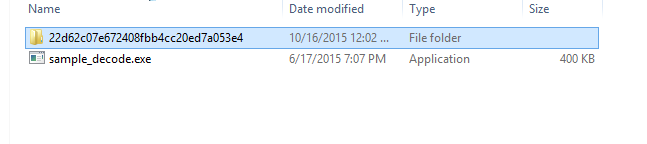
Also, as I have mentioned in several previous posts, please post your questions on mediasdk forum here: https://software.intel.com/en-us/forums/intel-media-sdk. It will be easier for us to track and respond.
Thanks,
- Mark as New
- Bookmark
- Subscribe
- Mute
- Subscribe to RSS Feed
- Permalink
- Report Inappropriate Content
Hi Harsh
With exe the plugin is working fine, i am running different project same as sample_decode but only with Screen Capture code and i am copying plugin at the location where the new ScreenCapture code is . But when i am running it , there is an error "Failed to load pliugin from GUID".
Hope now you understand what my problem is.
Help me with this.
Thank you
- Mark as New
- Bookmark
- Subscribe
- Mute
- Subscribe to RSS Feed
- Permalink
- Report Inappropriate Content
Hi Harsh
I have resolve the issue, I did copy plugins in my project debug folder. Now it's working fine.
Thanks

- Mark as New
- Bookmark
- Subscribe
- Mute
- Subscribe to RSS Feed
- Permalink
- Report Inappropriate Content
The plugin captures the framebuffer data. Does this mean while writing our own code for screen capture we just have to take care of decode and encode operation?
OR
Can we design our own Screen Capture code using the Intel Media SDK which can work independently from the plugin provided by Intel?

- Subscribe to RSS Feed
- Mark Topic as New
- Mark Topic as Read
- Float this Topic for Current User
- Bookmark
- Subscribe
- Printer Friendly Page