
- Mark as New
- Bookmark
- Subscribe
- Mute
- Subscribe to RSS Feed
- Permalink
- Report Inappropriate Content
Hi. I'm using QS mjpeg decoder and trying to decode to system memory (hardware codec implementation). Target colorspace is MFX_FOURCC_NV12 / MFX_CHROMAFORMAT_YUV420, and resolution is 1080p. Input data is from webcam.
This is what I get:
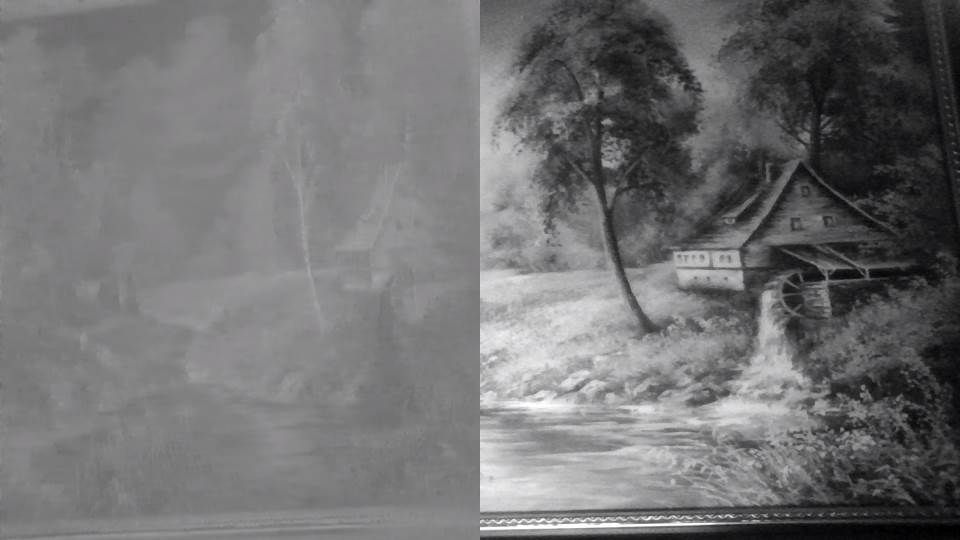
It looks like left side is chroma plane, and right side is half of luma plane. In UV plane all bytes is 0x80. I double checked this and can not find any copy mistake on my side. This doesn't look like copy mistake in system memory because in NV12 chroma plane width = luma plane width, and chroma plane height = half of luma plane height. This must look different.
OS - Win10 x64 latest build, driver 20.19.15.4531 (29.09.2016), GPU - Intel HD 4600. This is laptop.
- Mark as New
- Bookmark
- Subscribe
- Mute
- Subscribe to RSS Feed
- Permalink
- Report Inappropriate Content
Hi,
I've been in contact with Vladimir and reproduced the problem on my side, we've found the issue and the correct fix:
mfxVideoParams.mfx.JPEGColorFormat and mfxVideoParams.mfx.JPEGChromaFormat were both set to 0 before the calls to DecodeFrameAsync, and hardware encoder hence treated the stream a Monochrome YUV input, while it was 4:2:2 YUV.
We confirmed this by hardcoding these params, which got the stream be decoded correctly:
mfxVideoParams.mfx.JPEGColorFormat = MFX_JPEG_COLORFORMAT_YCbCr;
mfxVideoParams.mfx.JPEGChromaFormat = MFX_CHROMAFORMAT_YUV422;
The correct fix was to make a call to DecodeHeader with the first frame, before using DecodeFrameAsync, since DecodeHeader takes care of populating the JPEGColorFormat and JPEGChromaFormat parameters.
Link Copied
- Mark as New
- Bookmark
- Subscribe
- Mute
- Subscribe to RSS Feed
- Permalink
- Report Inappropriate Content
IntelMediaSDK 7.0.0.358
Can not initialize decoder with MFX_FOURCC_YV12 / MFX_CHROMAFORMAT_YUV420.
Can not initialize decoder with MFX_FOURCC_YV12 / MFX_CHROMAFORMAT_YUV411.
Same issue with MFX_FOURCC_YUY2 / MFX_CHROMAFORMAT_YUV422.
Is anybody alive here?
		if (m_params.mfx.FrameInfo.FourCC == MFX_FOURCC_NV12) {
			pFrame->surf.Data.Y = (mfxU8 *) BMI_ALIGN16((UINT_PTR) (&pFrame->data[0]));
			pFrame->surf.Data.UV = (mfxU8 *) BMI_ALIGN16((UINT_PTR) (pFrame->surf.Data.Y + (Width * Height)));
			pFrame->surf.Data.V = pFrame->surf.Data.UV + 1;
			pFrame->surf.Data.PitchLow = Width;
		} else
		if (m_params.mfx.FrameInfo.FourCC == MFX_FOURCC_YV12) {
			pFrame->surf.Data.Y = (mfxU8 *) BMI_ALIGN16((UINT_PTR) (&pFrame->data[0]));
			pFrame->surf.Data.U = (mfxU8 *) BMI_ALIGN16((UINT_PTR) (pFrame->surf.Data.Y + (Width * Height)));
			pFrame->surf.Data.V = (mfxU8 *) BMI_ALIGN16((UINT_PTR) (pFrame->surf.Data.U + ((Width / 2) * (Height / 2))));
			pFrame->surf.Data.PitchLow = Width;
		} else
		if (m_params.mfx.FrameInfo.FourCC == MFX_FOURCC_YUY2) {
			pFrame->surf.Data.Y = (mfxU8 *) BMI_ALIGN16((UINT_PTR) (&pFrame->data[0]));
			pFrame->surf.Data.U = pFrame->surf.Data.Y + 1;
			pFrame->surf.Data.V = pFrame->surf.Data.Y + 3;
			pFrame->surf.Data.PitchLow = Width * 2;
		} else
- Mark as New
- Bookmark
- Subscribe
- Mute
- Subscribe to RSS Feed
- Permalink
- Report Inappropriate Content
MFX_FOURCC_RGB4 / MFX_CHROMAFORMAT_YUV444 - same issue happens. It seems this issue is general.
What is correct way to report bugs? Usually forum works fine. But now is no answer here.
- Mark as New
- Bookmark
- Subscribe
- Mute
- Subscribe to RSS Feed
- Permalink
- Report Inappropriate Content
MFX_IMPL_SOFTWARE works fine. I tried MFX_FOURCC_NV12 / MFX_CHROMAFORMAT_YUV420. It seems this issue is in hardware decoder implementation only.

- Mark as New
- Bookmark
- Subscribe
- Mute
- Subscribe to RSS Feed
- Permalink
- Report Inappropriate Content
Hi Vladimir,
Sorry for the late response, I am trying to reproduce the issue but I want to understand your issue.
It looks like:
1. You are running sample_decode on the Windows platform.
2. The input is a MJPEG raw data file with a static picture.
3. You got an image like you show on the first post, it was divided into a picture with side-by-side gray image, the left half is the UV plane, the right half is the Y plane.
Since you mentioned the UV plan output is all 0x80, why I can still see some images?
Mark
- Mark as New
- Bookmark
- Subscribe
- Mute
- Subscribe to RSS Feed
- Permalink
- Report Inappropriate Content
Hi Yan.
1. I developed DirectShow filter based on MFXVideoSession / MFXVideoDECODE classes. There no VPP. Only decoder that decodes to system memory.
2. Input is webcam with MJPEG output.
3. I getting NV12 picture that contains following:
Y plane contains - left half is original UV plane (looks like), right half is right half of Y
UV plane contains - 0x80 all bytes (so we see gray result).
I.e. original UV content is in Y plane by some reason, but actual UV plane is all 0x80.
I tried decoding to RGB and getting same result. I suppose there some conversion inside from YUV to RGB so it looks like this issue happens before conversion.
If you have chance to contact me directly, I can send you our DirectShow filter so you can reproduce this issue easily.
- Mark as New
- Bookmark
- Subscribe
- Mute
- Subscribe to RSS Feed
- Permalink
- Report Inappropriate Content
Hi,
I've been in contact with Vladimir and reproduced the problem on my side, we've found the issue and the correct fix:
mfxVideoParams.mfx.JPEGColorFormat and mfxVideoParams.mfx.JPEGChromaFormat were both set to 0 before the calls to DecodeFrameAsync, and hardware encoder hence treated the stream a Monochrome YUV input, while it was 4:2:2 YUV.
We confirmed this by hardcoding these params, which got the stream be decoded correctly:
mfxVideoParams.mfx.JPEGColorFormat = MFX_JPEG_COLORFORMAT_YCbCr;
mfxVideoParams.mfx.JPEGChromaFormat = MFX_CHROMAFORMAT_YUV422;
The correct fix was to make a call to DecodeHeader with the first frame, before using DecodeFrameAsync, since DecodeHeader takes care of populating the JPEGColorFormat and JPEGChromaFormat parameters.
- Mark as New
- Bookmark
- Subscribe
- Mute
- Subscribe to RSS Feed
- Permalink
- Report Inappropriate Content
Thanks for all your help. All issues was solved.
I have another question related to MJPG decoder.
I'm testing QS MJPEG decoder with MJPG stream (4K 30fps) coming from hardware. It works perfectly well when hardware decoder implementation used. But when using software decoder implementation, my CPU (i7-4700HQ) have not enough resources to decode this stream. I'm getting around 22-23 fps on output.
Do you know is there multi-threaded decoding supported by software implementation of MJPEG decoder? I tried to set NumThread to 2 and higher but no difference.
Do you know, is there any plans to implement this in future? I think it makes sense.
- Mark as New
- Bookmark
- Subscribe
- Mute
- Subscribe to RSS Feed
- Permalink
- Report Inappropriate Content
Nevermind, we implemented multithreaded MJPEG decoding based on another software decoder.

- Subscribe to RSS Feed
- Mark Topic as New
- Mark Topic as Read
- Float this Topic for Current User
- Bookmark
- Subscribe
- Printer Friendly Page