
- Mark as New
- Bookmark
- Subscribe
- Mute
- Subscribe to RSS Feed
- Permalink
- Report Inappropriate Content
Hi,
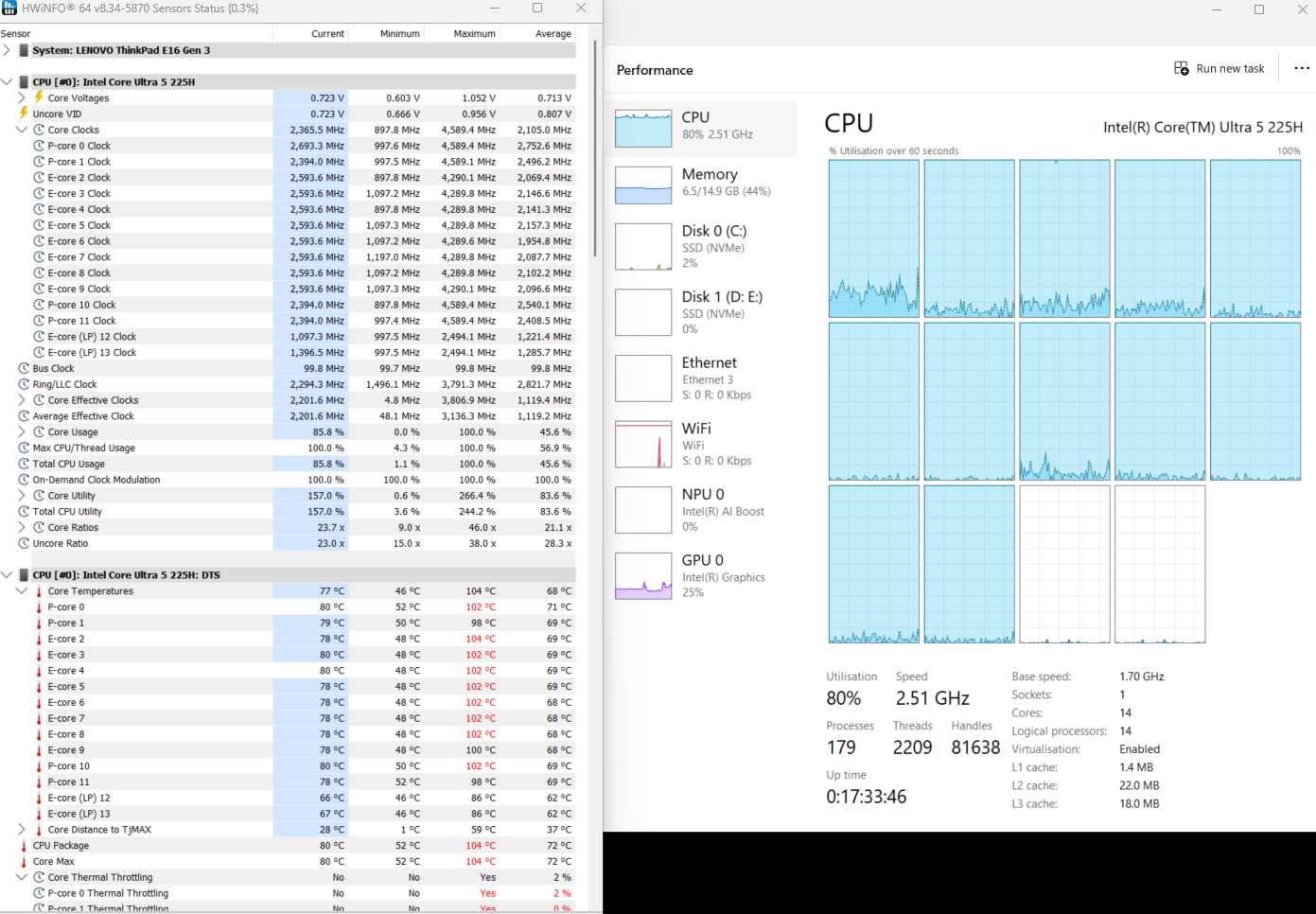
I bought Lenovo E16 Gen 3 Intel 225H laptop, Its just a 2 month old laptop (Vents are clean , no dust accumulated). I ran some ffmpeg encoding in parallel and the speeds get dropped and capped at 2.6 Ghz. Temperature also stays around 80 c. Initially though speeds of performance cores reach around 4.5 Ghz but once they hit TjMax , they stay at 80 c with reduced speeds.
All cores run at 2.6 Ghz , They dont even cross 3 Ghz. Atleast a low end Ryzen 5 5600h which I own has base frequency of 3.3 Ghz.
Once I terminate ffmpeg encoding, Speed cap of 2.6 Ghz goes and cores frequency varies and goes beyond 4 Ghz
I tried this in both Ubuntu and Windows 11, All drivers are updated to latest. Both Operating systems are in performance mode.
I disabled Intel Step and performance management in BIOS.
How do I fix this? Is this Intel throttling or the Lenovo throttling ? Its like running 12 cores @ 2.6 Ghz while my Legion laptop with Ryzen 5600H runs 6 cores at 3.3 ghz base
Link Copied

- Mark as New
- Bookmark
- Subscribe
- Mute
- Subscribe to RSS Feed
- Permalink
- Report Inappropriate Content
Hello TPCoreUltra225h,
Thank you for reaching out and for providing details about your Lenovo E16 Gen 3 laptop. I understand it’s frustrating to see your CPU speed drop under load, and I’d like to help.
To better understand the issue, could you please answer a few questions:
- Are you running the laptop on battery or plugged in while testing?
- Does the speed drop happen with programs other than ffmpeg?
- When the speed drops, what temperature does the CPU reach?
- Are all your drivers updated from Lenovo or Intel?
- Does the same thing happen on both Windows and Ubuntu?
Your answers will help us figure out what might be causing the CPU to slow down and what we can do next.
Thank you for your time, and I look forward to your reply.
Regards,
John M.
Intel Customer Support Technician
- Mark as New
- Bookmark
- Subscribe
- Mute
- Subscribe to RSS Feed
- Permalink
- Report Inappropriate Content
Hi John,
Please find my inline answer below in blue
- Are you running the laptop on battery or plugged in while testing?
Yes, Laptop is always plugged in ,i ts never on battery and always on performance mode in Windows 11 and Ubuntu
2. Does the speed drop happen with programs other than ffmpeg?
Yes, I checked by running Cinebench and other benchmark tools
3. When the speed drops, what temperature does the CPU reach?
CPU reaches within a minute102 C , then drops to around 80 C and stays there so does the speed @ 2.6 Ghz. This happens till the program is run. Once Cinebench or ffmpeg completes, Temperature drops to around 60 C and CPU speeds goes around 3 to 3.3 Ghz.
4. Are all your drivers updated from Lenovo or Intel?
Yes, Intel, Lenovo, Windows all the drivers are updates to latest.
5.Does the same thing happen on both Windows and Ubuntu?
Yes, I was able to reproduce this in Ubuntu as well.
I have attached video of CPU temp reaching TJMax and going back to 80C for Cinebench and Prime95 tool.


- Mark as New
- Bookmark
- Subscribe
- Mute
- Subscribe to RSS Feed
- Permalink
- Report Inappropriate Content
Hi @TPCoreUltra225h,
- Mark as New
- Bookmark
- Subscribe
- Mute
- Subscribe to RSS Feed
- Permalink
- Report Inappropriate Content
Hi PC1997,
Thanks for your reply. If its factory firmware or Intel firmware limited, Then I see no point in paying so much for the chip/laptop that cant be utilized to its full capacity. I rather pay less for a chip whose processing power can be utilized to its capacity.
The only reason I go with 'H' series and not 'U' series processor is for their performance on cost of battery backup, Along with it being a Thinkpad and not an Ideapad. Even after that If I am unable to utilize its full potential then Intel or Lenovo should put a disclaimer on its limited capacity so that customers can make an Informed decision.
- Mark as New
- Bookmark
- Subscribe
- Mute
- Subscribe to RSS Feed
- Permalink
- Report Inappropriate Content
- Mark as New
- Bookmark
- Subscribe
- Mute
- Subscribe to RSS Feed
- Permalink
- Report Inappropriate Content
Hello TPCoreUltra225h,
Thank you for patiently waiting.
Unfortunately, we do not have sufficient information on this product as it is an OEM unit. For assistance with possible BIOS settings or if an RMA is required, we kindly recommend that you contact Lenovo Support directly. They will be able to provide the guidance and support specific to your system.
We apologize for any inconvenience and appreciate your understanding.
Regards,
John M.
Intel Customer Support Technician

- Subscribe to RSS Feed
- Mark Topic as New
- Mark Topic as Read
- Float this Topic for Current User
- Bookmark
- Subscribe
- Printer Friendly Page