
- Mark as New
- Bookmark
- Subscribe
- Mute
- Subscribe to RSS Feed
- Permalink
- Report Inappropriate Content
When in the compact view, pressing "Optimize Power & Current Limits" results in the following "Tuning Error."
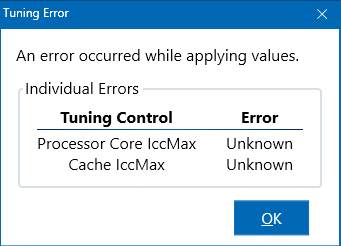
I use Intel Core i5-9600K CPU.
Link Copied

- Mark as New
- Bookmark
- Subscribe
- Mute
- Subscribe to RSS Feed
- Permalink
- Report Inappropriate Content
Hello AlexD,
Thank you for posting on the Intel® communities. I can imagine how frustrating this is for you.
I would appreciate it if you share the following information:
1. Is the error only appearing when pressing "Optimize Power & Current Limits" and not with other Intel® Extreme Tuning Utility (Intel® XTU) options?
2. Is this issue recent? Was it working properly before?
3. Run the Intel® System Support Utility (Intel® SSU) to gather more details about the system.
- Download the Intel® SSU and save the application on your computer: https://www.intel.com/content/www/us/en/download/18377/intel-system-support-utility-for-windows.html
- Open the application, check the "Everything" checkbox, and click "Scan" to see the system and device information. The Intel® SSU defaults to the "Summary View" on the output screen following the scan. Click the menu where it says "Summary" to change to "Detailed View".
- To save your scan, click Next and click Save.
Regards,
Deivid A.
Intel Customer Support Technician
- Mark as New
- Bookmark
- Subscribe
- Mute
- Subscribe to RSS Feed
- Permalink
- Report Inappropriate Content
The error seems to only appear when pressing "Optimize Power & Current Limits" It has been working like that ever since I installed the app for the first time.
- Mark as New
- Bookmark
- Subscribe
- Mute
- Subscribe to RSS Feed
- Permalink
- Report Inappropriate Content
Hello AlexD,
Thanks for your response. Based on this issue, I would like to know if you tried uninstalling and reinstalling this tool. If you have not, you can check this article with the steps:
If the issue persists, please attach the report from Intel® System Support Utility (Intel® SSU) to gather more details about the system.
- Download the Intel® SSU and save the application on your computer: https://www.intel.com/content/www/us/en/download/18377/intel-system-support-utility-for-windows.html
- Open the application, check the "Everything" checkbox, and click "Scan" to see the system and device information. The Intel® SSU defaults to the "Summary View" on the output screen following the scan. Click the menu where it says "Summary" to change to "Detailed View".
- To save your scan, click Next and click Save.
Regards,
Deivid A.
Intel Customer Support Technician
- Mark as New
- Bookmark
- Subscribe
- Mute
- Subscribe to RSS Feed
- Permalink
- Report Inappropriate Content
Reinstalling did not help unfortunately. Here is the SSU rreport.

- Mark as New
- Bookmark
- Subscribe
- Mute
- Subscribe to RSS Feed
- Permalink
- Report Inappropriate Content
Hello!
I would like to report the same problem with the exact same processor(i5-9600k).

- Mark as New
- Bookmark
- Subscribe
- Mute
- Subscribe to RSS Feed
- Permalink
- Report Inappropriate Content
Hello AlexD,
Thank you for the information provided
I will proceed to check the issue internally and post back soon with more details.
Best regards,
Deivid A.
Intel Customer Support Technician
- Mark as New
- Bookmark
- Subscribe
- Mute
- Subscribe to RSS Feed
- Permalink
- Report Inappropriate Content
Hello AlexD,
Thanks for your patience. I am still investigating this issue and to continue, I will need the following information:
1. Provide the Intel® Driver & Support Assistant (Intel® DSA) logs:
2. What is the browser you are using and its version?
3. What is the Intel® Driver & Support Assistant (Intel® DSA) version?
Best regards,
Deivid A.
Intel Customer Support Technician
- Mark as New
- Bookmark
- Subscribe
- Mute
- Subscribe to RSS Feed
- Permalink
- Report Inappropriate Content
I use Opera GX version 104.0.4944.60 and Intel® DSA version 23.4.39.9.
- Mark as New
- Bookmark
- Subscribe
- Mute
- Subscribe to RSS Feed
- Permalink
- Report Inappropriate Content
Hello AlexD,
Thanks for the confirmation. This will help me with the investigation and I will get back to you in case I need further details or if I have any steps for you.
Thanks for your comprehension.
Regards,
Deivid A.
Intel Customer Support Technician
- Mark as New
- Bookmark
- Subscribe
- Mute
- Subscribe to RSS Feed
- Permalink
- Report Inappropriate Content
Hello AlexD,
If you have made any changes to BIOS or Intel® Extreme Tuning Utility (Intel® XTU) settings, I recommend you set everything to default on BIOS and try again.
Also, from Intel® Extreme Tuning Utility (Intel® XTU) set Processor Core IccMax" and "Cache IccMax" to default, and test again.
Let me know if you are still having issues.
Regards,
Deivid A.
Intel Customer Support Technician
- Mark as New
- Bookmark
- Subscribe
- Mute
- Subscribe to RSS Feed
- Permalink
- Report Inappropriate Content
I am not sure what you mean by setting Processor Core "IccMax" and "Cache IccMax" to default. Those two settings do not have "default" option. They both have a range of options between 1.00 A and 256.00 A. By default, when I installed the program for the first time, they were both set to 255.75 A. At the moment they are set to 255.75 A as well. My BIOS settings are also set to default. The problem persists.
- Mark as New
- Bookmark
- Subscribe
- Mute
- Subscribe to RSS Feed
- Permalink
- Report Inappropriate Content
Hello AlexD,
I am getting back to you because I want to know if were able to follow the recommendations and if the issue persists.
If you need further support, just let me know.
Regards,
Deivid A.
Intel Customer Support Technician
- Mark as New
- Bookmark
- Subscribe
- Mute
- Subscribe to RSS Feed
- Permalink
- Report Inappropriate Content
Hello AlexD,
I do appreciate your confirmation related to the options "IccMax" and "Cache IccMax". I will continue with the investigation to confirm if there are any steps for you that can help you fix this inconvenience with the Intel® Extreme Tuning Utility (Intel® XTU).
Thanks for your time and comprehension.
Regards,
Deivid A.
Intel Customer Support Technician
- Mark as New
- Bookmark
- Subscribe
- Mute
- Subscribe to RSS Feed
- Permalink
- Report Inappropriate Content
Hello AlexD,
Based on the investigation, it’s possible that this feature wasn’t fully tested on Coffee Lake because is well outside the standard support window, as a discontinued product.
However, you could emulate what the feature is supposed to do by going into Advanced Tuning and setting the below controls to the highest value they can.
- Processor Core IccMax
- Turbo Boost Short Power Max
- Turbo Boost Power Max
- Cache IccMax (if it is visible)
Let me know if this helps you.
Regards,
Deivid A.
Intel Customer Support Technician
- Mark as New
- Bookmark
- Subscribe
- Mute
- Subscribe to RSS Feed
- Permalink
- Report Inappropriate Content
Hello AlexD
I am getting back to you because I would like to know if the previous recommendation helped you, if not, please let me know.
Regards,
Deivid A.
Intel Customer Support Technician

- Mark as New
- Bookmark
- Subscribe
- Mute
- Subscribe to RSS Feed
- Permalink
- Report Inappropriate Content
Hello, @AlexD
I hope you are doing great.
As we have not heard back from you, we will proceed to close this thread now.
If you need any further assistance, please feel free to contact us back and submit a new question as this thread will no longer be monitored.
Best regards,
Jocelyn M.
Intel Customer Support Technician.

- Mark as New
- Bookmark
- Subscribe
- Mute
- Subscribe to RSS Feed
- Permalink
- Report Inappropriate Content
Same issue here. i9-10850k with Asus TUF Gaming Plus Wifi B460M motherboard.


- Mark as New
- Bookmark
- Subscribe
- Mute
- Subscribe to RSS Feed
- Permalink
- Report Inappropriate Content
same issue here on i-9 9900k

- Subscribe to RSS Feed
- Mark Topic as New
- Mark Topic as Read
- Float this Topic for Current User
- Bookmark
- Subscribe
- Printer Friendly Page