
- Mark as New
- Bookmark
- Subscribe
- Mute
- Subscribe to RSS Feed
- Permalink
- Report Inappropriate Content
i9-14900K PCIe lanes training issue – GPU stuck at x2
Hello,
I believe my Intel Core i9-14900K may have an issue with the PCIe controller or lane training.
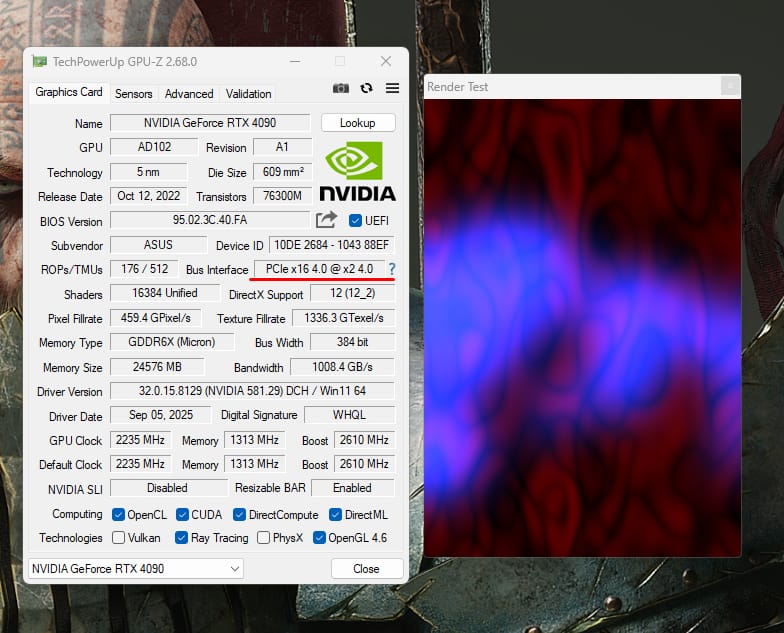
My GPU (ASUS ROG Strix GeForce RTX 4090) is detected as:
PCIe x16 4.0 @ x2 4.0 (even using render stress test, and sometime x1)
I also tested using a RTX 5060 and same issues appears.
This is confirmed both in GPU-Z and in the motherboard BIOS, which reports:
PCIEX16(G5): x2
So the problem appears before the OS loads.
System configuration
Motherboard: ASUS ROG Strix Z790-E Gaming WiFi II
CPU: Intel Core i9-14900K
GPU: ASUS ROG Strix GeForce RTX 4090
RAM: 96GB DDR5
NVMe: WD Black SN770 + WD Black SN850X
Troubleshooting already performed
Replaced the motherboard with a new one (same model)
Tested with another GPU (same result)
Tested GPU in secondary PCIe slot (negotiates x4)
Cleared CMOS and loaded BIOS defaults
Forced PCIe Gen4 in BIOS
Updated BIOS to latest version
Issue appears already in BIOS before OS loads
GPU-Z render test always stays at x2
No PCIe errors or crashes
Because the issue persists across different GPUs and a brand new motherboard, it seems the CPU may be failing to train all PCIe lanes.
Has anyone seen a similar issue with Raptor Lake / 14900K PCIe lane training?
Any insight would be appreciated.
Link Copied

- Mark as New
- Bookmark
- Subscribe
- Mute
- Subscribe to RSS Feed
- Permalink
- Report Inappropriate Content
Hello cris_hil,
Thank you for raising this concern through the Intel Community. I truly appreciate the detailed troubleshooting steps you’ve already performed to isolate the issue that information is very helpful.
I understand that when using the system, the GPU is operating at x2, as you mentioned. To further investigate this behavior, I would like to gather a few additional details:
- Does the processor show any signs of physical damage?
- Has the processor ever been overclocked? Please note that overclocking whether done manually or through tools such as Intel® Speed Optimizer, AI Assist, or any other method that increases voltage or frequency beyond supported specifications may void the processor warranty.
- When was the processor purchased? This will help determine if you are still within the retailer’s 30-day return or exchange period, which could potentially provide a faster resolution.
Once the requested information is provided, we will proceed with the next steps accordingly.
I look forward to your response.
Regards,
John M.
Intel Customer Support Technician
- Mark as New
- Bookmark
- Subscribe
- Mute
- Subscribe to RSS Feed
- Permalink
- Report Inappropriate Content
Hello John,
Thank you for your response and for looking into this issue.
Here is the additional information you requested:
- The processor shows no signs of physical damage.
- The CPU has never been overclocked, neither manually nor through tools such as Intel Speed Optimizer, AI Assist, or any automatic overclocking features.
- When I purchased the CPU, I updated the motherboard BIOS immediately to the latest available version, as I was aware of the voltage issues reported with 14th Gen processors and the BIOS updates intended to address them.
- The processor was purchased in Brazil. October 2024.
Additional information that may help with the investigation:
> Earlier in the system’s usage I experienced WHEA Logger Event ID 17 related to PCIe, as well as Windows blue screen crashes.
> Today I performed additional troubleshooting tests with minimal hardware configuration, removing all NVMe drives and leaving only:
- CPU
- RAM
- GPU
> Even in this configuration the system still reports PCIe x16 running at x2 Gen4 in the motherboard BIOS. I also forced the PCIe slot to Gen3 in BIOS, but the system still negotiated only x2 lanes, which suggests the issue occurs before the operating system loads.
> Another observation is that PCIe lane negotiation appears unstable across system boots. For example:
- First boot may report x16 (or x8 with NMVe plugged at the M2_1, which is expected according to the MB manual)
- Second boot often drops to x2
- In some cases it has even trained at x1
This behavior has been observed both in GPU-Z, HWiNFO64 and directly in the motherboard BIOS (PCIEX16 link width reporting x2).
For reference, I have also already performed the following troubleshooting steps:
- Replaced the motherboard with a brand new unit of the same model (RMA. My first thought was a MB issue).
- Tested with another GPU (RTX 4090 my main gpu, and RTX 5060 used in my secondary build)
- Cleared CMOS and loaded BIOS defaults
- Updated BIOS to the latest version
Because the issue persists across different GPUs and even a new motherboard, it appears that the system may be failing to consistently train all PCIe lanes from the CPU.
PS: I’m attaching a couple of screenshots from the test I performed today using a minimal hardware configuration (CPU, RAM and GPU only). The BIOS clearly shows the instability in the PCIe lane training.
- 1st boot: x16
- 2nd boot: x2
- 3rd boot: x2 even when forcing Gen3
Sorry if I’m being somewhat redundant in my explanations, but I’m really trying to be as thorough as possible. This system was built for professional work, so I want to make sure everything is working at its full capability.
Please let me know if there are any additional diagnostics or logs you would like me to provide.
Thank you again for your assistance.
Best regards,
cris_hil



- Mark as New
- Bookmark
- Subscribe
- Mute
- Subscribe to RSS Feed
- Permalink
- Report Inappropriate Content
If possible check in live ubuntu os, check shows GPU in x2 gen 3 mode after os loads..
also if possible check with same i9-14900K
- Mark as New
- Bookmark
- Subscribe
- Mute
- Subscribe to RSS Feed
- Permalink
- Report Inappropriate Content
Hi VARADHARAJAN,
Thank you very much for the suggestion and for taking the time to reply.
I'll consider testing with Ubuntu. However, after running tests with minimal hardware (CPU, GPU and RAM only), the issue still appears directly in the BIOS screen. Because of that, I believe it is unlikely to be related to the operating system.
That said, if the Ubuntu test could help further confirm my suspicion about the CPU, I’m willing to try it.
Thanks again for the help.
Cheers.
cris_hil
- Mark as New
- Bookmark
- Subscribe
- Mute
- Subscribe to RSS Feed
- Permalink
- Report Inappropriate Content
Hello cris_hil,
Thank you for providing the information I requested. Please check your email for the message I sent so we can continue this process via email, as this appears to be an instability-related concern.
Once you’ve reviewed it, kindly confirm so we can proceed with the next steps.
Regards,
John M.
Intel Customer Support Technician
- Mark as New
- Bookmark
- Subscribe
- Mute
- Subscribe to RSS Feed
- Permalink
- Report Inappropriate Content
Hello John,
Thank you for the update. I can confirm that I received your email and I'll reply there with the requested information so we can proceed with the next steps.
I really appreciate your attention and the quick responses here on the forum.
Best regards,
Cris
- Mark as New
- Bookmark
- Subscribe
- Mute
- Subscribe to RSS Feed
- Permalink
- Report Inappropriate Content
Hi guys!
I’d like to provide an update regarding this issue.
The CPU RMA was approved, and I received the replacement unit at the beginning of April. The processor has been installed and in use for some time now.
I’m happy to report that the problem has been completely resolved. The PCIe lane training is now working correctly, with the GPU properly negotiating at x16 as expected. No further issues were observed, either in BIOS or under load.
This confirms that the original CPU was indeed the root cause of the problem.
I would also like to highlight that the Intel support and RMA process were excellent throughout. Professional, and efficient.
Thanks to everyone who contributed or followed the case. Hopefully this helps others who may encounter a similar issue.
Best regards,
Cris.

- Subscribe to RSS Feed
- Mark Topic as New
- Mark Topic as Read
- Float this Topic for Current User
- Bookmark
- Subscribe
- Printer Friendly Page