
- Mark as New
- Bookmark
- Subscribe
- Mute
- Subscribe to RSS Feed
- Permalink
- Report Inappropriate Content
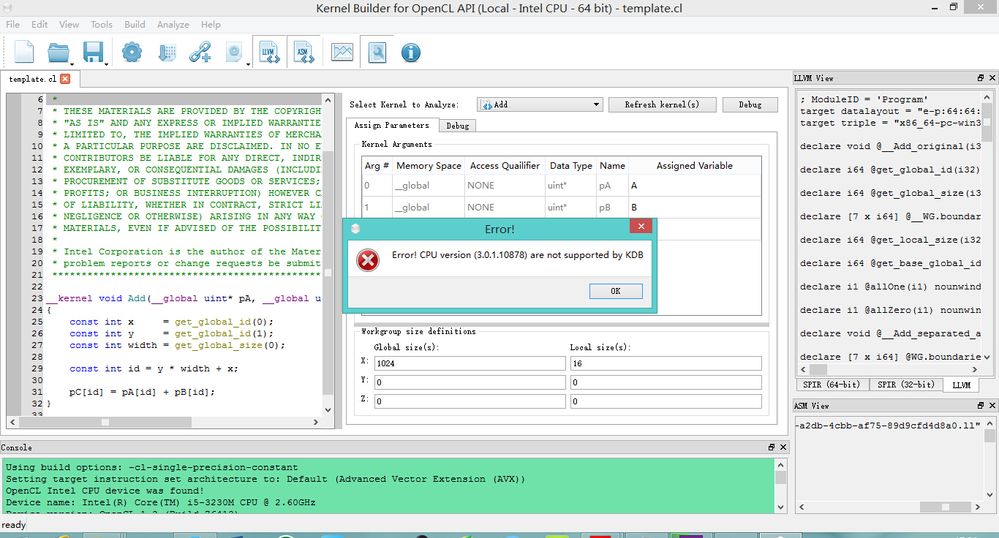
As the image shows below, I've set the input arrayA, B and the output arrayC, then click the debug button, and Error occur.
Since I am new in OpenCL, I don't know how to solve this problem, so is there anyone who can help me? Thanks a lot!
Link Copied

- Mark as New
- Bookmark
- Subscribe
- Mute
- Subscribe to RSS Feed
- Permalink
- Report Inappropriate Content
Hi,
Could you please provide the details of your system:
1. Your processor
2. Operating System
3. Version of the Graphics Driver
4. Version of INDE (or how you installed Kernel Builder)
Thanks!
- Mark as New
- Bookmark
- Subscribe
- Mute
- Subscribe to RSS Feed
- Permalink
- Report Inappropriate Content
Robert Ioffe (Intel) wrote:
Hi,
Could you please provide the details of your system:
1. Your processor
2. Operating System
3. Version of the Graphics Driver
4. Version of INDE (or how you installed Kernel Builder)
Thanks!
Thanks for answering! Well, my processor is Intel(R) Core(TM) i5-3230M CPU @ 2.60Hz with Intel(R) HD Graphics 4000, and I use windows 8.1(Chinese). The version of my Graphics Driver is Intel HD Graphics Driver for Windows* 7/8/8.1-64-bit version 15.33.30.64.3958(10.18.10.3958).
I've downloaded the Intel® SDK for OpenCL™ Applications and the Graphics Driver in Intel(R) Driver Update Utility, then I installed them. I know that there is also a plug-in in Visual Studio 2010, but when I use the plug-in in VS2010, it always show "Debug target exception occurred", and Kernel Builder had the problem as mentioned before. So is there anything I forget to download and install? Or how can I solve these problems?
Thanks.
- Mark as New
- Bookmark
- Subscribe
- Mute
- Subscribe to RSS Feed
- Permalink
- Report Inappropriate Content
hi,
Did you try switching from Intel CPU to Intel(R) Graphics in Tools/Options/Device Options under OpenCL Device?

- Subscribe to RSS Feed
- Mark Topic as New
- Mark Topic as Read
- Float this Topic for Current User
- Bookmark
- Subscribe
- Printer Friendly Page