
- Mark as New
- Bookmark
- Subscribe
- Mute
- Subscribe to RSS Feed
- Permalink
- Report Inappropriate Content
Hi there. I've installed this: https://www.intel.com/content/www/us/en/download/849936/intel-rapid-storage-technology-driver-installation-software-with-intel-optane-memory-12th-to-15th-gen-platforms.html
However, I'm unable to utilize the Intel Rapid Storage Technology Application. I suspect it's because my Intel Storage Middleware keeps failing to start. Usually, it'll have an error like the following:
Faulting application name: RstMwService.exe, version: 20.2.6.1025, time stamp: 0x67f90799
Faulting module name: RstMwService.exe, version: 20.2.6.1025, time stamp: 0x67f90799
Exception code: 0xc0000005
Fault offset: 0x00000000000c1fe3
Faulting process id: 0x137C
Faulting application start time: 0x1DC7196242FDE3B
Faulting application path: C:\WINDOWS\System32\DriverStore\FileRepository\iastorvd.inf_amd64_f28d27d12c1c64c5\RstMwService.exe
Faulting module path: C:\WINDOWS\System32\DriverStore\FileRepository\iastorvd.inf_amd64_f28d27d12c1c64c5\RstMwService.exe
Report Id: 5d2678f4-a841-48b5-9fee-0c1e6d430b85
Faulting package full name:
Faulting package-relative application ID:
I'm on a Z690 on Windows 25H2.
I've attached my Intel SSU.
Link Copied

- Mark as New
- Bookmark
- Subscribe
- Mute
- Subscribe to RSS Feed
- Permalink
- Report Inappropriate Content
Hello KevinZhao,
Thank you for the detailed report and for sharing your Intel SSU. I understand that the Intel Rapid Storage Technology (RST) application is not opening because the Intel Storage Middleware service is failing to start. I’m sorry for the inconvenience this has caused.
To help us move forward, could you please provide the information below:
- Intel® RST driver version currently installed:
- RAID level in use (if applicable):
- What is the primary use of Intel RST on this system?
- Are you using RAID or Intel Optane™ Memory? (Yes / No)
- Is Intel® Optane™ Memory currently enabled? (Yes / No)
- If possible, please provide a screenshot of the error message or issue you are encountering.
Once we receive this information, we will continue with the investigation.
Thank you for your time, and I look forward to your reply.
Regards,
John M.
Intel Customer Support Technician
- Mark as New
- Bookmark
- Subscribe
- Mute
- Subscribe to RSS Feed
- Permalink
- Report Inappropriate Content
- Intel® RST driver version currently installed: 20.2.6.1025.2, but I've tried the older versions, and they also don't work
- RAID level in use (if applicable): Raid 5 across 4 WD SN850X 4TB SSDs
- What is the primary use of Intel RST on this system? For RAID 5
- Are you using RAID or Intel Optane™ Memory? (Yes / No) Yes (RAID)
- Is Intel® Optane™ Memory currently enabled? (Yes / No) I believe so
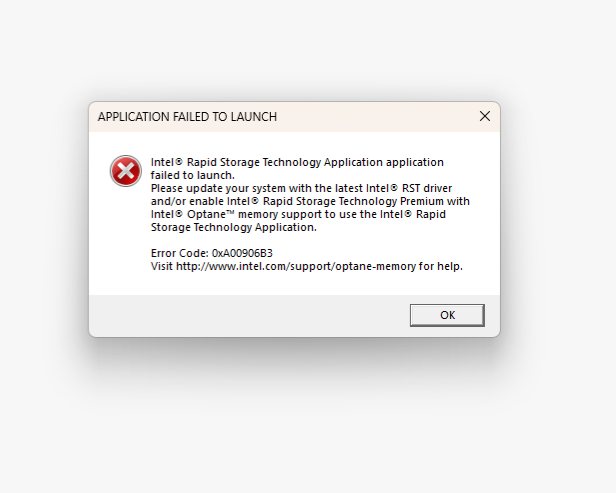
- If possible, please provide a screenshot of the error message or issue you are encountering.
I've attached the error message I am encountering when I try to open the Intel Rapid Storage Application.
This used to run before I did a fresh reinstall of Windows 11 25H2. I even did a rebuild of my RAID 5. However, right now, the Intel Storage Middleware services keeps failing to start. I've tried many hacks to try and make it work, but it's failing.
- Mark as New
- Bookmark
- Subscribe
- Mute
- Subscribe to RSS Feed
- Permalink
- Report Inappropriate Content
Hello KevinZhao,
Thank you for providing the requested information to help properly isolate the issue. Please follow the steps outlined below:
Driver Management
- Download and install the OEM drivers from your motherboard manufacturer’s website.
- Install the latest Intel® Rapid Storage Technology (IRST) driver.
- Monitor IRST to confirm that it is working properly.
System Updates
- Update your BIOS to the latest available version.
- Reinstall the OEM drivers after the BIOS update.
If the issue persists after completing these steps, please let me know so we can continue with further investigation.
Additionally, please advise if you would like to proceed with this case via the case ticket (email) or continue within this thread to avoid any confusion.
I look forward to your response.
Regards,
John M.
Intel Customer Support Technician
- Mark as New
- Bookmark
- Subscribe
- Mute
- Subscribe to RSS Feed
- Permalink
- Report Inappropriate Content
Hello KevinZhao,
I hope you had the opportunity to review the information I posted. At your earliest convenience, please let me know so we can determine the best course of action to resolve this matter efficiently.
Regards,
John M.
Intel Customer Support Technician
- Mark as New
- Bookmark
- Subscribe
- Mute
- Subscribe to RSS Feed
- Permalink
- Report Inappropriate Content
I'm using the latest BIOS. However, this used to work when I was on Windows 11 24H2. I did a clean install with Windows 11 25H2. Clearly, some driver is working because it's installed on a RAID 5 array. It's the Intel Storage Middleware Service that is never able to be started that is causing problems.
Will there be an updated driver for Windows 11 25H2?
- Mark as New
- Bookmark
- Subscribe
- Mute
- Subscribe to RSS Feed
- Permalink
- Report Inappropriate Content
Hello KevinZhao,
Thank you for letting me know that you have already installed the OEM drivers and performed a clean installation of Windows 11 25H2. However, as you mentioned, some drivers are only functioning because they are installed under RAID 5, and the Intel Storage Middleware Service is not starting, which appears to be causing the issue.
This may indicate a problem with the OEM drivers. To ensure the correct next steps, please allow me some time to investigate this internally and check for any potential compatibility issues with the latest drivers.
I will update you as soon as I have more information. Thank you for your patience and understanding.
Regards,
John M.
Intel Customer Support Technician
- Mark as New
- Bookmark
- Subscribe
- Mute
- Subscribe to RSS Feed
- Permalink
- Report Inappropriate Content
Hello KevinZhao,
Upon checking, I see that you already have an active case ticket, and one of my colleagues is currently assisting you. To avoid any confusion, I will add a note to the existing ticket and proceed accordingly.
I will now proceed with closing this thread.
Regards,
John M.
Intel Customer Support Technician
- Mark as New
- Bookmark
- Subscribe
- Mute
- Subscribe to RSS Feed
- Permalink
- Report Inappropriate Content
The final answer I got from Intel support was
"We couldn't replicate your issue with our builds. Please try reinstalling Windows and come back to us."

- Subscribe to RSS Feed
- Mark Topic as New
- Mark Topic as Read
- Float this Topic for Current User
- Bookmark
- Subscribe
- Printer Friendly Page