
- Mark as New
- Bookmark
- Subscribe
- Mute
- Subscribe to RSS Feed
- Permalink
- Report Inappropriate Content
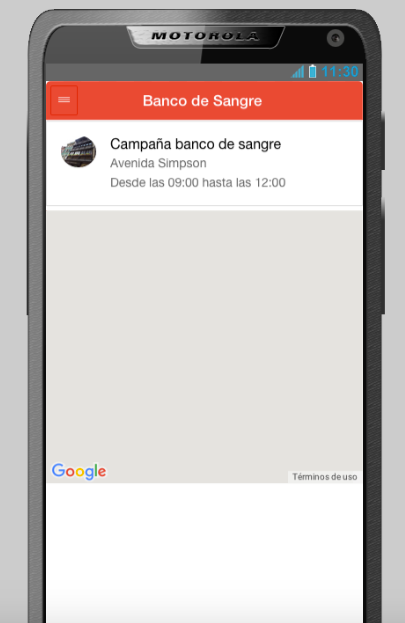
I have the next code that i use to try to show a google map, but i have the problem that the maps looks full gray, but this just happen when is secondary page. any suggest or what to fix that i will apriciate a lot thanks a lot
<div id="tipo_campa" class="upage-content vertical-col left hidden">
<ion-list class="widget uib_w_57 d-margins" data-uib="ionic/list" data-ver="0">
<ion-item class="item widget uib_w_59 d-margins item-avatar" data-uib="ionic/list_item_avatar" data-ver="0">
<img src="images/Strabburg.jpg">
<h2>Campaña banco de sangre</h2>
<p>Avenida Simpson</p>
<p>Desde las 09:00 hasta las 12:00</p>
</ion-item>
</ion-list>
<div id="map" style="height: 50vh"></div>
</div>
</div>
</div>
<script>
var map;
function initMap() {
var myLatLng = {lat: -39.83250715421206, lng: -73.23938548564911};
// Create a map object and specify the DOM element for display.
var map = new google.maps.Map(document.getElementById('map'), {
center: myLatLng,
scrollwheel: false,
zoom: 15
});
// Create a marker and set its position.
var marker = new google.maps.Marker({
map: map,
position: myLatLng,
title: 'Banco de Sangre'
});
}
</script>
<script src="https://maps.googleapis.com/maps/api/js?key=AIzaSyDl1lpx2C8RmatmhG__vBcmtjEsEPjUVbo&&callback=initMap" async="" defer=""></script>
- Tags:
- HTML5
- Intel® XDK
Link Copied
3 Replies

- Mark as New
- Bookmark
- Subscribe
- Mute
- Subscribe to RSS Feed
- Permalink
- Report Inappropriate Content
Could not get your question . It is incomplete .
Best Regards
- Mark as New
- Bookmark
- Subscribe
- Mute
- Subscribe to RSS Feed
- Permalink
- Report Inappropriate Content
thanks amir now i fixed that.
- Mark as New
- Bookmark
- Subscribe
- Mute
- Subscribe to RSS Feed
- Permalink
- Report Inappropriate Content
help pls =c

Reply
Topic Options
- Subscribe to RSS Feed
- Mark Topic as New
- Mark Topic as Read
- Float this Topic for Current User
- Bookmark
- Subscribe
- Printer Friendly Page